

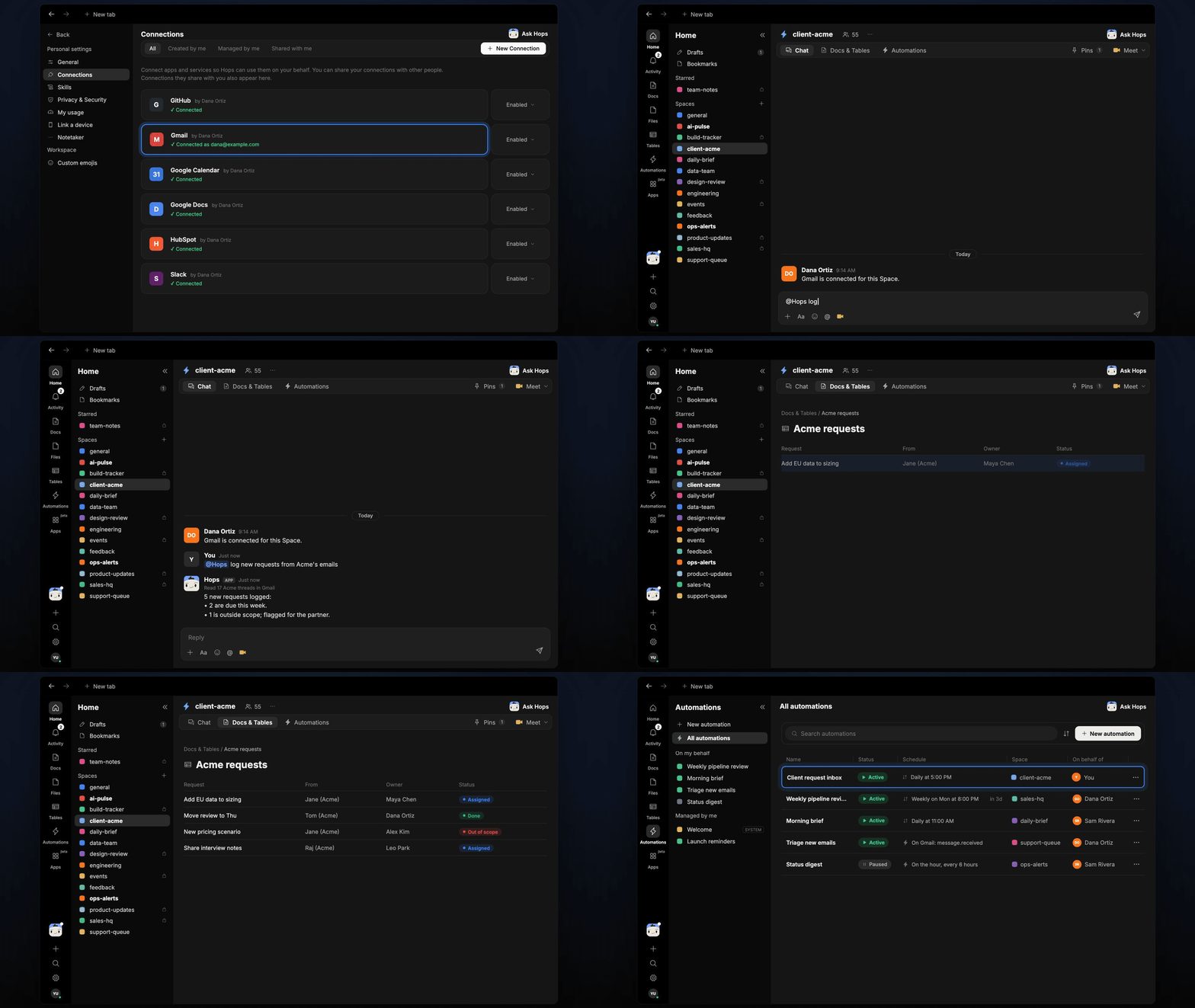
How it runs: Scheduled. An automation runs every weekday at 5:00 PM, posts new requests and saves them to the request table. You can also ask Hops any time.
What it does
- Pulls every ask out of client emails. Hops reads new threads from Gmail or Outlook and extracts each request, even when it is buried mid-thread.
- Assigns an owner and a due date. Owners come from the engagement team in Space context. Due dates come from the email, or a default you set.
- Checks scope. Each request is compared with the SOW pinned in the Space. Anything outside scope is flagged for the partner rather than logged as normal work.
- Avoids duplicates. A request that already has a row is updated, not added again.
- Highlights what is due soon. New requests due this week are listed first.
Ask Hops
Copy a prompt into any chat with Hops, or mention@Hops in a Space.
5 new requests logged from 17 Acme threads:
- 2 are due this week, owners Sam Cole and Priya Nair.
- 1 is outside scope (a second market analysis); flagged for the partner.
- Owners assigned for the rest.
What you get
- A daily post. Every weekday at 5:00 PM Hops posts the new requests, what is due soon and what is out of scope to the Space chat.
- An updated Table. The request log lives in Tables in the Space, with one row per request: source email, owner, due date and scope status.
- Answers on demand. Ask in chat any time and get the answer in the same thread.
Connections needed
Connect these apps. Each card opens Connections in the app.Gmail
Client email threads (or Outlook).
Slack
Where the daily request post goes.
Set it up
1
Connect your apps
Connect Gmail or Outlook, and Slack, in Connections.See Connections.
2
Create the Space
Create a client-acme Space. Pin the SOW scope in Space context.See Spaces and Space context.
3
Add the skill
4
Schedule it
Run it every weekday at 5:00 PM. Hops posts new requests and updates the request table.See Automation.