

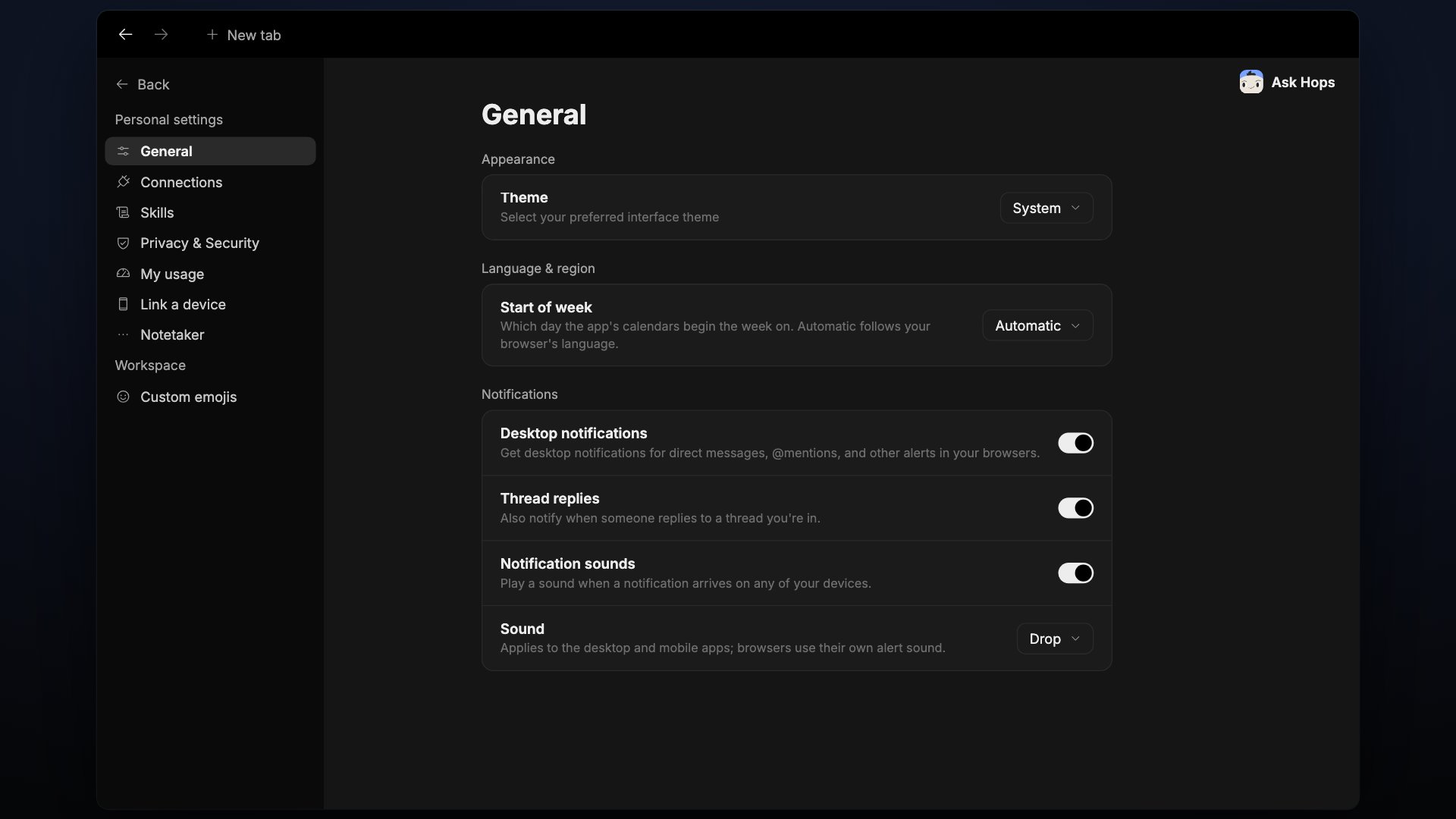
Appearance
- Theme — System (match your operating system), Light, or Dark.
Language & region
- Start of week — defaults to Automatic.
Notifications
- Desktop notifications — show notifications on your desktop.
- Thread replies — also notify when someone replies to a thread you’re in.
- Notification sounds — play a sound for notifications.
- Sound — pick the sound (for example Drop). It applies to the desktop and mobile apps.
Agent posts
- Auto-approve posts that pass the automatic check — a post from a session that read something private waits for your approval. With this on, the agent’s reply to you publishes by itself when the automatic check finds that everyone in the destination can already see what it draws on, or that it answers your request and discloses nothing private beyond what you asked it to share. Other agent posts still wait for approval.
The check is the agent’s own account of its sources, so content it misjudges would publish.
Links
- Open Hops links in the desktop app — open Hops links in the desktop app instead of the browser. A Download the desktop app link is included.
Onboarding
- Reset onboarding — click Reset to run the onboarding wizard again.
App updates
- Early updates — get updates as soon as they’re published, before everyone else. Switching reloads the app.
Team management
The Team Management page is where workspace admins manage seats, credits, and team member access. Access it from Settings, then Team Management.Seats
The top of the page shows how many seats are in use (for example, 1 of 1 seats used). Click Add more seats to expand your workspace.Monthly plan credits
Your workspace gets a monthly credit allocation that refills each billing cycle. The credits card shows:- How many credits are left
- The refill date
- Usage for the current billing period
Extra credits balance
If you’ve purchased extra credits, they show up here with a Buy more button to top up.Usage history
Click Usage history to see a breakdown of credit usage over time.Managing team members
The bottom of the page lists every member in your workspace:Credit allocation modes
- Auto: credits are distributed evenly across all active users
- Manual: you set a specific percentage cap for each user
Groups
Groups let admins collect members into named sets — for example, Sales, Marketing, or EU team — so permissions, Spaces, and connections can be granted to a group instead of one person at a time. Open Settings, then Groups.Create a group
1
Open Groups
Go to Settings, then under Administration, click Groups.
2
Click + New group
Give the group a name and a short description.
3
Add members
Search for teammates and add them. A member can belong to any number of groups.
Use a group
Once a group exists, you can:- Grant Space access to the group instead of individual users.
- Share skills and connections with a group in one step.
- Filter Usage and Team Management by group to see who spent what.
Workspace usage
The Usage page shows what your workspace spends its credits on — across threads, automations, and every routed service (Slack, X, and other billed integrations). Open Settings, then Usage.Overview
The Overview tab summarises the current period:- Credits spent against your workspace total.
- Billed events — how many chargeable actions ran.
- Billable services — one card listing every external integration (X, Slack, …) with its share of spend, and a single View all services link into the tab.
- A per-day chart to spot spikes.
Billable services tab
Every routed service shares a single Billable services tab. It reports credits spent and billed events across all services, plus a per-kind breakdown ordered by credits — with a Service column on every row so you can see which integration and which action dominate spend.Period picker
Use the picker at the top to switch between Last 7 days, Last 30 days, or a custom range. All cards, charts, and breakdowns update together, which makes it easy to compare periods or investigate a spike.Privacy & security
The Privacy & Security page lets you see every device signed in to your Hops account and manage how you authenticate. Open it from Settings, then Privacy & Security.Sessions
The Sessions list shows every device with an active session:- Device and browser (for example, Chrome on macOS or Safari on iOS)
- Approximate location
- Last seen timestamp
- A This device badge on the session you’re using right now
Sign out a device
Click Sign out next to any session to end it.Sign out of all other devices
Under Sign out of all other devices, click Sign out to revoke every session except your current one. Use this if you’ve lost a device or suspect an account is compromised.Password
Under Password, click Set a password to add a password to your account. You can use it alongside your SSO login for extra protection or as a fallback sign-in method.Custom emojis
Custom emojis let everyone in your organization use your own images as reactions and inline emojis. Manage them under Settings, then Custom emojis.Add an emoji
1
Open Custom emojis
Go to Settings, then under Workspace, click Custom emojis.
2
Click Add emoji
Click + Add emoji in the top right.
3
Upload the file
Choose an image. Supported formats: PNG, GIF, JPEG, WebP, up to 256 KB.
4
Name it
Give the emoji a name. It becomes the shortcode — for example,
:party_parrot:.Size limit
Emoji files are capped at 256 KB. What happens to a larger file depends on whether it is animated:- Still images (PNG, JPEG, WebP, and non-animated GIF) are resized for you. Hops scales the image down to 128 px and converts it to PNG before uploading, and shows a note such as
Sized down from 15.3 MB to fit the 256 KB limit. - Animated images are not resized, because resizing would drop the animation. An animated file over 256 KB is rejected — compress it or shorten it and try again.
Organization emojis
The Organization emojis list shows every custom emoji, with its shortcode, who uploaded it, and when. Use the list to review, remove, or spot duplicates.Using custom emojis
Type the shortcode in any message or reaction picker — for example,:agent: — and Hops replaces it with the image. Everyone in the workspace sees the same emoji.
Security
The workspace Security page is where admins set organization-wide protections that apply to every member, on top of each user’s personal Privacy & Security settings. Open Settings, then under Administration, click Security. Typical controls:- Allowed sign-in methods — decide which methods (SSO, password, magic link) your workspace accepts.
- Session policy — set how long a session stays active before members have to sign in again.
- Two-factor authentication — require 2FA for every member.
- Approved email domains — restrict who can be invited to the workspace by email domain.
- Data export & retention — export workspace data, or set how long threads and files are retained.
SSO
Single sign-on lets your team sign in to Hops with your identity provider (Okta, Google Workspace, Microsoft Entra ID, or any SAML 2.0 / OIDC provider). Open Settings, then under Administration, click SSO.Configure SSO
1
Pick your provider
Choose SAML 2.0 or OIDC, or pick a preset (Okta, Google, Microsoft Entra ID).
2
Exchange metadata
Copy Hops’s ACS URL, Entity ID, and (for OIDC) redirect URL into your identity provider. Paste the provider’s metadata URL, certificate, or client ID/secret back into Hops.
3
Map attributes
Map your provider’s
email, first_name, last_name, and (optionally) groups claims to Hops fields.4
Test the connection
Use Test SSO to sign in as yourself before you enforce it. Fix any mismatched claims.
5
Enforce SSO
Turn on Require SSO for all members so passwords are disabled and everyone signs in through your IdP.
Just-in-time provisioning
When a user signs in through SSO for the first time, Hops creates their account automatically and adds them to the workspace. If you send agroups claim, Hops can also add them to matching Groups on sign-in.