> ## Documentation Index
> Fetch the complete documentation index at: https://hopsdocs.mintlify.site/llms.txt
> Use this file to discover all available pages before exploring further.
# Quarterly LP update
> Turn portfolio metrics into the quarterly LP update.
LP updates mean chasing every portfolio company for numbers. Hops collects the metrics each quarter, builds the portfolio table and drafts the letter in last quarter's tone.
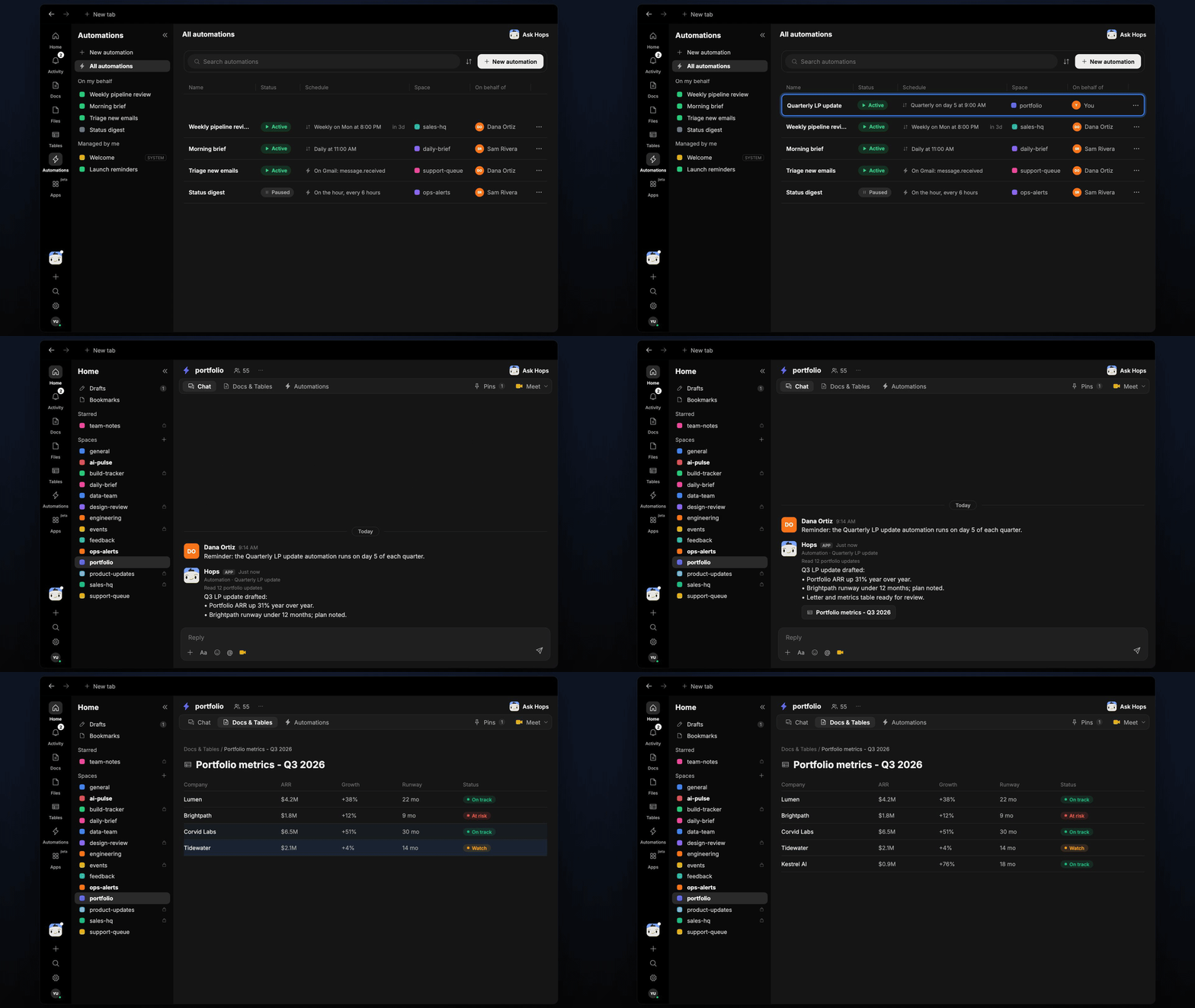
**How it runs:** Scheduled. An automation runs on day 5 of each quarter, posts the draft and saves the letter and metrics table. You can also ask Hops any time.
## What it does
* **Collects the numbers.** Hops reads founder updates in Gmail and portfolio metrics in Google Sheets.
* **Builds the portfolio table.** One row per company with ARR, growth and runway.
* **Drafts the letter.** Fund highlights, company notes and risks, matching last quarter's tone and format.
* **Flags risks.** Companies with short runway or missed plans are called out with a note.
* **Lists who is missing.** Companies that have not sent an update are listed so you can chase them.
 ## Ask Hops
Copy a prompt into any chat with Hops, or mention `@Hops` in a Space.
```text theme={null}
Draft the Q3 LP update.
```
```text theme={null}
Build the portfolio metrics table for this quarter: ARR, growth and runway per company.
```
```text theme={null}
Which portfolio companies have not sent their Q3 update?
```
```text theme={null}
Which companies have runway under 12 months?
```
```text theme={null}
Compare this quarter's LP letter draft with last quarter's and show what changed.
```
Example reply:
> Q3 LP update drafted:
>
> * Portfolio ARR up 31% year over year.
> * Brightpath runway under 12 months; plan noted.
> * Letter and metrics table ready for review.
## What you get
* **A post** in the portfolio Space (or Slack channel) when the draft is ready.
* **A dated Doc** in **Docs** with the LP letter and a metrics **Table** in **Tables** with every company.
* **Answers on demand.** Ask Hops for any metric or company in chat.
## Connections needed
Connect these apps. Each card opens Connections in the app.
Founder updates.
Portfolio metrics.
Where the draft post goes.
## Set it up
Connect the apps above in **Connections**.
See [Connections](/docs/connections/overview).
Create a **portfolio** Space and pin last quarter's LP letter in Space context.
See [Spaces](/docs/spaces/overview) and [Space context](/docs/spaces/space-context).
Give Hops these instructions:
```text theme={null}
You draft the LP update. Build a metrics table per company (ARR, growth, runway), then write the letter: fund highlights, company notes and risks. Match last quarter's tone and format.
```
See [Build a skill](/docs/agents/build-a-skill).
Run it on day 5 of each quarter. It posts the draft to the portfolio Space and saves the letter Doc and metrics Table.
See [Automation](/docs/spaces/automation).
## Related topics
- [VC & PE](/teams/vc-pe.md)
- [Explore use cases](/use-cases/overview.md)
- [Investor update](/teams/founders-executives/use-cases/investor-update.md)
- [Founders & executives](/teams/founders-executives.md)
- [Exit interview themes](/teams/hr-people-ops/use-cases/exit-interview-themes.md)
This documentation is built and hosted on [Mintlify](https://mintlify.com), a developer documentation platform.
## Ask Hops
Copy a prompt into any chat with Hops, or mention `@Hops` in a Space.
```text theme={null}
Draft the Q3 LP update.
```
```text theme={null}
Build the portfolio metrics table for this quarter: ARR, growth and runway per company.
```
```text theme={null}
Which portfolio companies have not sent their Q3 update?
```
```text theme={null}
Which companies have runway under 12 months?
```
```text theme={null}
Compare this quarter's LP letter draft with last quarter's and show what changed.
```
Example reply:
> Q3 LP update drafted:
>
> * Portfolio ARR up 31% year over year.
> * Brightpath runway under 12 months; plan noted.
> * Letter and metrics table ready for review.
## What you get
* **A post** in the portfolio Space (or Slack channel) when the draft is ready.
* **A dated Doc** in **Docs** with the LP letter and a metrics **Table** in **Tables** with every company.
* **Answers on demand.** Ask Hops for any metric or company in chat.
## Connections needed
Connect these apps. Each card opens Connections in the app.
Founder updates.
Portfolio metrics.
Where the draft post goes.
## Set it up
Connect the apps above in **Connections**.
See [Connections](/docs/connections/overview).
Create a **portfolio** Space and pin last quarter's LP letter in Space context.
See [Spaces](/docs/spaces/overview) and [Space context](/docs/spaces/space-context).
Give Hops these instructions:
```text theme={null}
You draft the LP update. Build a metrics table per company (ARR, growth, runway), then write the letter: fund highlights, company notes and risks. Match last quarter's tone and format.
```
See [Build a skill](/docs/agents/build-a-skill).
Run it on day 5 of each quarter. It posts the draft to the portfolio Space and saves the letter Doc and metrics Table.
See [Automation](/docs/spaces/automation).
## Related topics
- [VC & PE](/teams/vc-pe.md)
- [Explore use cases](/use-cases/overview.md)
- [Investor update](/teams/founders-executives/use-cases/investor-update.md)
- [Founders & executives](/teams/founders-executives.md)
- [Exit interview themes](/teams/hr-people-ops/use-cases/exit-interview-themes.md)
This documentation is built and hosted on [Mintlify](https://mintlify.com), a developer documentation platform.