> ## Documentation Index
> Fetch the complete documentation index at: https://hopsdocs.mintlify.site/llms.txt
> Use this file to discover all available pages before exploring further.
# Investment memo
> Draft memos from diligence notes and company materials in your standard format.
After initial diligence, the notes, decks and data-room files need to become a memo. Hops drafts the investment memo in your standard format and cites the source for every claim.
**How it runs:** Ask Hops, with a skill so the output has the same format every time. No automation needed.
## What it does
* **Reads the deal materials.** Hops uses the deck, data-room files and diligence notes in Google Drive or Dropbox, plus internal research in Notion and email threads in Gmail.
* **Follows your format.** Sections are thesis, market, team, product, traction, risks and ask, matching your template.
* **Cites every claim.** Each point names the diligence doc, call notes or data-room file it came from.
* **Never invents metrics.** Missing numbers are listed as open questions.
* **Surfaces risks.** Gaps and inconsistencies between sources are called out.
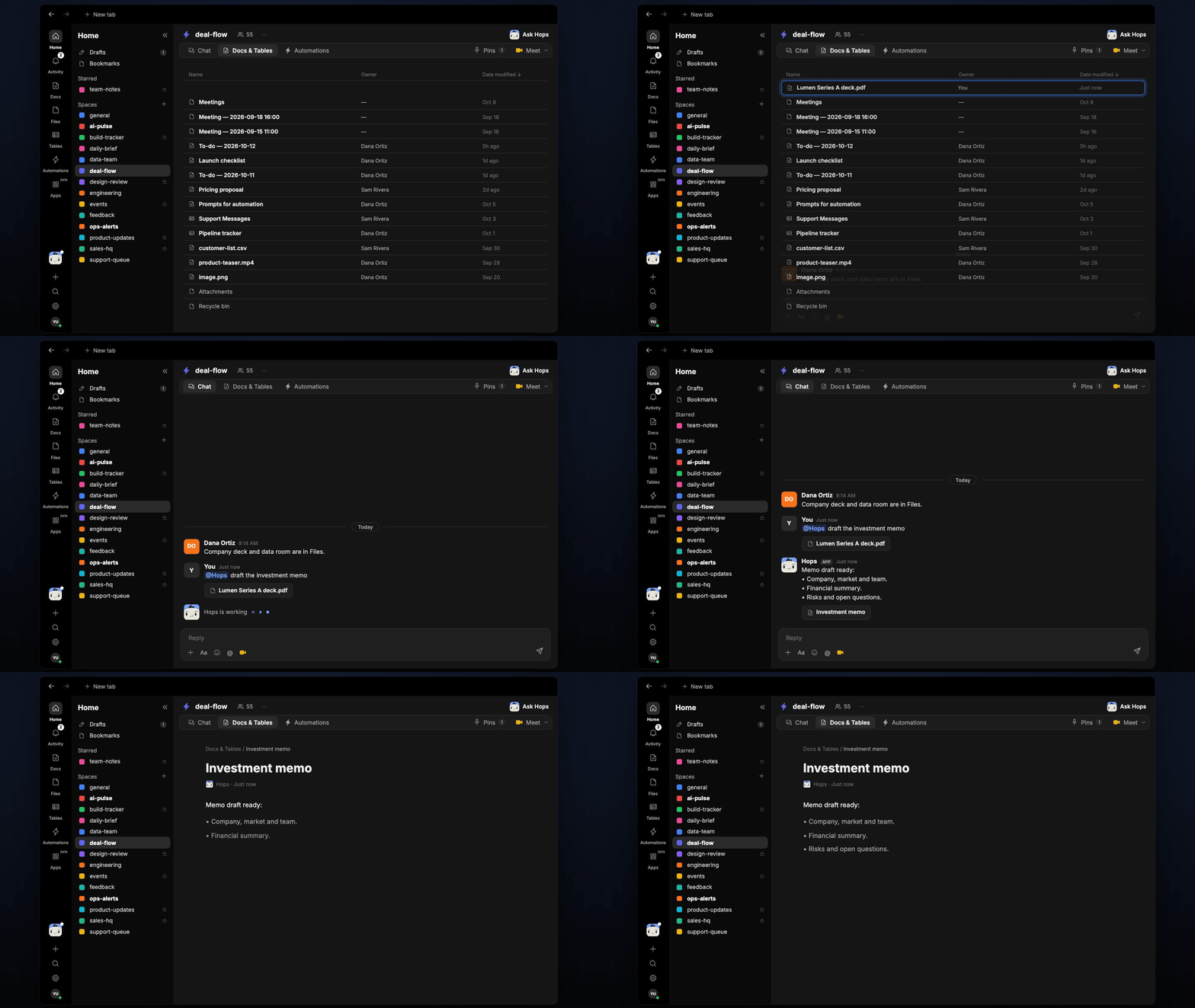 ## Ask Hops
Copy a prompt into any chat with Hops, or mention `@Hops` in a Space.
```text theme={null}
Draft the investment memo for Lumen from the deck and our diligence notes.
```
```text theme={null}
Write the market and competition sections for the Globex memo, with sources.
```
```text theme={null}
What are the biggest risks in the Acme data room that should go in the memo?
```
```text theme={null}
Update the Lumen memo with the latest numbers from the data room.
```
```text theme={null}
List the open questions we still need to answer before the Northwind memo is final.
```
Example reply:
> Memo draft ready:
>
> * Thesis, market and team drafted with sources.
> * Financial summary from the data room.
> * Risks and open questions listed; 3 metrics not yet verified.
## What you get
* **A draft in chat**, in the same thread, in your memo format.
* **A saved Doc, when you ask for one.** Say "save this as a doc" and Hops writes the memo to **Docs** in the deal Space.
## Connections needed
Connect these apps. Each card opens Connections in the app.
Data rooms and diligence notes (or Dropbox).
Internal research.
Founder and advisor threads.
## Set it up
Connect the apps above in **Connections**.
See [Connections](/docs/connections/overview).
Create a **deal-flow** Space per deal in diligence and pin the memo template and thesis framework in Space context.
See [Spaces](/docs/spaces/overview) and [Space context](/docs/spaces/space-context).
Give Hops these instructions:
```text theme={null}
You draft investment memos in the firm's standard format (template in the Space Context document). Sections: thesis, market, team, product, traction, risks, ask. Cite the source (diligence doc, call notes, data-room file) for every claim. Never invent metrics.
```
See [Build a skill](/docs/agents/build-a-skill).
Ask Hops in chat to draft the memo.
## Related topics
- [VC & PE](/teams/vc-pe.md)
- [Explore use cases](/use-cases/overview.md)
- [Founder pipeline and partner meeting](/teams/vc-pe/use-cases/partner-meeting-prep.md)
This documentation is built and hosted on [Mintlify](https://mintlify.com), a developer documentation platform.
## Ask Hops
Copy a prompt into any chat with Hops, or mention `@Hops` in a Space.
```text theme={null}
Draft the investment memo for Lumen from the deck and our diligence notes.
```
```text theme={null}
Write the market and competition sections for the Globex memo, with sources.
```
```text theme={null}
What are the biggest risks in the Acme data room that should go in the memo?
```
```text theme={null}
Update the Lumen memo with the latest numbers from the data room.
```
```text theme={null}
List the open questions we still need to answer before the Northwind memo is final.
```
Example reply:
> Memo draft ready:
>
> * Thesis, market and team drafted with sources.
> * Financial summary from the data room.
> * Risks and open questions listed; 3 metrics not yet verified.
## What you get
* **A draft in chat**, in the same thread, in your memo format.
* **A saved Doc, when you ask for one.** Say "save this as a doc" and Hops writes the memo to **Docs** in the deal Space.
## Connections needed
Connect these apps. Each card opens Connections in the app.
Data rooms and diligence notes (or Dropbox).
Internal research.
Founder and advisor threads.
## Set it up
Connect the apps above in **Connections**.
See [Connections](/docs/connections/overview).
Create a **deal-flow** Space per deal in diligence and pin the memo template and thesis framework in Space context.
See [Spaces](/docs/spaces/overview) and [Space context](/docs/spaces/space-context).
Give Hops these instructions:
```text theme={null}
You draft investment memos in the firm's standard format (template in the Space Context document). Sections: thesis, market, team, product, traction, risks, ask. Cite the source (diligence doc, call notes, data-room file) for every claim. Never invent metrics.
```
See [Build a skill](/docs/agents/build-a-skill).
Ask Hops in chat to draft the memo.
## Related topics
- [VC & PE](/teams/vc-pe.md)
- [Explore use cases](/use-cases/overview.md)
- [Founder pipeline and partner meeting](/teams/vc-pe/use-cases/partner-meeting-prep.md)
This documentation is built and hosted on [Mintlify](https://mintlify.com), a developer documentation platform.