> ## Documentation Index
> Fetch the complete documentation index at: https://hopsdocs.mintlify.site/llms.txt
> Use this file to discover all available pages before exploring further.
# Data room review
> Check a data room for missing documents and red flags.
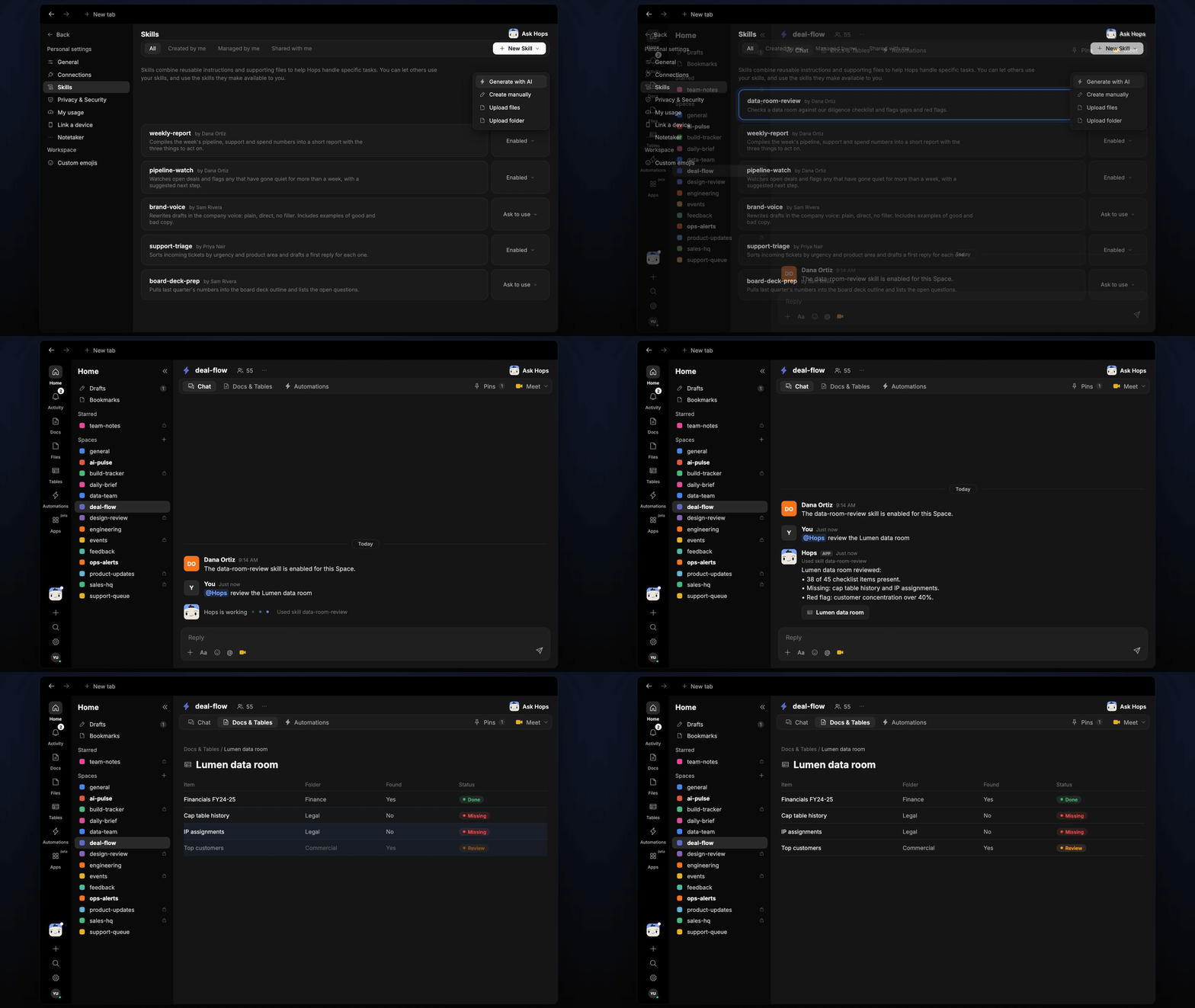
Diligence starts with a data room and a checklist, and someone has to map every file by hand. When new documents land, Hops checks them against your checklist and flags what is missing or worrying.
**How it runs:** Triggered. An automation runs when new files are uploaded to the data room, and you can also ask Hops directly.
## What it does
* **Maps files to the checklist.** Every document is matched to an item on your diligence checklist.
* **Lists what is missing.** Open items are listed, such as cap table history or IP assignments.
* **Flags red flags.** Customer concentration, related-party deals and unusual terms are called out.
* **Cites the file.** Every finding names the document it came from.
* **Only reports what changed.** After the first pass, new uploads update the review instead of repeating it.
 ## Ask Hops
Copy a prompt into any chat with Hops, or mention `@Hops` in a Space.
```text theme={null}
Review the Lumen data room against our checklist.
```
```text theme={null}
What is still missing from the Globex data room?
```
```text theme={null}
Flag any customer concentration or related-party issues in the Acme data room.
```
```text theme={null}
What was uploaded to the Lumen data room since yesterday?
```
```text theme={null}
Which checklist items are covered only by a single document?
```
Example reply:
> Lumen data room reviewed:
>
> * 38 of 45 checklist items present.
> * Missing: cap table history and IP assignments.
> * Red flag: customer concentration over 40%.
## What you get
* **A post** in the deal Space (or Slack channel) when new uploads change the picture.
* **A saved Doc** in **Docs** with the review and a checklist **Table** in **Tables**, updated with each run.
* **Answers on demand.** Ask Hops about any item or file in chat.
## Connections needed
Connect these apps. Each card opens Connections in the app.
The data room folder (or Dropbox).
Where review updates are posted.
## Set it up
Connect the apps above in **Connections**.
See [Connections](/docs/connections/overview).
Create a **deal-flow** Space per deal and pin the diligence checklist in Space context.
See [Spaces](/docs/spaces/overview) and [Space context](/docs/spaces/space-context).
Give Hops these instructions:
```text theme={null}
You review data rooms. Map every document to the checklist, list missing items and flag red flags such as concentration, related-party deals or unusual terms. Cite the file for each finding.
```
See [Build a skill](/docs/agents/build-a-skill).
Run it when new files are uploaded to the data room. It posts what changed to the deal Space and updates the review Doc and checklist Table.
See [Automation](/docs/spaces/automation).
## Related topics
- [VC & PE](/teams/vc-pe.md)
- [Deal rooms](/teams/sales/use-cases/deal-rooms.md)
- [Investment memo](/teams/vc-pe/use-cases/investment-memo.md)
- [Pipeline review](/teams/revops/use-cases/pipeline-review.md)
- [Board meeting and fundraise prep](/teams/founders-executives/use-cases/board-deck-prep.md)
This documentation is built and hosted on [Mintlify](https://mintlify.com), a developer documentation platform.
## Ask Hops
Copy a prompt into any chat with Hops, or mention `@Hops` in a Space.
```text theme={null}
Review the Lumen data room against our checklist.
```
```text theme={null}
What is still missing from the Globex data room?
```
```text theme={null}
Flag any customer concentration or related-party issues in the Acme data room.
```
```text theme={null}
What was uploaded to the Lumen data room since yesterday?
```
```text theme={null}
Which checklist items are covered only by a single document?
```
Example reply:
> Lumen data room reviewed:
>
> * 38 of 45 checklist items present.
> * Missing: cap table history and IP assignments.
> * Red flag: customer concentration over 40%.
## What you get
* **A post** in the deal Space (or Slack channel) when new uploads change the picture.
* **A saved Doc** in **Docs** with the review and a checklist **Table** in **Tables**, updated with each run.
* **Answers on demand.** Ask Hops about any item or file in chat.
## Connections needed
Connect these apps. Each card opens Connections in the app.
The data room folder (or Dropbox).
Where review updates are posted.
## Set it up
Connect the apps above in **Connections**.
See [Connections](/docs/connections/overview).
Create a **deal-flow** Space per deal and pin the diligence checklist in Space context.
See [Spaces](/docs/spaces/overview) and [Space context](/docs/spaces/space-context).
Give Hops these instructions:
```text theme={null}
You review data rooms. Map every document to the checklist, list missing items and flag red flags such as concentration, related-party deals or unusual terms. Cite the file for each finding.
```
See [Build a skill](/docs/agents/build-a-skill).
Run it when new files are uploaded to the data room. It posts what changed to the deal Space and updates the review Doc and checklist Table.
See [Automation](/docs/spaces/automation).
## Related topics
- [VC & PE](/teams/vc-pe.md)
- [Deal rooms](/teams/sales/use-cases/deal-rooms.md)
- [Investment memo](/teams/vc-pe/use-cases/investment-memo.md)
- [Pipeline review](/teams/revops/use-cases/pipeline-review.md)
- [Board meeting and fundraise prep](/teams/founders-executives/use-cases/board-deck-prep.md)
This documentation is built and hosted on [Mintlify](https://mintlify.com), a developer documentation platform.