> ## Documentation Index
> Fetch the complete documentation index at: https://hopsdocs.mintlify.site/llms.txt
> Use this file to discover all available pages before exploring further.
# Weekly patterns report
> Identify recurring issues across tickets before they become crises.
One-off tickets are noise but repeated ones are a signal. Hops reads last week's tickets and surfaces the top 3 recurring issues, with counts and examples.
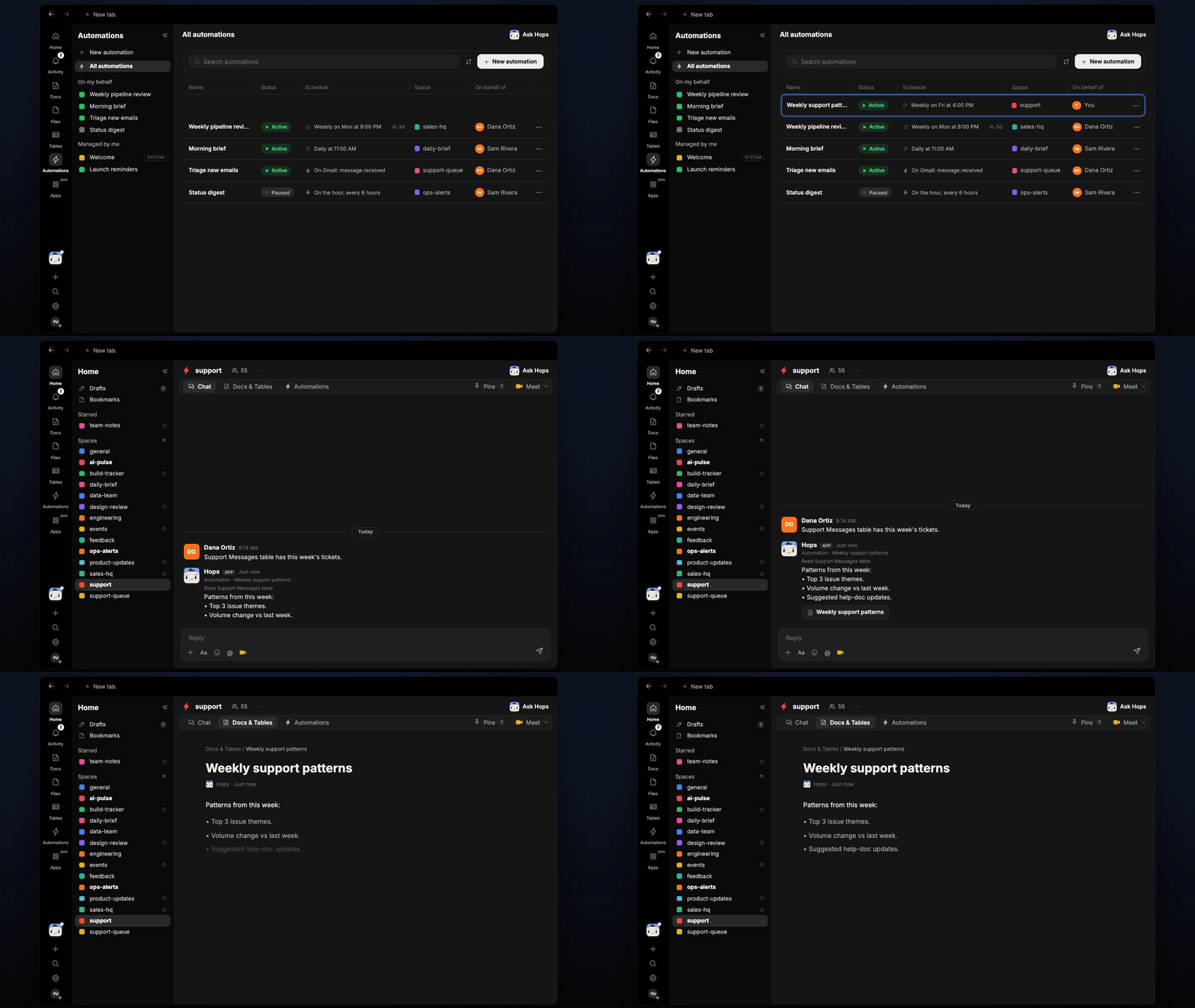
**How it runs:** Scheduled. An automation runs every Monday at 9am, posts the top 3 issues and saves a dated Doc. You can also ask Hops any time.
## What it does
* **Reads the last 7 days.** Both resolved and open tickets.
* **Groups by root cause,** not by surface symptom.
* **Returns the top 3.** Each with a ticket count and a link to one representative ticket.
* **Shows the trend.** Volume change against the week before, plus suggested help doc updates.
 ## Ask Hops
Copy a prompt into any chat with Hops, or mention `@Hops` in a Space.
```text theme={null}
What were the top 3 recurring issues last week?
```
```text theme={null}
Show tickets related to the login timeout issue.
```
```text theme={null}
Which issue grew the most week over week?
```
```text theme={null}
Suggest help doc updates for the top issue.
```
Example reply:
> Top 3 issues last week:
>
> * Login timeouts: 41 tickets, up 12 from last week.
> * CSV export errors: 27 tickets.
> * Invoice PDF missing: 19 tickets.
## What you get
* **A Slack or Space post** every Monday with the top 3 issues.
* **A saved Doc** in **Docs** for each week, so trends are easy to compare.
* **On-demand reports** for any period or product area.
## Connections needed
Connect these apps. Each card opens Connections in the app.
Tickets and sentiment (or Intercom).
Where Hops posts the results and nudges owners.
## Set it up
Connect the apps above in **Connections**.
See [Connections](/docs/connections/overview).
Create a skill with this prompt so the output has the same format every time.
```text theme={null}
You produce a weekly patterns report from support tickets. Read the last 7 days of resolved and open tickets. Group by root cause, not by surface symptom. Return the top 3 recurring issues with ticket counts and a link to one representative ticket each.
```
See [Build a skill](/docs/agents/build-a-skill).
Run every Monday at 9am. Hops posts the top 3 issues to the Support Space and saves a dated Doc.
See [Automation](/docs/spaces/automation).
## Related topics
- [Explore use cases](/use-cases/overview.md)
- [Support](/teams/support.md)
- [Paid campaign report](/teams/marketing/use-cases/paid-campaigns.md)
- [Marketplace brief](/teams/operations/use-cases/marketplace-brief.md)
- [Marketing](/teams/marketing/overview.md)
This documentation is built and hosted on [Mintlify](https://mintlify.com), a developer documentation platform.
## Ask Hops
Copy a prompt into any chat with Hops, or mention `@Hops` in a Space.
```text theme={null}
What were the top 3 recurring issues last week?
```
```text theme={null}
Show tickets related to the login timeout issue.
```
```text theme={null}
Which issue grew the most week over week?
```
```text theme={null}
Suggest help doc updates for the top issue.
```
Example reply:
> Top 3 issues last week:
>
> * Login timeouts: 41 tickets, up 12 from last week.
> * CSV export errors: 27 tickets.
> * Invoice PDF missing: 19 tickets.
## What you get
* **A Slack or Space post** every Monday with the top 3 issues.
* **A saved Doc** in **Docs** for each week, so trends are easy to compare.
* **On-demand reports** for any period or product area.
## Connections needed
Connect these apps. Each card opens Connections in the app.
Tickets and sentiment (or Intercom).
Where Hops posts the results and nudges owners.
## Set it up
Connect the apps above in **Connections**.
See [Connections](/docs/connections/overview).
Create a skill with this prompt so the output has the same format every time.
```text theme={null}
You produce a weekly patterns report from support tickets. Read the last 7 days of resolved and open tickets. Group by root cause, not by surface symptom. Return the top 3 recurring issues with ticket counts and a link to one representative ticket each.
```
See [Build a skill](/docs/agents/build-a-skill).
Run every Monday at 9am. Hops posts the top 3 issues to the Support Space and saves a dated Doc.
See [Automation](/docs/spaces/automation).
## Related topics
- [Explore use cases](/use-cases/overview.md)
- [Support](/teams/support.md)
- [Paid campaign report](/teams/marketing/use-cases/paid-campaigns.md)
- [Marketplace brief](/teams/operations/use-cases/marketplace-brief.md)
- [Marketing](/teams/marketing/overview.md)
This documentation is built and hosted on [Mintlify](https://mintlify.com), a developer documentation platform.