> ## Documentation Index
> Fetch the complete documentation index at: https://hopsdocs.mintlify.site/llms.txt
> Use this file to discover all available pages before exploring further.
# Slipping partner usage
> Spot partners whose usage is dropping before they churn.
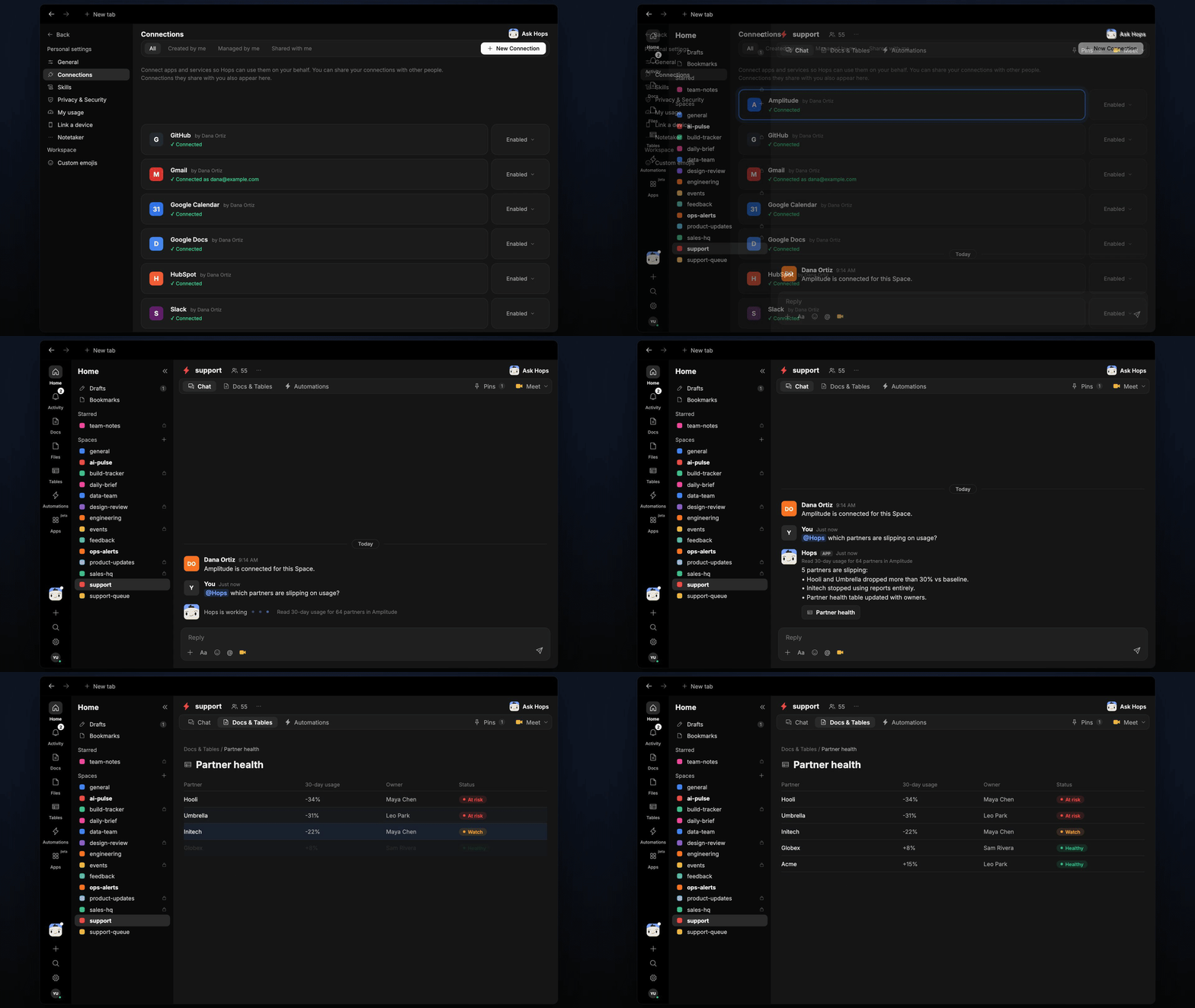
Usage drops weeks before a partner churns. Hops reads product usage from Amplitude, compares it to each partner's baseline and flags the ones slipping.
**How it runs:** Scheduled. An automation runs every Wednesday at 9am, posts new slipping partners and updates a partner health Table. You can also ask Hops any time.
## What it does
* **Compares to baseline.** The last 30 days of usage against each partner's 90-day baseline.
* **Flags drops over 20%.** Smaller moves are not reported.
* **Names the owner** from HubSpot or Salesforce.
* **Suggests a reason** from recent tickets, such as a stopped feature or an open bug.
 ## Ask Hops
Copy a prompt into any chat with Hops, or mention `@Hops` in a Space.
```text theme={null}
Which partners are slipping this week?
```
```text theme={null}
Why did Hooli's usage drop?
```
```text theme={null}
Show partners down more than 30%.
```
```text theme={null}
Who owns the Umbrella account and what do tickets say?
```
Example reply:
> 64 partners read in Amplitude:
>
> * 5 are slipping.
> * Hooli and Umbrella dropped more than 30%.
> * Initech stopped using reports.
## What you get
* **A Slack or Space post** every Wednesday with new slipping partners and owners.
* **Updated Tables** in the Space with partner health, usage change and owner.
* **On-demand checks** for any partner.
## Connections needed
Connect these apps. Each card opens Connections in the app.
Product usage trends.
Deals, contacts and owners (or Salesforce).
Where Hops posts the results and nudges owners.
## Set it up
Connect the apps above in **Connections**.
See [Connections](/docs/connections/overview).
Create a **support** Space and pin the partner list and owners in Space context.
See [Spaces](/docs/spaces/overview) and [Space context](/docs/spaces/space-context).
Create a skill with this prompt so the output has the same format every time.
```text theme={null}
You watch partner health. Compare each partner's last 30 days of usage to its 90-day baseline. Flag drops over 20%, name the owner and suggest one reason from recent tickets.
```
See [Build a skill](/docs/agents/build-a-skill).
Run every Wednesday at 9am. Hops posts new slipping partners to the support Space and updates the partner health Table.
See [Automation](/docs/spaces/automation).
## Related topics
- [Support](/teams/support.md)
- [Account risk watch](/teams/professional-services/use-cases/account-risk-watch.md)
- [My usage](/settings/my-usage.md)
- [Plans that slip](/teams/founders-executives/use-cases/plans-that-slip.md)
- [Partner onboarding](/teams/operations/use-cases/partner-onboarding.md)
This documentation is built and hosted on [Mintlify](https://mintlify.com), a developer documentation platform.
## Ask Hops
Copy a prompt into any chat with Hops, or mention `@Hops` in a Space.
```text theme={null}
Which partners are slipping this week?
```
```text theme={null}
Why did Hooli's usage drop?
```
```text theme={null}
Show partners down more than 30%.
```
```text theme={null}
Who owns the Umbrella account and what do tickets say?
```
Example reply:
> 64 partners read in Amplitude:
>
> * 5 are slipping.
> * Hooli and Umbrella dropped more than 30%.
> * Initech stopped using reports.
## What you get
* **A Slack or Space post** every Wednesday with new slipping partners and owners.
* **Updated Tables** in the Space with partner health, usage change and owner.
* **On-demand checks** for any partner.
## Connections needed
Connect these apps. Each card opens Connections in the app.
Product usage trends.
Deals, contacts and owners (or Salesforce).
Where Hops posts the results and nudges owners.
## Set it up
Connect the apps above in **Connections**.
See [Connections](/docs/connections/overview).
Create a **support** Space and pin the partner list and owners in Space context.
See [Spaces](/docs/spaces/overview) and [Space context](/docs/spaces/space-context).
Create a skill with this prompt so the output has the same format every time.
```text theme={null}
You watch partner health. Compare each partner's last 30 days of usage to its 90-day baseline. Flag drops over 20%, name the owner and suggest one reason from recent tickets.
```
See [Build a skill](/docs/agents/build-a-skill).
Run every Wednesday at 9am. Hops posts new slipping partners to the support Space and updates the partner health Table.
See [Automation](/docs/spaces/automation).
## Related topics
- [Support](/teams/support.md)
- [Account risk watch](/teams/professional-services/use-cases/account-risk-watch.md)
- [My usage](/settings/my-usage.md)
- [Plans that slip](/teams/founders-executives/use-cases/plans-that-slip.md)
- [Partner onboarding](/teams/operations/use-cases/partner-onboarding.md)
This documentation is built and hosted on [Mintlify](https://mintlify.com), a developer documentation platform.