> ## Documentation Index
> Fetch the complete documentation index at: https://hopsdocs.mintlify.site/llms.txt
> Use this file to discover all available pages before exploring further.
# Response drafting
> Draft ticket replies from your help docs, past resolutions, and account history.
Agents spend time searching help docs and old tickets for every reply. Hops drafts a first-pass answer from the ticket, the customer's history and your help docs, citing the article it used.
**How it runs:** Ask Hops, with a skill so the output has the same format every time. No automation needed.
## What it does
* **Reads the whole context.** The ticket, the customer's history and their account details.
* **Answers from your help docs** and cites the article used.
* **Matches your tone.** Helpful, direct, no jargon, with numbered steps when needed.
* **Never invents product behavior.** If the docs do not cover it, Hops says so and suggests who to ask.
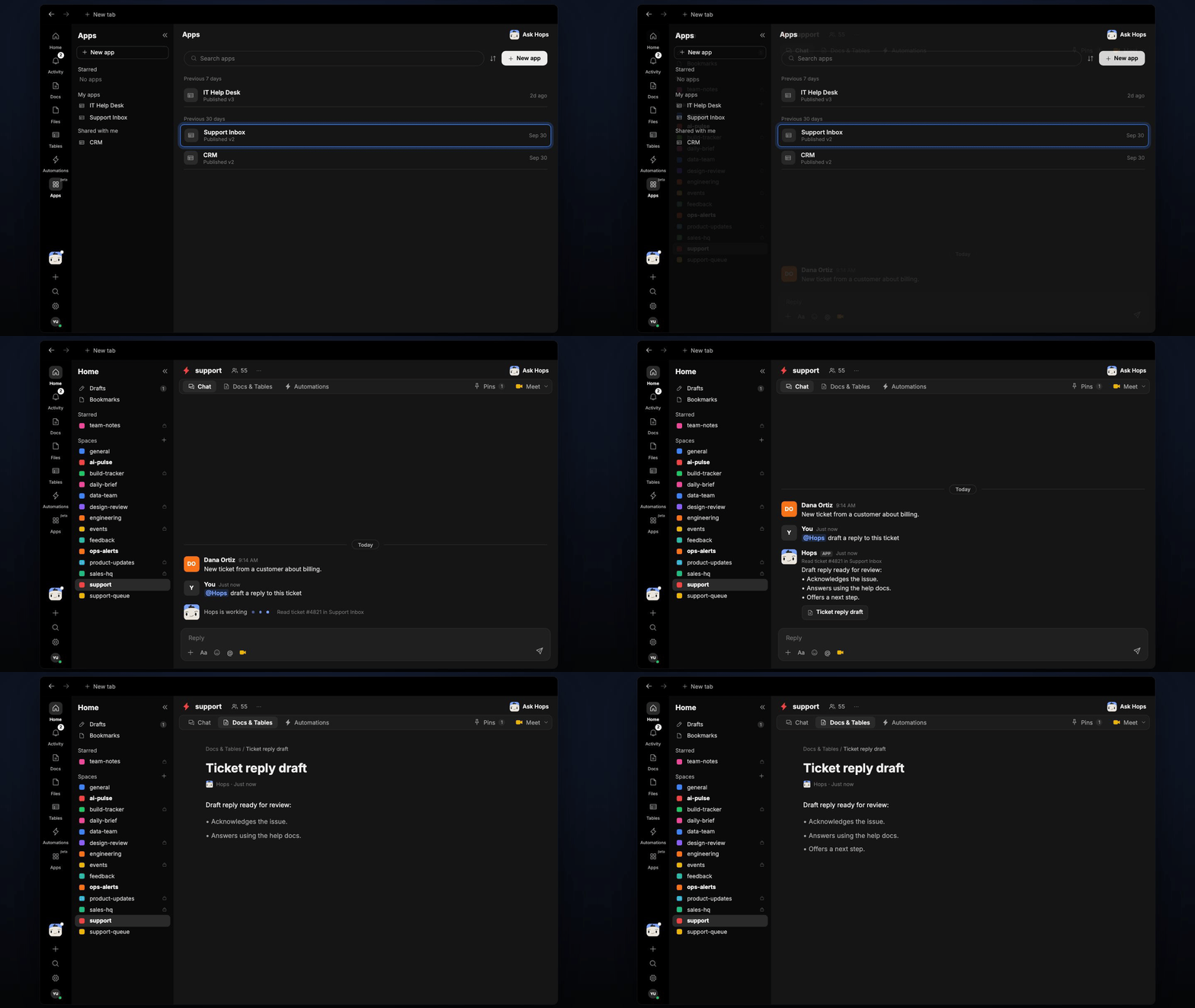 ## Ask Hops
Copy a prompt into any chat with Hops, or mention `@Hops` in a Space.
```text theme={null}
Draft a reply to ticket #48213 from Acme.
```
```text theme={null}
Reply to Globex's SSO question using our help docs.
```
```text theme={null}
Draft a response to Northwind who asked for a refund, citing our policy.
```
```text theme={null}
Shorten the draft and make it friendlier.
```
Example reply:
> Draft reply for Acme:
>
> > Hi Dana, thanks for flagging the export issue.
>
> * Steps 1-3 from the Exports help article.
> * Next step: reply if it still fails and we will escalate.
## What you get
* **A draft in chat**, in the same thread, with the help doc cited.
* **A saved Doc, when you ask for one.** Say "save this as a doc" and Hops writes it to **Docs** in the Space.
* **A reply draft** in the Support Inbox, when you ask Hops to prepare it there.
## Connections needed
Connect these apps. Each card opens Connections in the app.
Tickets and sentiment (or Intercom).
Help center articles (or Confluence).
Deals, contacts and owners (or Salesforce).
Ticket threads and customer history.
## Set it up
Connect the apps above in **Connections**.
See [Connections](/docs/connections/overview).
Create a **support** Space and pin your tone guide and top help articles in Space context.
See [Spaces](/docs/spaces/overview) and [Space context](/docs/spaces/space-context).
Create a skill with this prompt so the output has the same format every time.
```text theme={null}
You draft first-pass replies to support tickets. Use the customer's ticket history, their account context, and the help docs. Match the team's tone, helpful, direct, no jargon. If a solution requires steps, number them. Cite the help doc you used. Never invent product behavior.
```
See [Build a skill](/docs/agents/build-a-skill).
Ask Hops in chat. Mention the account or period you care about.
## Related topics
- [Explore use cases](/use-cases/overview.md)
- [Support](/teams/support.md)
- [Chat](/spaces/chat.md)
- [Hops overview](/agents/overview.md)
- [Contract redlines](/teams/legal/use-cases/contract-summary.md)
This documentation is built and hosted on [Mintlify](https://mintlify.com), a developer documentation platform.
## Ask Hops
Copy a prompt into any chat with Hops, or mention `@Hops` in a Space.
```text theme={null}
Draft a reply to ticket #48213 from Acme.
```
```text theme={null}
Reply to Globex's SSO question using our help docs.
```
```text theme={null}
Draft a response to Northwind who asked for a refund, citing our policy.
```
```text theme={null}
Shorten the draft and make it friendlier.
```
Example reply:
> Draft reply for Acme:
>
> > Hi Dana, thanks for flagging the export issue.
>
> * Steps 1-3 from the Exports help article.
> * Next step: reply if it still fails and we will escalate.
## What you get
* **A draft in chat**, in the same thread, with the help doc cited.
* **A saved Doc, when you ask for one.** Say "save this as a doc" and Hops writes it to **Docs** in the Space.
* **A reply draft** in the Support Inbox, when you ask Hops to prepare it there.
## Connections needed
Connect these apps. Each card opens Connections in the app.
Tickets and sentiment (or Intercom).
Help center articles (or Confluence).
Deals, contacts and owners (or Salesforce).
Ticket threads and customer history.
## Set it up
Connect the apps above in **Connections**.
See [Connections](/docs/connections/overview).
Create a **support** Space and pin your tone guide and top help articles in Space context.
See [Spaces](/docs/spaces/overview) and [Space context](/docs/spaces/space-context).
Create a skill with this prompt so the output has the same format every time.
```text theme={null}
You draft first-pass replies to support tickets. Use the customer's ticket history, their account context, and the help docs. Match the team's tone, helpful, direct, no jargon. If a solution requires steps, number them. Cite the help doc you used. Never invent product behavior.
```
See [Build a skill](/docs/agents/build-a-skill).
Ask Hops in chat. Mention the account or period you care about.
## Related topics
- [Explore use cases](/use-cases/overview.md)
- [Support](/teams/support.md)
- [Chat](/spaces/chat.md)
- [Hops overview](/agents/overview.md)
- [Contract redlines](/teams/legal/use-cases/contract-summary.md)
This documentation is built and hosted on [Mintlify](https://mintlify.com), a developer documentation platform.