> ## Documentation Index
> Fetch the complete documentation index at: https://hopsdocs.mintlify.site/llms.txt
> Use this file to discover all available pages before exploring further.
# Shared follow-ups
> Track every promised follow-up across the team so none are missed.
Reps promise follow-ups on calls and in email, then forget. Hops reads the team's threads and keeps one table of what was promised, to whom and by when.
**How it runs:** Scheduled. An automation runs every weekday at 8am, posts overdue follow-ups per rep and updates the follow-up Table. You can also ask Hops any time.
## What it does
* **Finds promises in email.** Hops looks for phrases like send, share and get back to you in the team's Gmail or Outlook threads.
* **Logs each one.** Account, what was promised, owner and due date go into a single table.
* **Matches to the CRM.** Each follow-up is linked to the account or deal so managers see the stakes.
* **Drafts the overdue ones.** For anything late, Hops writes the email so the rep only has to send it.
* **Posts per rep.** Each rep sees only their own overdue items in the morning post.
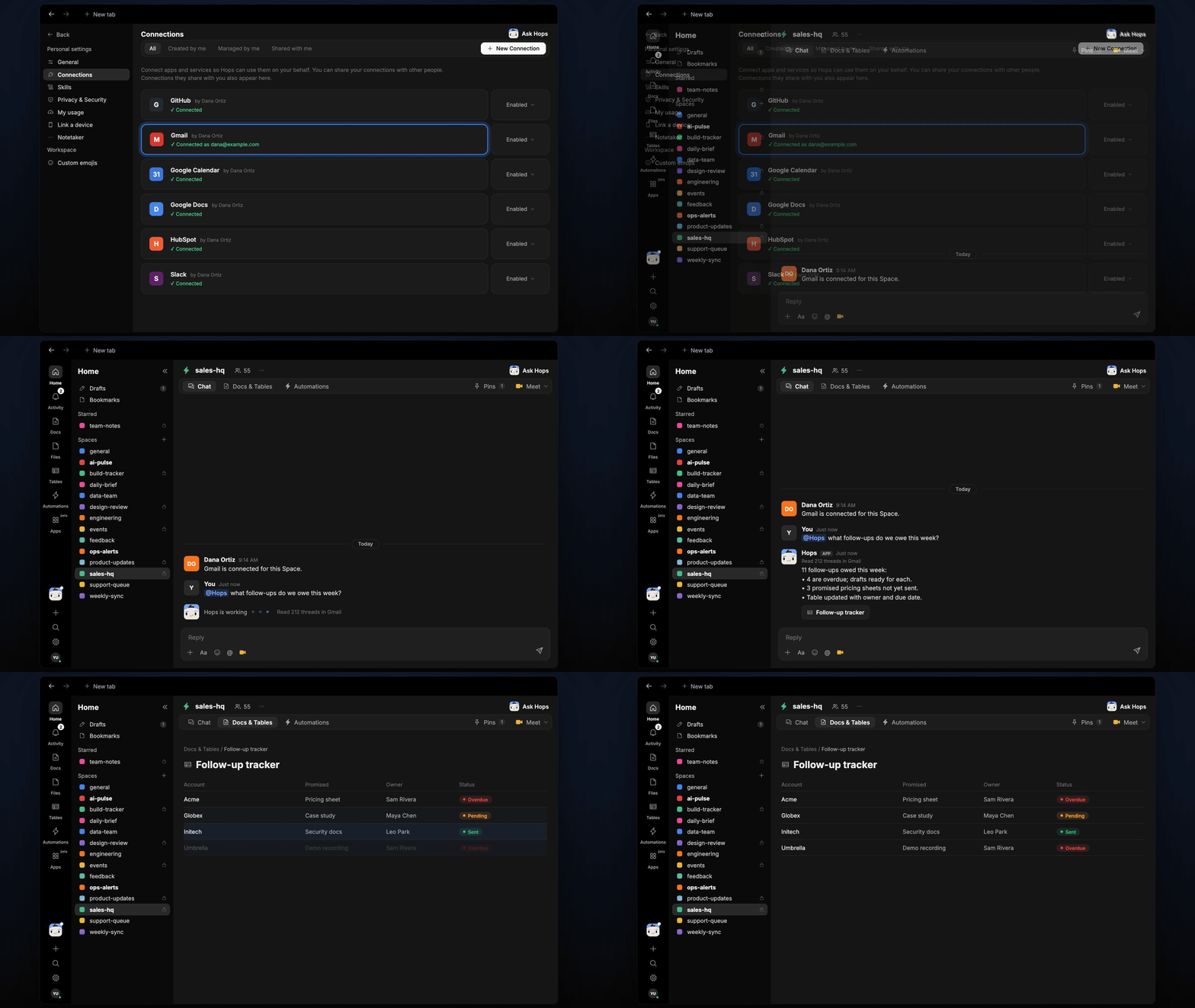 ## Ask Hops
Copy a prompt into any chat with Hops, or mention `@Hops` in a Space.
```text theme={null}
What follow-ups do we owe this week?
```
```text theme={null}
List overdue follow-ups for each rep.
```
```text theme={null}
Which pricing sheets did we promise to Acme and Globex and not send?
```
```text theme={null}
Draft the overdue follow-ups for Marcus.
```
```text theme={null}
Show all follow-ups tied to deals closing this quarter.
```
Example reply:
> 11 follow-ups owed this week:
>
> * 4 are overdue; drafts ready for each.
> * 3 promised pricing sheets not yet sent.
> * Table updated with owner and due date.
## What you get
* **An answer in chat**, in the same thread, with what is owed and by whom.
* **A morning post** every weekday at 8am in Slack or the Space chat with overdue follow-ups per rep.
* **An updated Table** in **Tables** of the Space with every promise, owner, due date and status.
* **Email drafts** for anything overdue.
## Connections needed
Connect these apps. Each card opens Connections in the app.
Reads threads for promises and holds drafts (or Outlook).
Links follow-ups to accounts and deals (or Salesforce).
Posts overdue follow-ups per rep.
## Set it up
Connect Gmail or Outlook, your CRM and Slack in **Connections**.
See [Connections](/docs/connections/overview).
Create a **sales-hq** Space for the team and keep the follow-up table in **Tables**.
See [Spaces](/docs/spaces/overview) and [Space context](/docs/spaces/space-context).
Give Hops these instructions:
```text theme={null}
You track follow-ups. Find promises in email threads (send, share, get back to you). Log account, what was promised, owner and due date. Draft the follow-up for anything overdue.
```
See [Build a skill](/docs/agents/build-a-skill).
Every weekday at 8am Hops posts overdue follow-ups per rep and updates the follow-up Table in **Tables**.
See [Automation](/docs/spaces/automation).
## Related topics
- [Sales](/teams/sales.md)
- [Post-event follow-up](/teams/sales/use-cases/post-event-follow-up.md)
- [Incident postmortems](/teams/product-engineering/use-cases/postmortems.md)
- [Board meeting and fundraise prep](/teams/founders-executives/use-cases/board-deck-prep.md)
- [Diligence tracker](/teams/professional-services/use-cases/diligence-tracker.md)
This documentation is built and hosted on [Mintlify](https://mintlify.com), a developer documentation platform.
## Ask Hops
Copy a prompt into any chat with Hops, or mention `@Hops` in a Space.
```text theme={null}
What follow-ups do we owe this week?
```
```text theme={null}
List overdue follow-ups for each rep.
```
```text theme={null}
Which pricing sheets did we promise to Acme and Globex and not send?
```
```text theme={null}
Draft the overdue follow-ups for Marcus.
```
```text theme={null}
Show all follow-ups tied to deals closing this quarter.
```
Example reply:
> 11 follow-ups owed this week:
>
> * 4 are overdue; drafts ready for each.
> * 3 promised pricing sheets not yet sent.
> * Table updated with owner and due date.
## What you get
* **An answer in chat**, in the same thread, with what is owed and by whom.
* **A morning post** every weekday at 8am in Slack or the Space chat with overdue follow-ups per rep.
* **An updated Table** in **Tables** of the Space with every promise, owner, due date and status.
* **Email drafts** for anything overdue.
## Connections needed
Connect these apps. Each card opens Connections in the app.
Reads threads for promises and holds drafts (or Outlook).
Links follow-ups to accounts and deals (or Salesforce).
Posts overdue follow-ups per rep.
## Set it up
Connect Gmail or Outlook, your CRM and Slack in **Connections**.
See [Connections](/docs/connections/overview).
Create a **sales-hq** Space for the team and keep the follow-up table in **Tables**.
See [Spaces](/docs/spaces/overview) and [Space context](/docs/spaces/space-context).
Give Hops these instructions:
```text theme={null}
You track follow-ups. Find promises in email threads (send, share, get back to you). Log account, what was promised, owner and due date. Draft the follow-up for anything overdue.
```
See [Build a skill](/docs/agents/build-a-skill).
Every weekday at 8am Hops posts overdue follow-ups per rep and updates the follow-up Table in **Tables**.
See [Automation](/docs/spaces/automation).
## Related topics
- [Sales](/teams/sales.md)
- [Post-event follow-up](/teams/sales/use-cases/post-event-follow-up.md)
- [Incident postmortems](/teams/product-engineering/use-cases/postmortems.md)
- [Board meeting and fundraise prep](/teams/founders-executives/use-cases/board-deck-prep.md)
- [Diligence tracker](/teams/professional-services/use-cases/diligence-tracker.md)
This documentation is built and hosted on [Mintlify](https://mintlify.com), a developer documentation platform.