> ## Documentation Index
> Fetch the complete documentation index at: https://hopsdocs.mintlify.site/llms.txt
> Use this file to discover all available pages before exploring further.
# CRM follow-up
> Log the call and draft the next email straight from the CRM app.
After every call someone has to log the outcome and write the next email. With the CRM app installed, Hops logs call outcomes to the right record and drafts the follow-up in one step.
**How it runs:** Ask Hops. No skill or automation needed. Connect your apps and ask in any chat.
## What it does
* **Finds the right record.** Hops locates the account and contact in the CRM app.
* **Logs the outcome.** The call result and next step are written to the record.
* **Updates the stage.** If the deal moved, Hops changes the stage and tells you.
* **Drafts the next email.** A short follow-up is ready in Gmail for you to review.
* **Confirms every change.** Hops lists what it changed so nothing happens silently.
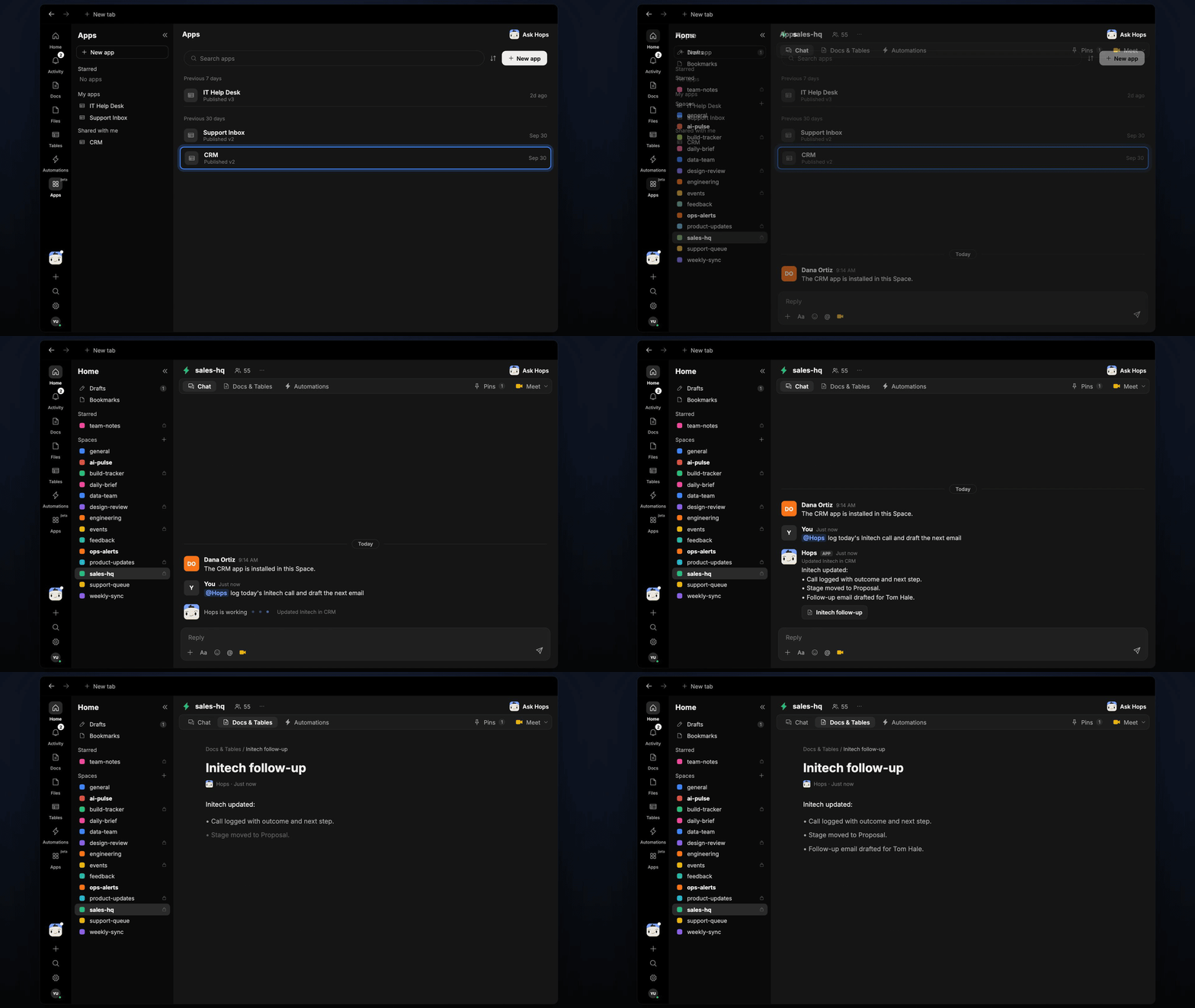 ## Ask Hops
Copy a prompt into any chat with Hops, or mention `@Hops` in a Space.
```text theme={null}
Log today's Initech call and draft the next email.
```
```text theme={null}
Move Globex to Proposal and log that they asked for revised pricing.
```
```text theme={null}
Which of my calls this week have no logged outcome?
```
```text theme={null}
Update Acme's next step to security review on Oct 16.
```
```text theme={null}
Draft a follow-up to Tom Hale at Initech after today's call.
```
Example reply:
> Initech updated:
>
> * Call logged with outcome and next step.
> * Stage moved to Proposal.
> * Follow-up email drafted for Tom Hale.
## What you get
* **An answer in chat**, in the same thread, listing the CRM changes.
* **A CRM update** on the right record.
* **An email draft** in Gmail, ready to review.
* **A saved Doc, when you ask for one.** Say "save this as a doc" and Hops writes it to **Docs** in the Space.
## Connections needed
Connect these apps. Each card opens Connections in the app.
Install the CRM app from Apps so Hops can read and update records.
Holds the follow-up draft.
## Set it up
Install the CRM app from Apps and connect Gmail in **Connections**.
See [Connections](/docs/connections/overview).
Create a **sales-hq** Space for the team and pin your stage definitions in Space context.
See [Spaces](/docs/spaces/overview) and [Space context](/docs/spaces/space-context).
Ask Hops in chat after each call.
## Related topics
- [Sales](/teams/sales.md)
- [Post-event follow-up](/teams/sales/use-cases/post-event-follow-up.md)
- [Post-call follow-up](/teams/sales/use-cases/post-call-follow-up.md)
- [Shared follow-ups](/teams/sales/use-cases/shared-follow-ups.md)
- [Incident postmortems](/teams/product-engineering/use-cases/postmortems.md)
This documentation is built and hosted on [Mintlify](https://mintlify.com), a developer documentation platform.
## Ask Hops
Copy a prompt into any chat with Hops, or mention `@Hops` in a Space.
```text theme={null}
Log today's Initech call and draft the next email.
```
```text theme={null}
Move Globex to Proposal and log that they asked for revised pricing.
```
```text theme={null}
Which of my calls this week have no logged outcome?
```
```text theme={null}
Update Acme's next step to security review on Oct 16.
```
```text theme={null}
Draft a follow-up to Tom Hale at Initech after today's call.
```
Example reply:
> Initech updated:
>
> * Call logged with outcome and next step.
> * Stage moved to Proposal.
> * Follow-up email drafted for Tom Hale.
## What you get
* **An answer in chat**, in the same thread, listing the CRM changes.
* **A CRM update** on the right record.
* **An email draft** in Gmail, ready to review.
* **A saved Doc, when you ask for one.** Say "save this as a doc" and Hops writes it to **Docs** in the Space.
## Connections needed
Connect these apps. Each card opens Connections in the app.
Install the CRM app from Apps so Hops can read and update records.
Holds the follow-up draft.
## Set it up
Install the CRM app from Apps and connect Gmail in **Connections**.
See [Connections](/docs/connections/overview).
Create a **sales-hq** Space for the team and pin your stage definitions in Space context.
See [Spaces](/docs/spaces/overview) and [Space context](/docs/spaces/space-context).
Ask Hops in chat after each call.
## Related topics
- [Sales](/teams/sales.md)
- [Post-event follow-up](/teams/sales/use-cases/post-event-follow-up.md)
- [Post-call follow-up](/teams/sales/use-cases/post-call-follow-up.md)
- [Shared follow-ups](/teams/sales/use-cases/shared-follow-ups.md)
- [Incident postmortems](/teams/product-engineering/use-cases/postmortems.md)
This documentation is built and hosted on [Mintlify](https://mintlify.com), a developer documentation platform.