> ## Documentation Index
> Fetch the complete documentation index at: https://hopsdocs.mintlify.site/llms.txt
> Use this file to discover all available pages before exploring further.
# Post-event follow-up
> Turn an event lead list into prioritized, personalized follow-ups.
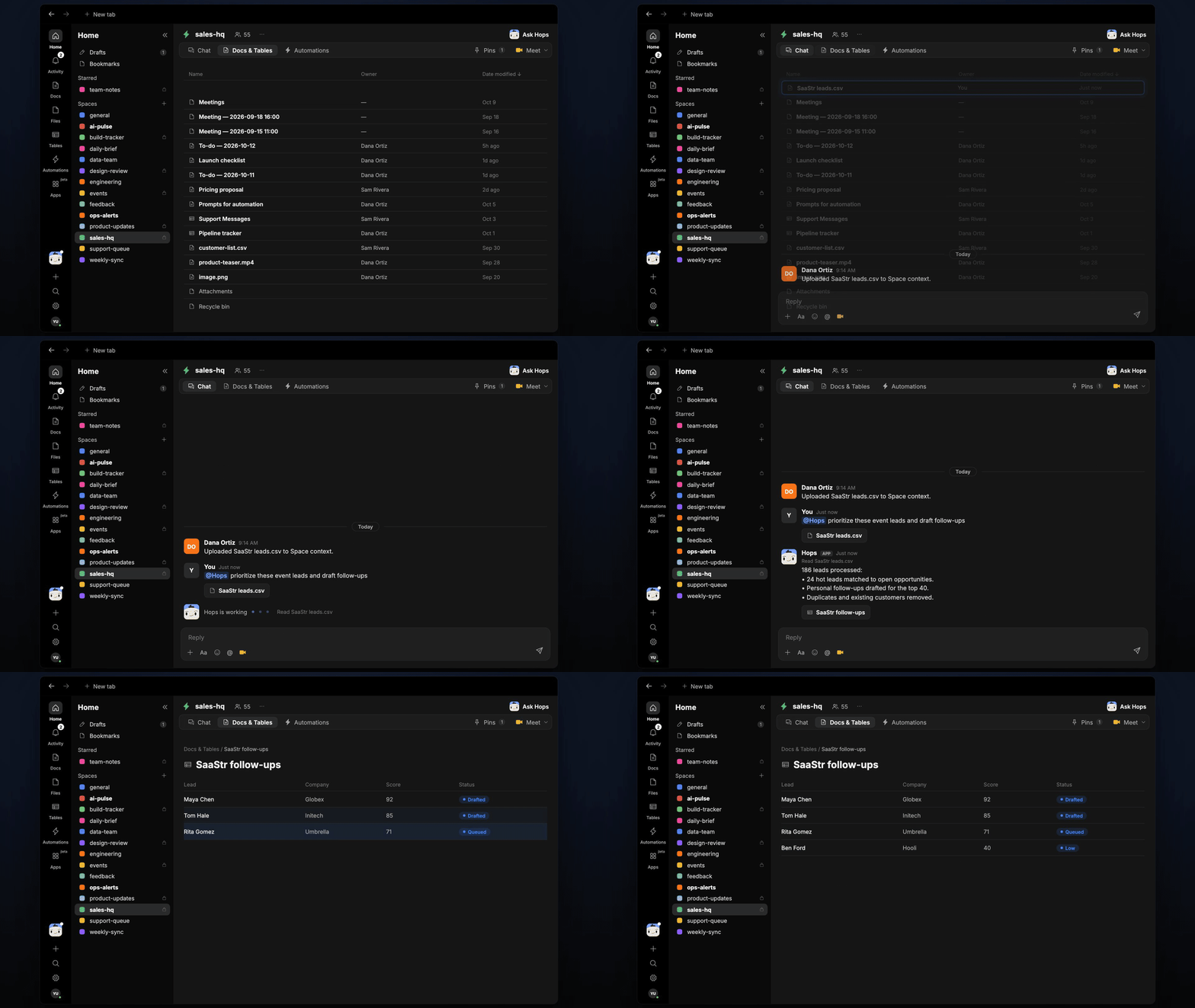
After a conference you have a spreadsheet of badge scans and no time to work it. Upload the list and Hops scores the leads, matches them to the CRM and drafts a follow-up for each.
**How it runs:** Triggered. An automation runs when an event attendee list is uploaded to the Space, and you can also ask Hops directly.
## What it does
* **Scores every lead.** Hops compares each attendee against the ICP pinned in the Space and ranks them.
* **Matches to the CRM.** Existing contacts and open opportunities are linked, so reps see who is already in a deal.
* **Removes noise.** Duplicates and existing customers are taken out of the follow-up list.
* **Drafts a short follow-up.** Each of the top leads gets a two-line email that mentions the event.
* **Reminds reps.** The next morning at 9am reps are reminded to review and send their drafts.
 ## Ask Hops
Copy a prompt into any chat with Hops, or mention `@Hops` in a Space.
```text theme={null}
Prioritize these event leads and draft follow-ups.
```
```text theme={null}
Which leads from the SaaStr list are already in open opportunities?
```
```text theme={null}
Draft follow-ups for the top 40 leads and mention the booth demo.
```
```text theme={null}
Remove customers and duplicates from this attendee list.
```
```text theme={null}
Split the hot leads by rep territory and tell each rep what to send.
```
Example reply:
> 186 leads processed:
>
> * 24 hot leads matched to open opportunities.
> * Personal follow-ups drafted for the top 40.
> * Duplicates and existing customers removed.
## What you get
* **A post when the list lands**, in the Space chat or Slack, with the hot leads and who owns them.
* **A scored lead Table** in **Tables** of the Space with score, CRM match and owner.
* **Email drafts** in Gmail for the top leads.
* **A reminder** to reps at 9am the next morning to send their drafts.
## Connections needed
Connect these apps. Each card opens Connections in the app.
Matches leads and logs outreach (or Salesforce).
Holds the follow-up drafts.
## Set it up
Connect your CRM (HubSpot or Salesforce) and Gmail in **Connections**.
See [Connections](/docs/connections/overview).
Create a **sales-hq** Space and pin your ICP in Space context.
See [Spaces](/docs/spaces/overview) and [Space context](/docs/spaces/space-context).
Give Hops these instructions:
```text theme={null}
You follow up event leads. Score each lead against the ICP, match to CRM records, remove customers and duplicates, and draft a two-line follow-up that mentions the event.
```
See [Build a skill](/docs/agents/build-a-skill).
Runs when an attendee list is uploaded. Hops posts the hot leads, saves the scored list in **Tables** and reminds reps at 9am the next day.
See [Automation](/docs/spaces/automation).
## Related topics
- [Sales](/teams/sales.md)
- [Post-call follow-up](/teams/sales/use-cases/post-call-follow-up.md)
- [Incident postmortems](/teams/product-engineering/use-cases/postmortems.md)
- [Shared follow-ups](/teams/sales/use-cases/shared-follow-ups.md)
- [CRM follow-up](/teams/sales/use-cases/sales-follow-up.md)
This documentation is built and hosted on [Mintlify](https://mintlify.com), a developer documentation platform.
## Ask Hops
Copy a prompt into any chat with Hops, or mention `@Hops` in a Space.
```text theme={null}
Prioritize these event leads and draft follow-ups.
```
```text theme={null}
Which leads from the SaaStr list are already in open opportunities?
```
```text theme={null}
Draft follow-ups for the top 40 leads and mention the booth demo.
```
```text theme={null}
Remove customers and duplicates from this attendee list.
```
```text theme={null}
Split the hot leads by rep territory and tell each rep what to send.
```
Example reply:
> 186 leads processed:
>
> * 24 hot leads matched to open opportunities.
> * Personal follow-ups drafted for the top 40.
> * Duplicates and existing customers removed.
## What you get
* **A post when the list lands**, in the Space chat or Slack, with the hot leads and who owns them.
* **A scored lead Table** in **Tables** of the Space with score, CRM match and owner.
* **Email drafts** in Gmail for the top leads.
* **A reminder** to reps at 9am the next morning to send their drafts.
## Connections needed
Connect these apps. Each card opens Connections in the app.
Matches leads and logs outreach (or Salesforce).
Holds the follow-up drafts.
## Set it up
Connect your CRM (HubSpot or Salesforce) and Gmail in **Connections**.
See [Connections](/docs/connections/overview).
Create a **sales-hq** Space and pin your ICP in Space context.
See [Spaces](/docs/spaces/overview) and [Space context](/docs/spaces/space-context).
Give Hops these instructions:
```text theme={null}
You follow up event leads. Score each lead against the ICP, match to CRM records, remove customers and duplicates, and draft a two-line follow-up that mentions the event.
```
See [Build a skill](/docs/agents/build-a-skill).
Runs when an attendee list is uploaded. Hops posts the hot leads, saves the scored list in **Tables** and reminds reps at 9am the next day.
See [Automation](/docs/spaces/automation).
## Related topics
- [Sales](/teams/sales.md)
- [Post-call follow-up](/teams/sales/use-cases/post-call-follow-up.md)
- [Incident postmortems](/teams/product-engineering/use-cases/postmortems.md)
- [Shared follow-ups](/teams/sales/use-cases/shared-follow-ups.md)
- [CRM follow-up](/teams/sales/use-cases/sales-follow-up.md)
This documentation is built and hosted on [Mintlify](https://mintlify.com), a developer documentation platform.