> ## Documentation Index
> Fetch the complete documentation index at: https://hopsdocs.mintlify.site/llms.txt
> Use this file to discover all available pages before exploring further.
# Post-call follow-up
> Draft the follow-up email from your notes and the account context.
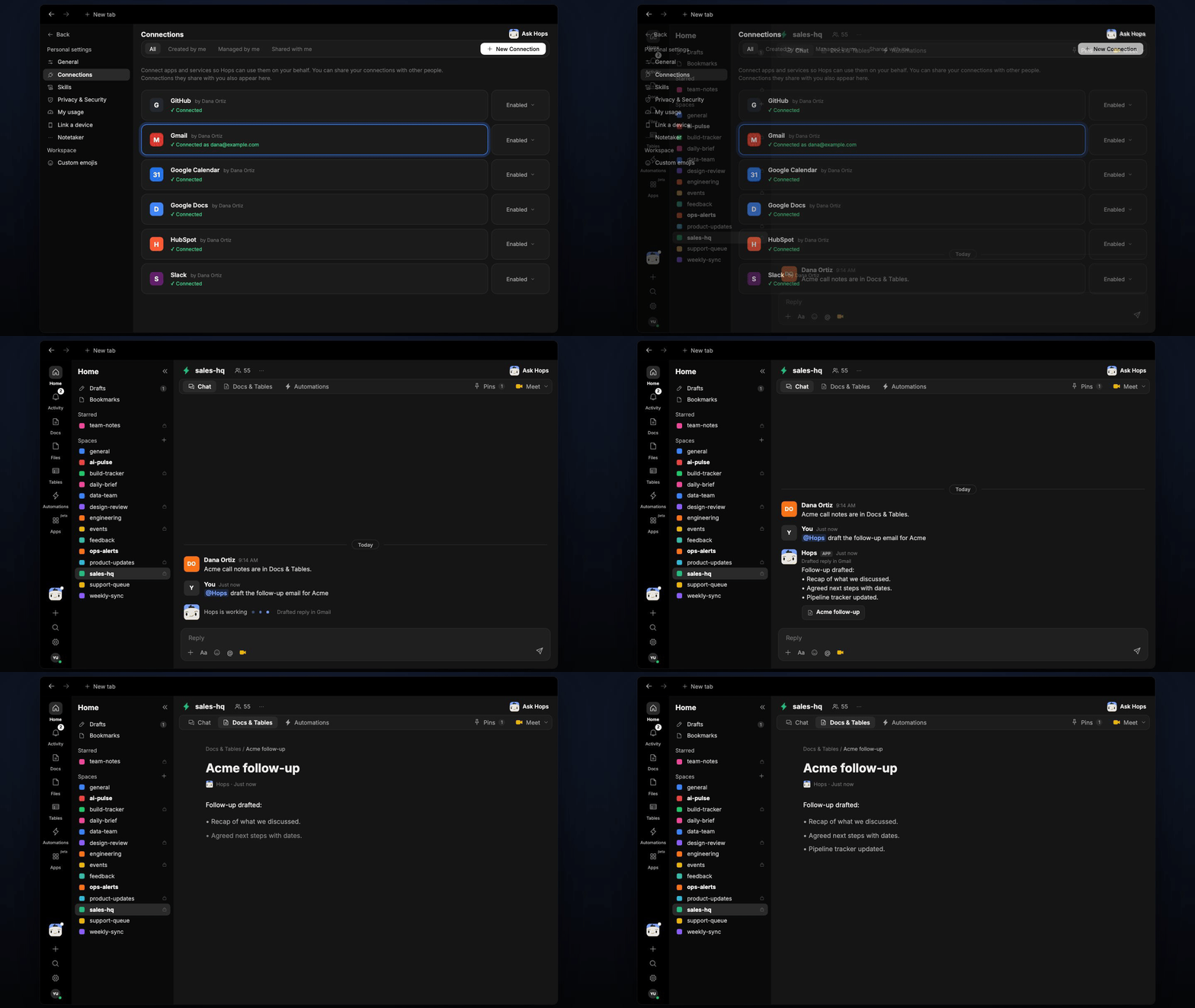
After a call, reps lose time writing the recap and next steps. Paste your notes into the chat and Hops drafts the follow-up using the notes, the account history and your sales playbook.
**How it runs:** Ask Hops, with a skill so the output has the same format every time. No automation needed.
## What it does
* **Drafts in the rep's voice.** Hops matches the tone of past emails and keeps it under 150 words.
* **Uses the account history.** Deal stage, earlier threads and open items come from the CRM and Gmail.
* **Follows your playbook.** Templates and messaging pinned in the Space shape the structure of the email.
* **Ends with a clear ask.** Every draft has agreed next steps with dates and one specific ask.
* **Leaves it as a draft.** The email waits in Gmail or Outlook for you to review and send.
 ## Ask Hops
Copy a prompt into any chat with Hops, or mention `@Hops` in a Space.
```text theme={null}
Draft the follow-up email for Acme. Notes: they want SSO, security review next week, pricing for 200 seats.
```
```text theme={null}
Write a short follow-up to Priya at Globex recapping today's demo.
```
```text theme={null}
Draft a follow-up for Northwind that proposes two times for a technical session.
```
```text theme={null}
Turn these call notes into a recap email and a list of next steps.
```
```text theme={null}
Log the outcome of the Initech call in the CRM and draft the follow-up.
```
Example reply:
> Follow-up drafted for Acme:
>
> * Recap of SSO, security review and 200-seat pricing.
> * Next steps: security review Oct 16, pricing sent by Friday.
> * Draft saved in Gmail, 128 words.
## What you get
* **An email draft** in Gmail or Outlook, ready to review.
* **An answer in chat**, in the same thread, with the recap and next steps.
* **A saved Doc, when you ask for one.** Say "save the recap as a doc" and Hops writes it to **Docs** in the Space.
## Connections needed
Connect these apps. Each card opens Connections in the app.
Account history and deal stage (or Salesforce).
Earlier threads and the draft (or Outlook).
Playbooks and email templates.
## Set it up
Connect your CRM, Gmail or Outlook and Google Drive in **Connections**.
See [Connections](/docs/connections/overview).
Create a Space per major account and add the sales playbook and email templates to Space context.
See [Spaces](/docs/spaces/overview) and [Space context](/docs/spaces/space-context).
Give Hops these instructions:
```text theme={null}
You draft post-call follow-up emails. Use the notes from the thread, the account's CRM history, and the sales playbook in the Space Context document. Match the rep's tone. Keep the email under 150 words. Include a clear next step and a specific ask.
```
See [Build a skill](/docs/agents/build-a-skill).
Ask Hops in chat after each call and paste your notes.
## Related topics
- [Sales](/teams/sales.md)
- [Explore use cases](/use-cases/overview.md)
- [Post-event follow-up](/teams/sales/use-cases/post-event-follow-up.md)
- [CRM follow-up](/teams/sales/use-cases/sales-follow-up.md)
- [Shared follow-ups](/teams/sales/use-cases/shared-follow-ups.md)
This documentation is built and hosted on [Mintlify](https://mintlify.com), a developer documentation platform.
## Ask Hops
Copy a prompt into any chat with Hops, or mention `@Hops` in a Space.
```text theme={null}
Draft the follow-up email for Acme. Notes: they want SSO, security review next week, pricing for 200 seats.
```
```text theme={null}
Write a short follow-up to Priya at Globex recapping today's demo.
```
```text theme={null}
Draft a follow-up for Northwind that proposes two times for a technical session.
```
```text theme={null}
Turn these call notes into a recap email and a list of next steps.
```
```text theme={null}
Log the outcome of the Initech call in the CRM and draft the follow-up.
```
Example reply:
> Follow-up drafted for Acme:
>
> * Recap of SSO, security review and 200-seat pricing.
> * Next steps: security review Oct 16, pricing sent by Friday.
> * Draft saved in Gmail, 128 words.
## What you get
* **An email draft** in Gmail or Outlook, ready to review.
* **An answer in chat**, in the same thread, with the recap and next steps.
* **A saved Doc, when you ask for one.** Say "save the recap as a doc" and Hops writes it to **Docs** in the Space.
## Connections needed
Connect these apps. Each card opens Connections in the app.
Account history and deal stage (or Salesforce).
Earlier threads and the draft (or Outlook).
Playbooks and email templates.
## Set it up
Connect your CRM, Gmail or Outlook and Google Drive in **Connections**.
See [Connections](/docs/connections/overview).
Create a Space per major account and add the sales playbook and email templates to Space context.
See [Spaces](/docs/spaces/overview) and [Space context](/docs/spaces/space-context).
Give Hops these instructions:
```text theme={null}
You draft post-call follow-up emails. Use the notes from the thread, the account's CRM history, and the sales playbook in the Space Context document. Match the rep's tone. Keep the email under 150 words. Include a clear next step and a specific ask.
```
See [Build a skill](/docs/agents/build-a-skill).
Ask Hops in chat after each call and paste your notes.
## Related topics
- [Sales](/teams/sales.md)
- [Explore use cases](/use-cases/overview.md)
- [Post-event follow-up](/teams/sales/use-cases/post-event-follow-up.md)
- [CRM follow-up](/teams/sales/use-cases/sales-follow-up.md)
- [Shared follow-ups](/teams/sales/use-cases/shared-follow-ups.md)
This documentation is built and hosted on [Mintlify](https://mintlify.com), a developer documentation platform.