> ## Documentation Index
> Fetch the complete documentation index at: https://hopsdocs.mintlify.site/llms.txt
> Use this file to discover all available pages before exploring further.
# Deal rooms
> One Space per deal with every file, thread and next step in it.
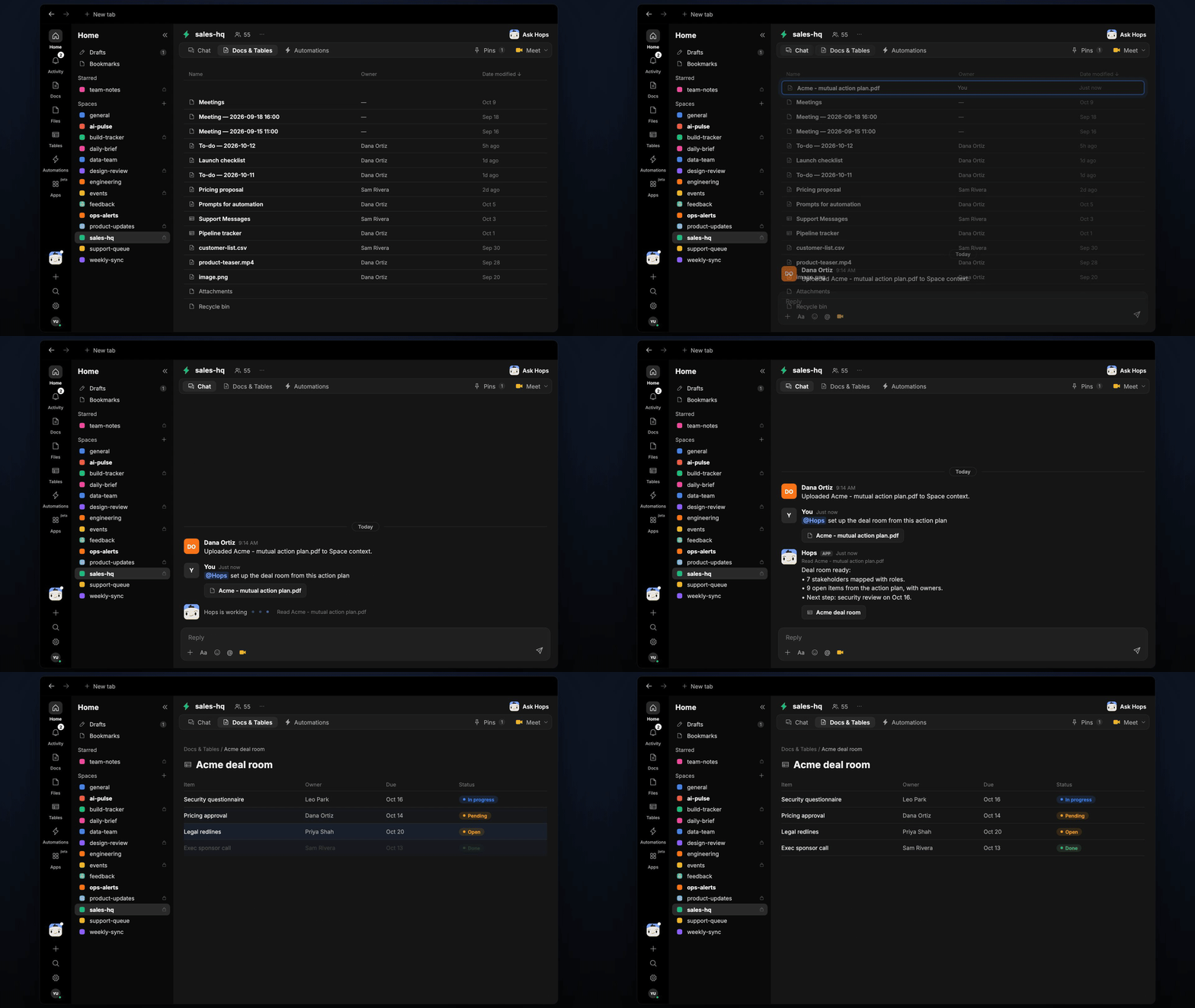
Big deals have many files and many people. Give each deal its own Space, drop in the files, and Hops keeps a live deal-room table of stakeholders, open items and next steps.
**How it runs:** One Space per deal, with its own context, skill and automations.
## What it does
* **Builds the room from your files.** Hops reads the mutual action plan, proposals and notes in the Space and sets up the deal-room table.
* **Maps stakeholders.** Each person gets a role, their stance and the last contact, pulled from the CRM and Gmail.
* **Tracks open items.** Every item has an owner, due date and status, kept current from threads and files.
* **Flags what is overdue.** Late items are posted in the Space each morning with a suggested next step.
* **Keeps deals separate.** Each deal's context stays in its own Space, so nothing leaks between accounts.
 ## Ask Hops
Copy a prompt into any chat with Hops, or mention `@Hops` in a Space.
```text theme={null}
Set up the deal room from this action plan.
```
```text theme={null}
Who are the stakeholders on the Acme deal and who is our champion?
```
```text theme={null}
What is overdue in the Globex deal room?
```
```text theme={null}
Summarize the latest email threads and update the open items.
```
```text theme={null}
What is the next step for this deal and who owns it?
```
Example reply:
> Deal room ready:
>
> * 7 stakeholders mapped with roles.
> * 9 open items from the action plan, with owners.
> * Next step: security review on Oct 16.
## What you get
* **A dedicated Space per deal** with its own context, files and chat.
* **A stakeholder and open-items Table** in **Tables**, updated as threads and files change.
* **A daily post** each weekday at 9am in the deal Space listing overdue items.
* **Docs** in the Space, such as call summaries and the action plan recap, whenever you ask.
## Connections needed
Connect these apps. Each card opens Connections in the app.
Deal record, contacts and stage (or Salesforce).
Threads with the buying team.
Proposals, security docs and action plans.
Posts overdue items.
## Set it up
Connect your CRM, Gmail, Google Drive and Slack in **Connections**.
See [Connections](/docs/connections/overview).
Create one Space per deal, for example **deal-acme**. Pin the mutual action plan in Space context.
See [Spaces](/docs/spaces/overview) and [Space context](/docs/spaces/space-context).
Give Hops these instructions:
```text theme={null}
You run deal rooms. From files and threads in the Space, keep a table of stakeholders and open items with owner, due date and status. Flag anything overdue and suggest the next step.
```
See [Build a skill](/docs/agents/build-a-skill).
Every weekday at 9am Hops posts overdue items in the deal Space and updates the open-items Table.
See [Automation](/docs/spaces/automation).
## Related topics
- [Explore use cases](/use-cases/overview.md)
- [Sales](/teams/sales.md)
- [Data room review](/teams/vc-pe/use-cases/data-room.md)
- [Pipeline review](/teams/revops/use-cases/pipeline-review.md)
- [Diligence tracker](/teams/professional-services/use-cases/diligence-tracker.md)
This documentation is built and hosted on [Mintlify](https://mintlify.com), a developer documentation platform.
## Ask Hops
Copy a prompt into any chat with Hops, or mention `@Hops` in a Space.
```text theme={null}
Set up the deal room from this action plan.
```
```text theme={null}
Who are the stakeholders on the Acme deal and who is our champion?
```
```text theme={null}
What is overdue in the Globex deal room?
```
```text theme={null}
Summarize the latest email threads and update the open items.
```
```text theme={null}
What is the next step for this deal and who owns it?
```
Example reply:
> Deal room ready:
>
> * 7 stakeholders mapped with roles.
> * 9 open items from the action plan, with owners.
> * Next step: security review on Oct 16.
## What you get
* **A dedicated Space per deal** with its own context, files and chat.
* **A stakeholder and open-items Table** in **Tables**, updated as threads and files change.
* **A daily post** each weekday at 9am in the deal Space listing overdue items.
* **Docs** in the Space, such as call summaries and the action plan recap, whenever you ask.
## Connections needed
Connect these apps. Each card opens Connections in the app.
Deal record, contacts and stage (or Salesforce).
Threads with the buying team.
Proposals, security docs and action plans.
Posts overdue items.
## Set it up
Connect your CRM, Gmail, Google Drive and Slack in **Connections**.
See [Connections](/docs/connections/overview).
Create one Space per deal, for example **deal-acme**. Pin the mutual action plan in Space context.
See [Spaces](/docs/spaces/overview) and [Space context](/docs/spaces/space-context).
Give Hops these instructions:
```text theme={null}
You run deal rooms. From files and threads in the Space, keep a table of stakeholders and open items with owner, due date and status. Flag anything overdue and suggest the next step.
```
See [Build a skill](/docs/agents/build-a-skill).
Every weekday at 9am Hops posts overdue items in the deal Space and updates the open-items Table.
See [Automation](/docs/spaces/automation).
## Related topics
- [Explore use cases](/use-cases/overview.md)
- [Sales](/teams/sales.md)
- [Data room review](/teams/vc-pe/use-cases/data-room.md)
- [Pipeline review](/teams/revops/use-cases/pipeline-review.md)
- [Diligence tracker](/teams/professional-services/use-cases/diligence-tracker.md)
This documentation is built and hosted on [Mintlify](https://mintlify.com), a developer documentation platform.