> ## Documentation Index
> Fetch the complete documentation index at: https://hopsdocs.mintlify.site/llms.txt
> Use this file to discover all available pages before exploring further.
# Deal desk
> Review non-standard deals against your pricing rules before approval.
Discounts and custom terms need review, and the review usually happens in a rush. Hops reads the opportunity, checks it against your pricing rules and drafts the approval note.
**How it runs:** Triggered. An automation runs when a new deal-desk request is marked for approval, and you can also ask Hops directly.
## What it does
* **Reads the opportunity.** Hops pulls discount, terms, products and contract length from Salesforce or HubSpot.
* **Checks it against policy.** Each line is compared with the pricing and discount rules pinned in the Space.
* **Lists every exception.** For each one Hops names who must approve it and suggests a counter.
* **Drafts the approval note.** A short note with the trade-offs, ready to send to the approver.
* **Posts to the right channel.** The summary goes to the deal desk Slack channel so approvers see it at once.
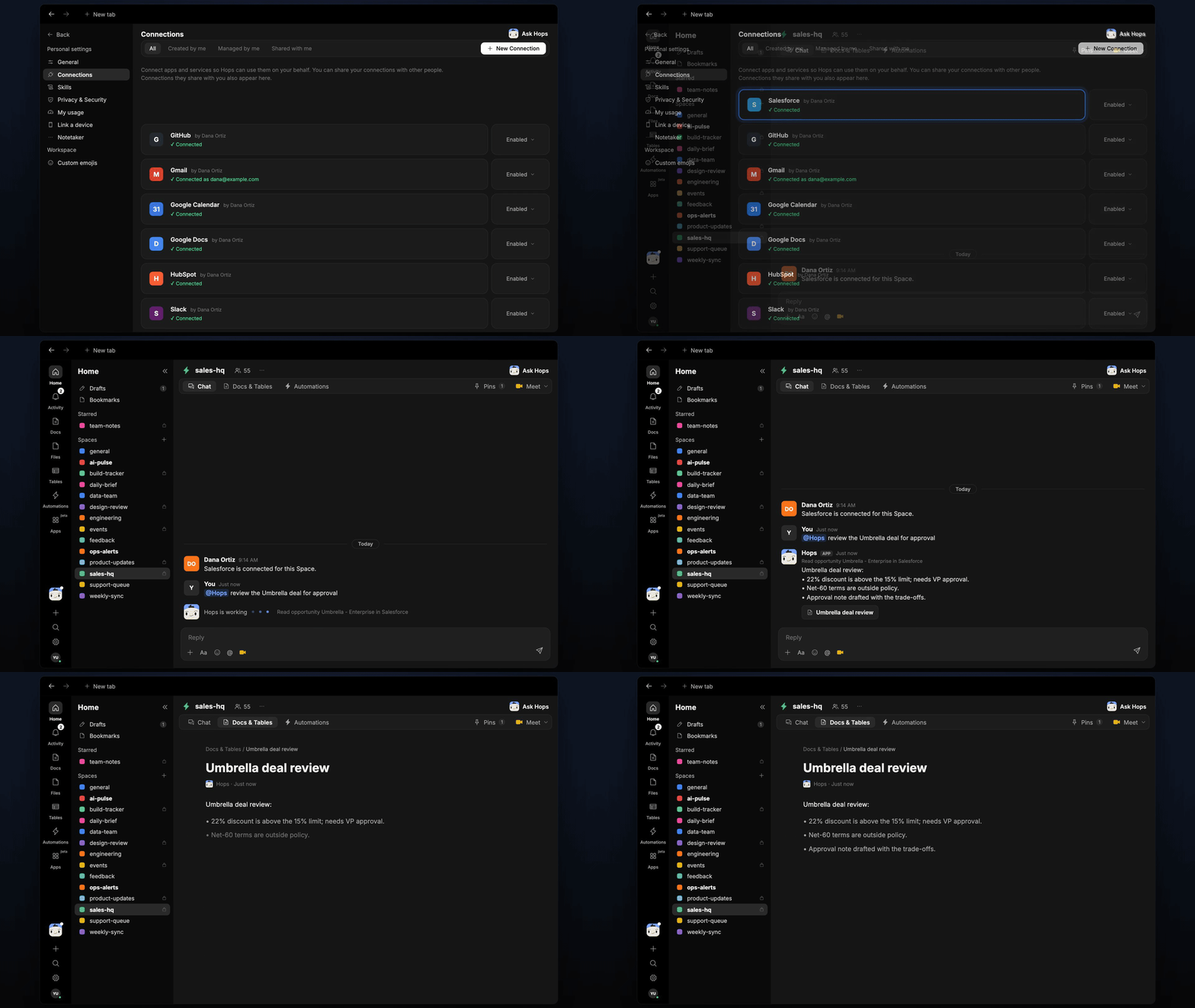 ## Ask Hops
Copy a prompt into any chat with Hops, or mention `@Hops` in a Space.
```text theme={null}
Review the Umbrella deal for approval.
```
```text theme={null}
Does the Northwind opportunity break any discount rules?
```
```text theme={null}
Draft the approval note for the Globex renewal with 18% discount.
```
```text theme={null}
Which open opportunities are marked for approval right now?
```
```text theme={null}
What would a compliant counter-offer for Acme look like?
```
Example reply:
> Umbrella deal review:
>
> * 22% discount is above the 15% limit; needs VP approval.
> * Net-60 terms are outside policy.
> * Suggested counter: 17% with annual prepay.
> * Approval note drafted with the trade-offs.
## What you get
* **A post when the request arrives**, in the deal desk Slack channel or the Space chat, with exceptions and approvers.
* **A saved Doc** in **Docs** of the Space with the review and approval note for each deal.
* **A draft approval note** you can send as is or edit.
* **On-demand reviews.** Ask Hops about any opportunity at any time.
## Connections needed
Connect these apps. Each card opens Connections in the app.
Reads opportunities, discounts and terms (or HubSpot).
Posts the review to the deal desk channel.
## Set it up
Connect your CRM (Salesforce or HubSpot) and Slack in **Connections**.
See [Connections](/docs/connections/overview).
Create a **sales-hq** Space and pin the pricing and discount policy in Space context.
See [Spaces](/docs/spaces/overview) and [Space context](/docs/spaces/space-context).
Give Hops these instructions:
```text theme={null}
You run the deal desk. Compare discount, terms and products against policy. List each exception, who must approve it, and a suggested counter. Draft a short approval note.
```
See [Build a skill](/docs/agents/build-a-skill).
Runs when a new opportunity is marked for approval. Hops posts the review to the deal desk channel and saves it in **Docs**.
See [Automation](/docs/spaces/automation).
## Related topics
- [Sales](/teams/sales.md)
- [RFP desk](/teams/sales/use-cases/rfp-desk.md)
- [Deal rooms](/teams/sales/use-cases/deal-rooms.md)
- [Stalled deals](/teams/revops/use-cases/stalled-deals.md)
- [Apps](/apps/overview.md)
This documentation is built and hosted on [Mintlify](https://mintlify.com), a developer documentation platform.
## Ask Hops
Copy a prompt into any chat with Hops, or mention `@Hops` in a Space.
```text theme={null}
Review the Umbrella deal for approval.
```
```text theme={null}
Does the Northwind opportunity break any discount rules?
```
```text theme={null}
Draft the approval note for the Globex renewal with 18% discount.
```
```text theme={null}
Which open opportunities are marked for approval right now?
```
```text theme={null}
What would a compliant counter-offer for Acme look like?
```
Example reply:
> Umbrella deal review:
>
> * 22% discount is above the 15% limit; needs VP approval.
> * Net-60 terms are outside policy.
> * Suggested counter: 17% with annual prepay.
> * Approval note drafted with the trade-offs.
## What you get
* **A post when the request arrives**, in the deal desk Slack channel or the Space chat, with exceptions and approvers.
* **A saved Doc** in **Docs** of the Space with the review and approval note for each deal.
* **A draft approval note** you can send as is or edit.
* **On-demand reviews.** Ask Hops about any opportunity at any time.
## Connections needed
Connect these apps. Each card opens Connections in the app.
Reads opportunities, discounts and terms (or HubSpot).
Posts the review to the deal desk channel.
## Set it up
Connect your CRM (Salesforce or HubSpot) and Slack in **Connections**.
See [Connections](/docs/connections/overview).
Create a **sales-hq** Space and pin the pricing and discount policy in Space context.
See [Spaces](/docs/spaces/overview) and [Space context](/docs/spaces/space-context).
Give Hops these instructions:
```text theme={null}
You run the deal desk. Compare discount, terms and products against policy. List each exception, who must approve it, and a suggested counter. Draft a short approval note.
```
See [Build a skill](/docs/agents/build-a-skill).
Runs when a new opportunity is marked for approval. Hops posts the review to the deal desk channel and saves it in **Docs**.
See [Automation](/docs/spaces/automation).
## Related topics
- [Sales](/teams/sales.md)
- [RFP desk](/teams/sales/use-cases/rfp-desk.md)
- [Deal rooms](/teams/sales/use-cases/deal-rooms.md)
- [Stalled deals](/teams/revops/use-cases/stalled-deals.md)
- [Apps](/apps/overview.md)
This documentation is built and hosted on [Mintlify](https://mintlify.com), a developer documentation platform.