> ## Documentation Index
> Fetch the complete documentation index at: https://hopsdocs.mintlify.site/llms.txt
> Use this file to discover all available pages before exploring further.
# Renewal watch
> See every renewal in the next 90 days with its risk.
Renewals surprise teams when nobody is watching. Hops lists upcoming renewals each week with usage, support and engagement signals so CSMs act early.
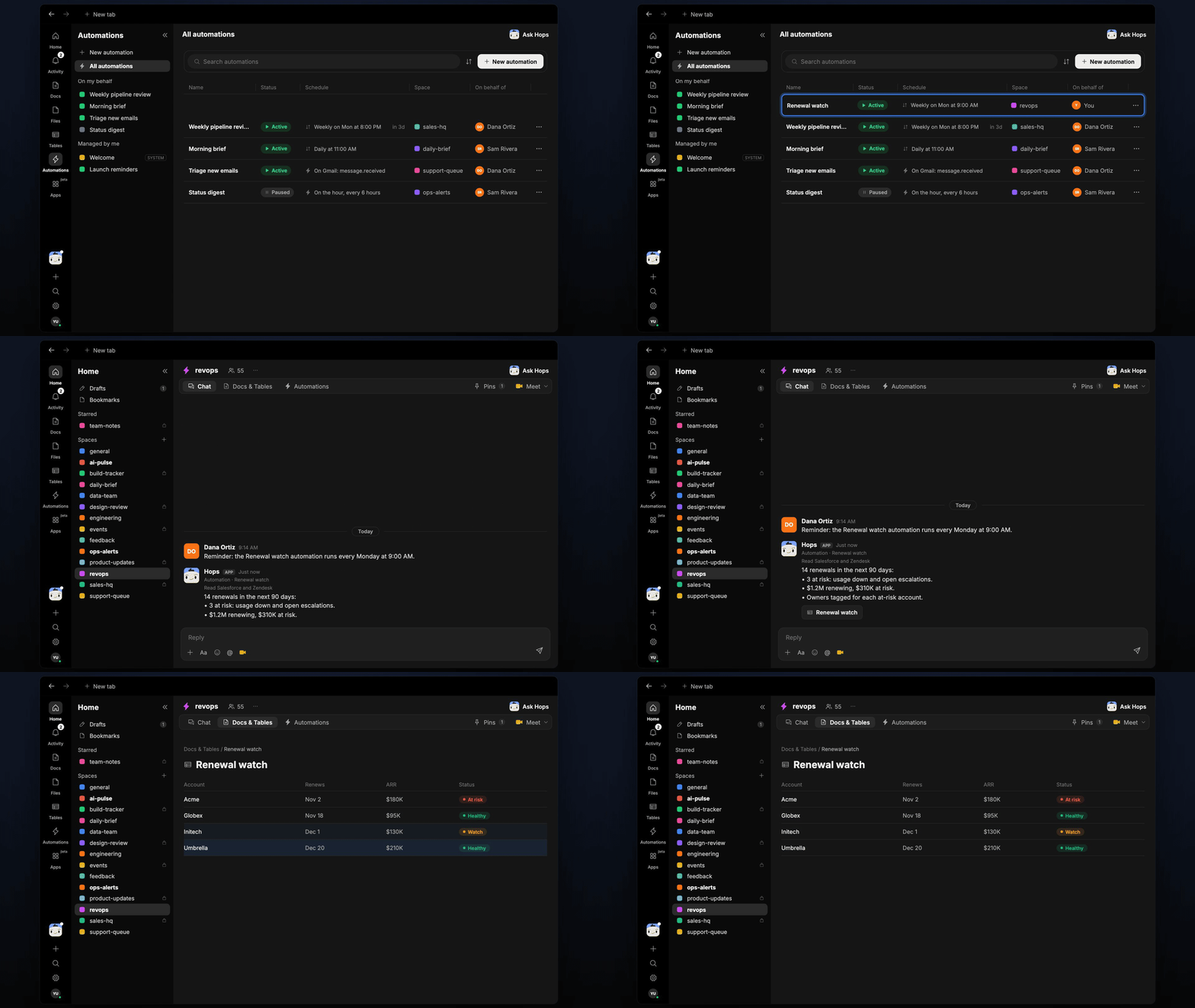
**How it runs:** Scheduled. An automation runs every Monday at 9:00 AM, posts the renewal list and updates a Table. You can also ask Hops any time.
## What it does
* **Lists the next 90 days.** Every renewal with ARR, owner and date from Salesforce or HubSpot.
* **Rates risk from signals.** Usage trend from Amplitude, open escalations in Zendesk and last contact date.
* **Explains each at-risk rating** in one line, so the CSM knows where to start.
* **Totals the exposure.** Renewing ARR and at-risk ARR at the top.
 ## Ask Hops
Copy a prompt into any chat with Hops, or mention `@Hops` in a Space.
```text theme={null}
Show renewals in the next 90 days with risk.
```
```text theme={null}
Why is Globex rated at risk?
```
```text theme={null}
Which at-risk renewals have no contact in 30 days?
```
```text theme={null}
List renewals over $100K ARR for next quarter.
```
Example reply:
> 14 renewals in the next 90 days:
>
> * 3 at risk: usage down, open escalations.
> * $1.2M renewing, $310K at risk.
> * Owners tagged on each at-risk account.
## What you get
* **A Slack or Space post** every Monday with totals and at-risk accounts tagged to owners.
* **Updated Tables** in the Space with a row per renewal, ARR, risk and reason.
* **On-demand lists** by owner, segment or date range.
## Connections needed
Connect these apps. Each card opens Connections in the app.
Opportunities, owners and close dates (or HubSpot).
Tickets and sentiment (or Intercom).
Product usage trends.
Where Hops posts the results and nudges owners.
## Set it up
Connect the apps above in **Connections**.
See [Connections](/docs/connections/overview).
Create a skill with this prompt so the output has the same format every time.
```text theme={null}
You watch renewals. List renewals in the next 90 days with ARR, owner and risk. Risk comes from usage trend, open escalations and last contact. Explain each at-risk rating in one line.
```
See [Build a skill](/docs/agents/build-a-skill).
Run every Monday at 9:00 AM. Hops posts the list to the Space and updates the renewals Table.
See [Automation](/docs/spaces/automation).
## Related topics
- [RevOps](/teams/revops.md)
- [Explore use cases](/use-cases/overview.md)
- [Contract renewals](/teams/legal/use-cases/contract-renewals.md)
- [Handoff watch](/teams/sales/use-cases/deal-handoff.md)
- [Account risk watch](/teams/professional-services/use-cases/account-risk-watch.md)
This documentation is built and hosted on [Mintlify](https://mintlify.com), a developer documentation platform.
## Ask Hops
Copy a prompt into any chat with Hops, or mention `@Hops` in a Space.
```text theme={null}
Show renewals in the next 90 days with risk.
```
```text theme={null}
Why is Globex rated at risk?
```
```text theme={null}
Which at-risk renewals have no contact in 30 days?
```
```text theme={null}
List renewals over $100K ARR for next quarter.
```
Example reply:
> 14 renewals in the next 90 days:
>
> * 3 at risk: usage down, open escalations.
> * $1.2M renewing, $310K at risk.
> * Owners tagged on each at-risk account.
## What you get
* **A Slack or Space post** every Monday with totals and at-risk accounts tagged to owners.
* **Updated Tables** in the Space with a row per renewal, ARR, risk and reason.
* **On-demand lists** by owner, segment or date range.
## Connections needed
Connect these apps. Each card opens Connections in the app.
Opportunities, owners and close dates (or HubSpot).
Tickets and sentiment (or Intercom).
Product usage trends.
Where Hops posts the results and nudges owners.
## Set it up
Connect the apps above in **Connections**.
See [Connections](/docs/connections/overview).
Create a skill with this prompt so the output has the same format every time.
```text theme={null}
You watch renewals. List renewals in the next 90 days with ARR, owner and risk. Risk comes from usage trend, open escalations and last contact. Explain each at-risk rating in one line.
```
See [Build a skill](/docs/agents/build-a-skill).
Run every Monday at 9:00 AM. Hops posts the list to the Space and updates the renewals Table.
See [Automation](/docs/spaces/automation).
## Related topics
- [RevOps](/teams/revops.md)
- [Explore use cases](/use-cases/overview.md)
- [Contract renewals](/teams/legal/use-cases/contract-renewals.md)
- [Handoff watch](/teams/sales/use-cases/deal-handoff.md)
- [Account risk watch](/teams/professional-services/use-cases/account-risk-watch.md)
This documentation is built and hosted on [Mintlify](https://mintlify.com), a developer documentation platform.