> ## Documentation Index
> Fetch the complete documentation index at: https://hopsdocs.mintlify.site/llms.txt
> Use this file to discover all available pages before exploring further.
# Forecast changes
> See what changed in the forecast since last week and why.
The forecast moves every week and nobody remembers why. Hops compares the current forecast with last week's snapshot and explains each change from deal notes.
**How it runs:** Scheduled. An automation runs every Monday at 8am, posts the changes and saves a dated Doc. You can also ask Hops any time.
## What it does
* **Compares to last week's snapshot.** Hops reads the current forecast in Salesforce and diffs it against the saved snapshot.
* **Lists every moved deal.** Deals that changed category, amount or close date, with the dollar impact.
* **Gives the reason.** The explanation comes from deal notes and recent activity, not a guess.
* **Shows the net change.** The total movement is at the top, with commit and best case called out.
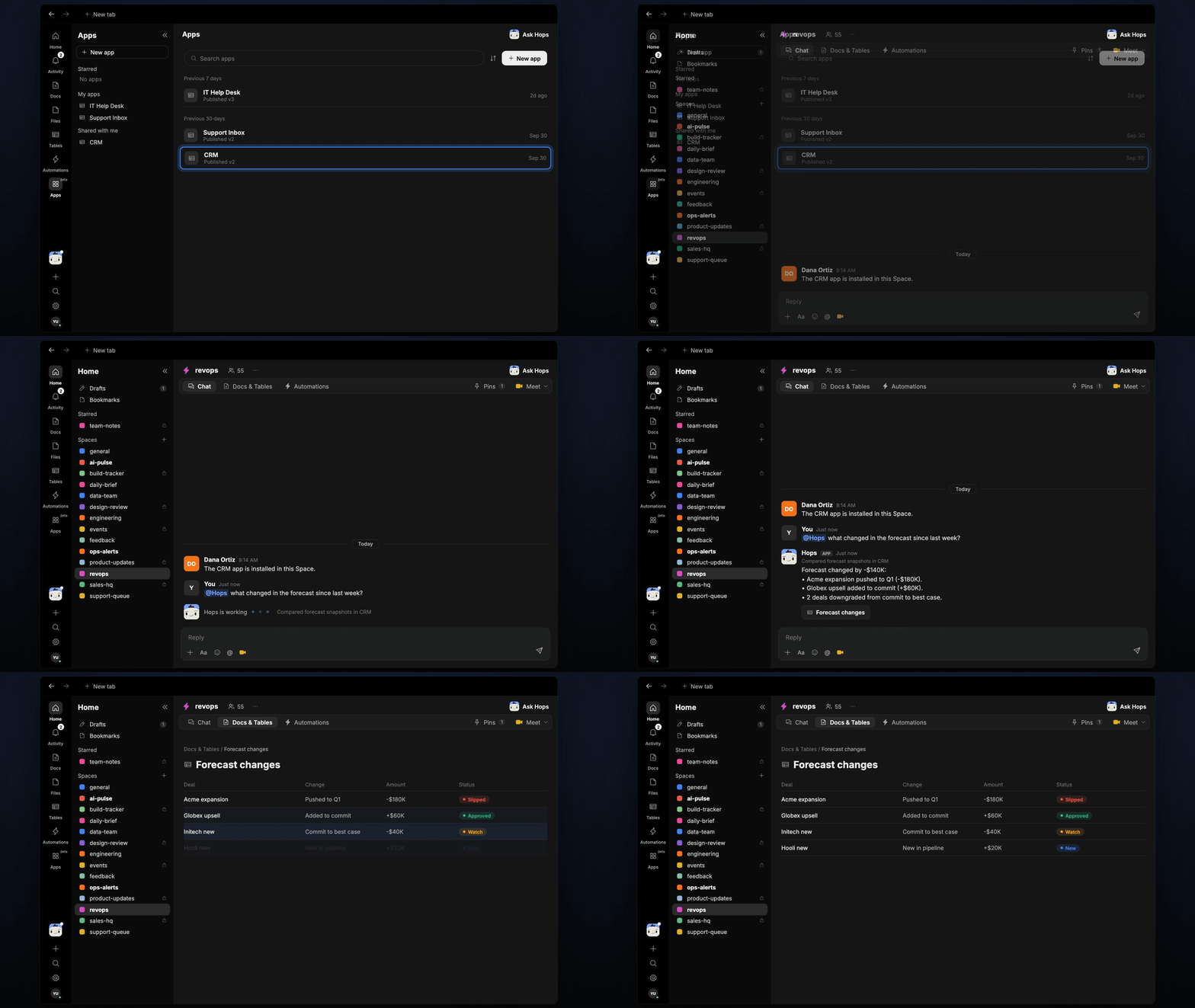 ## Ask Hops
Copy a prompt into any chat with Hops, or mention `@Hops` in a Space.
```text theme={null}
What changed in the forecast since last Monday?
```
```text theme={null}
Why did the Acme expansion move out of commit?
```
```text theme={null}
Show forecast changes for the EMEA team only.
```
```text theme={null}
Which deals moved to best case this week and why?
```
Example reply:
> Forecast changed by -\$140K since last week:
>
> * Acme expansion pushed to Q1 (-\$180K), legal review not started.
> * Globex upsell added to commit (+\$60K).
> * 2 deals downgraded to best case.
## What you get
* **A Slack or Space post** every Monday with the net change and moved deals.
* **A saved Doc** in **Docs** for each week, so you can compare over time.
* **On-demand answers** for any team or period.
## Connections needed
Connect these apps. Each card opens Connections in the app.
Opportunities, owners and close dates (or HubSpot).
Where Hops posts the results and nudges owners.
## Set it up
Connect the apps above in **Connections**.
See [Connections](/docs/connections/overview).
Create a skill with this prompt so the output has the same format every time.
```text theme={null}
You explain forecast changes. Compare the current forecast with last week's snapshot. List every deal that moved category, amount or close date, with the amount and the reason from notes.
```
See [Build a skill](/docs/agents/build-a-skill).
Run every Monday at 8am. Hops posts the changes to the Space and saves a dated Doc.
See [Automation](/docs/spaces/automation).
## Related topics
- [RevOps](/teams/revops.md)
- [Promo risk check](/teams/operations/use-cases/promo-risk.md)
- [Chase missing submissions](/teams/sales/use-cases/chase-submissions.md)
- [Contract redlines](/teams/legal/use-cases/contract-summary.md)
- [Release notes](/teams/product-engineering/use-cases/release-notes.md)
This documentation is built and hosted on [Mintlify](https://mintlify.com), a developer documentation platform.
## Ask Hops
Copy a prompt into any chat with Hops, or mention `@Hops` in a Space.
```text theme={null}
What changed in the forecast since last Monday?
```
```text theme={null}
Why did the Acme expansion move out of commit?
```
```text theme={null}
Show forecast changes for the EMEA team only.
```
```text theme={null}
Which deals moved to best case this week and why?
```
Example reply:
> Forecast changed by -\$140K since last week:
>
> * Acme expansion pushed to Q1 (-\$180K), legal review not started.
> * Globex upsell added to commit (+\$60K).
> * 2 deals downgraded to best case.
## What you get
* **A Slack or Space post** every Monday with the net change and moved deals.
* **A saved Doc** in **Docs** for each week, so you can compare over time.
* **On-demand answers** for any team or period.
## Connections needed
Connect these apps. Each card opens Connections in the app.
Opportunities, owners and close dates (or HubSpot).
Where Hops posts the results and nudges owners.
## Set it up
Connect the apps above in **Connections**.
See [Connections](/docs/connections/overview).
Create a skill with this prompt so the output has the same format every time.
```text theme={null}
You explain forecast changes. Compare the current forecast with last week's snapshot. List every deal that moved category, amount or close date, with the amount and the reason from notes.
```
See [Build a skill](/docs/agents/build-a-skill).
Run every Monday at 8am. Hops posts the changes to the Space and saves a dated Doc.
See [Automation](/docs/spaces/automation).
## Related topics
- [RevOps](/teams/revops.md)
- [Promo risk check](/teams/operations/use-cases/promo-risk.md)
- [Chase missing submissions](/teams/sales/use-cases/chase-submissions.md)
- [Contract redlines](/teams/legal/use-cases/contract-summary.md)
- [Release notes](/teams/product-engineering/use-cases/release-notes.md)
This documentation is built and hosted on [Mintlify](https://mintlify.com), a developer documentation platform.