> ## Documentation Index
> Fetch the complete documentation index at: https://hopsdocs.mintlify.site/llms.txt
> Use this file to discover all available pages before exploring further.
# Financial model check
> Catch errors in a financial model before the client sees it.
A single hardcoded cell or mismatched assumption can undermine a whole model. Hops reads the model in Google Drive or Sheets and checks it the way a careful reviewer would, then ranks what it finds.
**How it runs:** Ask Hops, with a skill so the output has the same format every time. No automation needed.
## What it does
* **Finds hardcoded values.** Hops looks for typed-in numbers inside formula ranges.
* **Compares assumptions across tabs.** The same driver, such as churn or growth, should match everywhere it appears.
* **Checks links and totals.** Broken links and totals that do not reconcile are listed with their cells.
* **Ranks issues by impact.** Items that change the headline numbers come first, cosmetic issues last.
* **Compares versions.** Ask for what changed between two versions of the model.
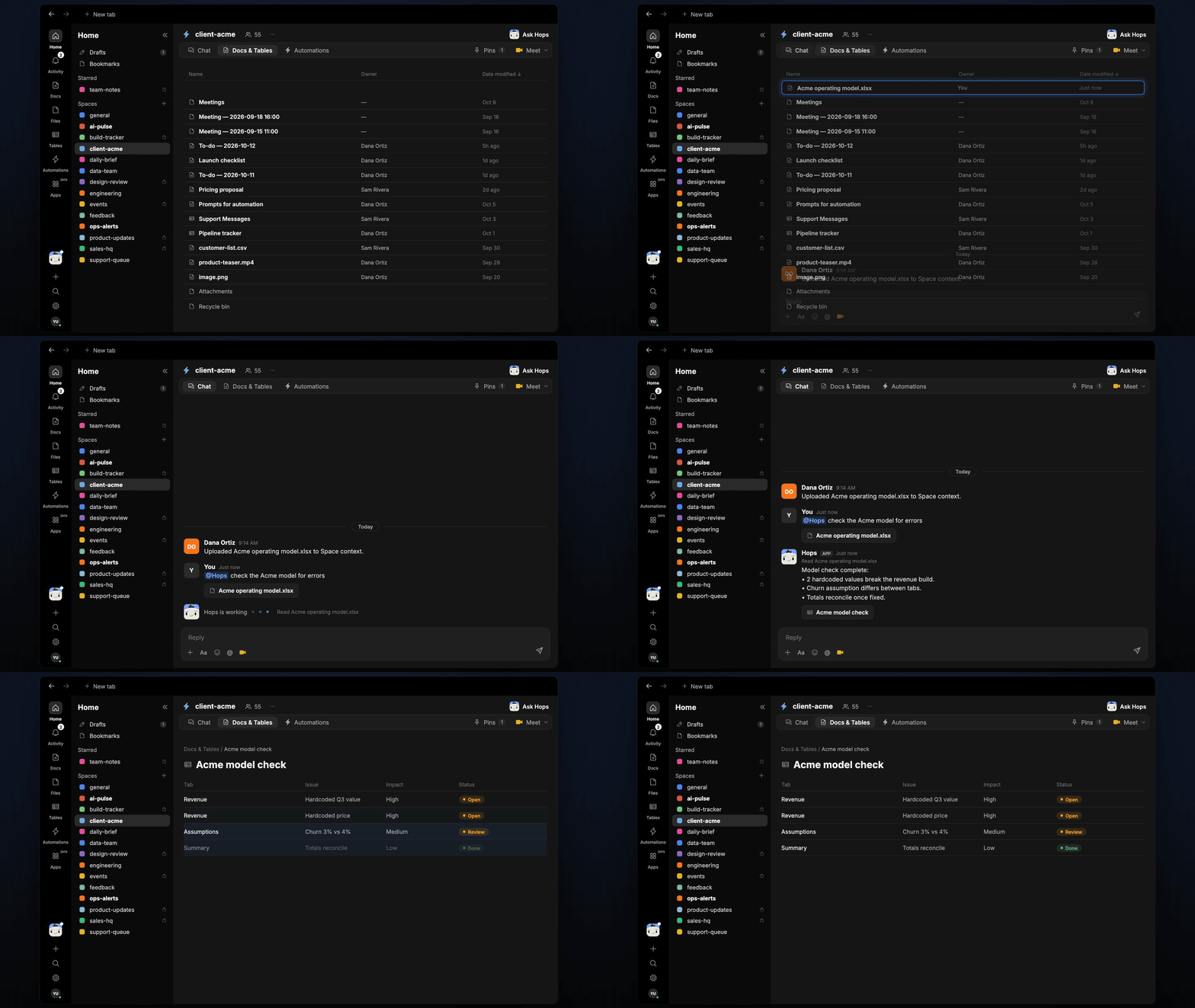 ## Ask Hops
Copy a prompt into any chat with Hops, or mention `@Hops` in a Space.
```text theme={null}
Check the Acme operating model for errors.
```
```text theme={null}
Do the churn and growth assumptions match across all tabs of the Globex model?
```
```text theme={null}
What changed between v3 and v4 of the Northwind model?
```
```text theme={null}
Do the totals on the summary tab reconcile with the detail tabs?
```
```text theme={null}
List only the issues that change the revenue forecast.
```
Example reply:
> Checked Acme operating model.xlsx:
>
> * High: 2 hardcoded values break the revenue build.
> * Medium: churn assumption differs between the Revenue and Summary tabs.
> * Low: 1 broken link to an old file.
## What you get
* **A ranked issue list in chat**, in the same thread, with the tab and cell for each issue.
* **A saved Doc or Table, when you ask for one.** Say "save this as a doc" or "put this in a table" and Hops writes it to **Docs** or **Tables** in the Space.
## Connections needed
Connect these apps. Each card opens Connections in the app.
Model files (or Google Sheets).
Sharing findings with the team.
## Set it up
Connect Google Drive or Sheets, and Slack, in **Connections**.
See [Connections](/docs/connections/overview).
Create a **client-acme** Space and pin the model in Space context, so Hops checks the right file.
See [Spaces](/docs/spaces/overview) and [Space context](/docs/spaces/space-context).
Give Hops these instructions:
```text theme={null}
You check financial models. Look for hardcoded values in formula ranges, inconsistent assumptions between tabs, broken links and totals that do not reconcile. Rank issues by impact.
```
See [Build a skill](/docs/agents/build-a-skill).
Ask Hops in chat on every new model version.
## Related topics
- [Agencies & consulting](/teams/professional-services.md)
- [Board prep](/teams/finance/use-cases/board-prep.md)
- [Finance](/teams/finance.md)
- [Commission checks](/teams/revops/use-cases/commissions.md)
- [FAQ](/help/faq.md)
This documentation is built and hosted on [Mintlify](https://mintlify.com), a developer documentation platform.
## Ask Hops
Copy a prompt into any chat with Hops, or mention `@Hops` in a Space.
```text theme={null}
Check the Acme operating model for errors.
```
```text theme={null}
Do the churn and growth assumptions match across all tabs of the Globex model?
```
```text theme={null}
What changed between v3 and v4 of the Northwind model?
```
```text theme={null}
Do the totals on the summary tab reconcile with the detail tabs?
```
```text theme={null}
List only the issues that change the revenue forecast.
```
Example reply:
> Checked Acme operating model.xlsx:
>
> * High: 2 hardcoded values break the revenue build.
> * Medium: churn assumption differs between the Revenue and Summary tabs.
> * Low: 1 broken link to an old file.
## What you get
* **A ranked issue list in chat**, in the same thread, with the tab and cell for each issue.
* **A saved Doc or Table, when you ask for one.** Say "save this as a doc" or "put this in a table" and Hops writes it to **Docs** or **Tables** in the Space.
## Connections needed
Connect these apps. Each card opens Connections in the app.
Model files (or Google Sheets).
Sharing findings with the team.
## Set it up
Connect Google Drive or Sheets, and Slack, in **Connections**.
See [Connections](/docs/connections/overview).
Create a **client-acme** Space and pin the model in Space context, so Hops checks the right file.
See [Spaces](/docs/spaces/overview) and [Space context](/docs/spaces/space-context).
Give Hops these instructions:
```text theme={null}
You check financial models. Look for hardcoded values in formula ranges, inconsistent assumptions between tabs, broken links and totals that do not reconcile. Rank issues by impact.
```
See [Build a skill](/docs/agents/build-a-skill).
Ask Hops in chat on every new model version.
## Related topics
- [Agencies & consulting](/teams/professional-services.md)
- [Board prep](/teams/finance/use-cases/board-prep.md)
- [Finance](/teams/finance.md)
- [Commission checks](/teams/revops/use-cases/commissions.md)
- [FAQ](/help/faq.md)
This documentation is built and hosted on [Mintlify](https://mintlify.com), a developer documentation platform.