> ## Documentation Index
> Fetch the complete documentation index at: https://hopsdocs.mintlify.site/llms.txt
> Use this file to discover all available pages before exploring further.
# Client feedback to tasks
> Turn a client call into tasks with owners and a recap email.
Client calls produce feedback that gets lost between the call and the task board. Hops reads the transcript, turns each point into a task with an owner and due date, and drafts the recap email.
**How it runs:** Ask Hops, with a skill so the output has the same format every time. No automation needed.
## What it does
* **Reads the transcript.** Hops pulls the call transcript from Google Drive and separates feedback from small talk.
* **Makes one task per point.** Each piece of feedback becomes a task with an owner and a due date.
* **Creates them in your task tool.** Tasks can be added to Asana or Jira when you ask.
* **Splits the type of work.** Deck changes and new analyses are labeled so the team can plan them.
* **Drafts the recap email.** A short email back to the client confirms what was heard and what happens next. Hops drafts it; you send it.
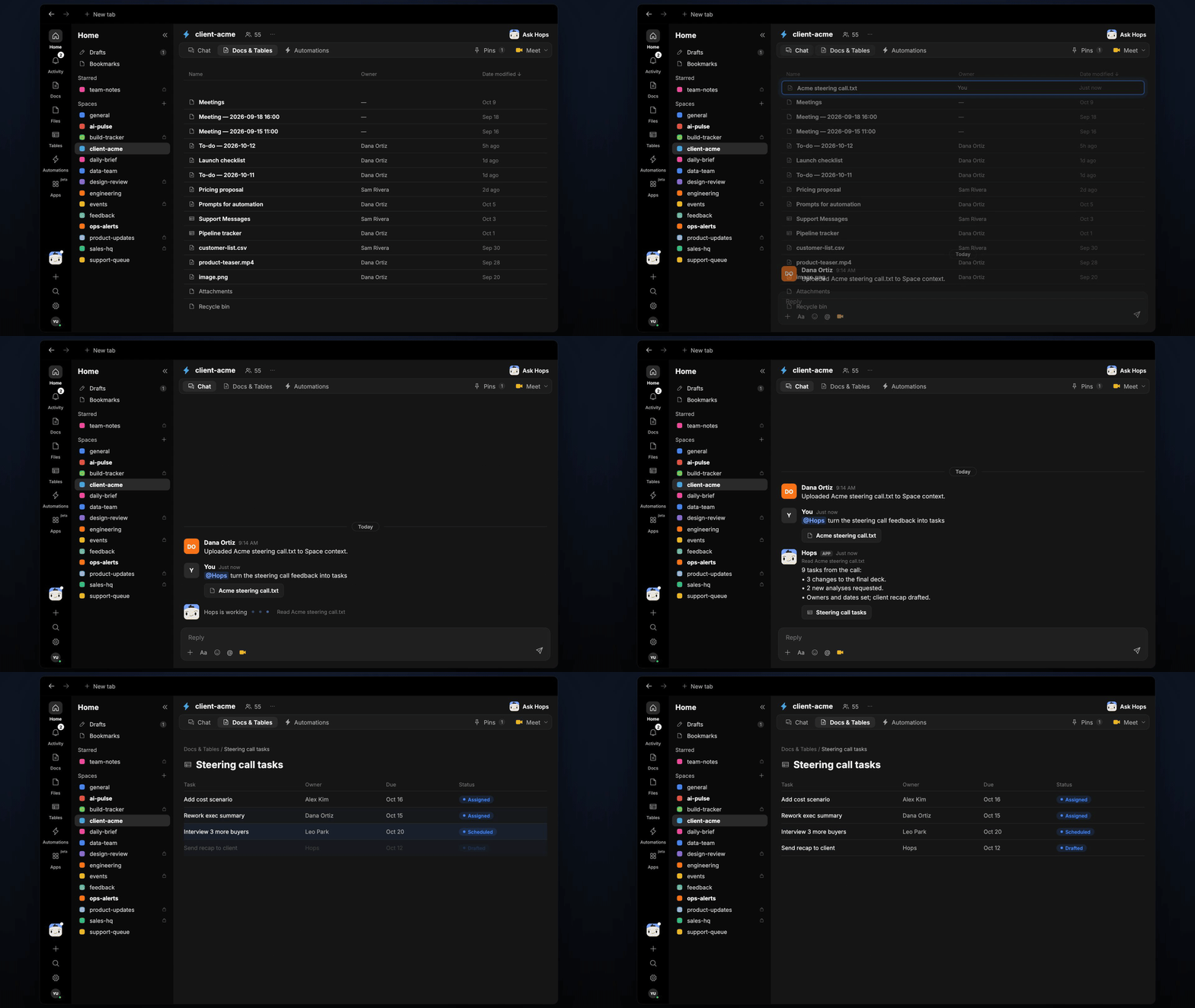 ## Ask Hops
Copy a prompt into any chat with Hops, or mention `@Hops` in a Space.
```text theme={null}
Turn the Acme steering call transcript into tasks with owners and due dates.
```
```text theme={null}
What did Globex ask us to change in today's call?
```
```text theme={null}
Create Jira tasks for the feedback from the Northwind workshop.
```
```text theme={null}
Draft a recap email to the Acme sponsor with what we heard and what happens next.
```
```text theme={null}
Which feedback from the call needs new analysis rather than a deck change?
```
Example reply:
> 9 tasks from Acme steering call.txt:
>
> * 3 deck changes, 2 new analyses.
> * Owners and due dates set for each.
> * Recap email to the client drafted.
## What you get
* **A task list in chat**, in the same thread, with an owner and due date for each item.
* **Tasks in your tool, when you ask.** Say "create these in Asana" and Hops adds them.
* **A recap email draft** for you to review and send.
* **A saved Doc or Table, when you ask for one.** Hops writes it to **Docs** or **Tables** in the Space.
## Connections needed
Connect these apps. Each card opens Connections in the app.
Call transcripts.
Where tasks are created (or Jira).
Sharing the task list with the team.
## Set it up
Connect Google Drive, Asana or Jira, and Slack in **Connections**.
See [Connections](/docs/connections/overview).
Create a **client-acme** Space and list the team and owners in Space context.
See [Spaces](/docs/spaces/overview) and [Space context](/docs/spaces/space-context).
Give Hops these instructions:
```text theme={null}
You turn client feedback into tasks. List each piece of feedback as a task with an owner and due date, and draft a short recap email back to the client.
```
See [Build a skill](/docs/agents/build-a-skill).
Ask Hops in chat after every client call.
## Related topics
- [Agencies & consulting](/teams/professional-services.md)
- [Client status and dashboard](/teams/professional-services/use-cases/client-status-report.md)
- [Feedback mining](/teams/product-engineering/use-cases/feedback-mining.md)
- [Account risk watch](/teams/professional-services/use-cases/account-risk-watch.md)
- [Client onboarding and kickoff](/teams/professional-services/use-cases/engagement-kickoff.md)
This documentation is built and hosted on [Mintlify](https://mintlify.com), a developer documentation platform.
## Ask Hops
Copy a prompt into any chat with Hops, or mention `@Hops` in a Space.
```text theme={null}
Turn the Acme steering call transcript into tasks with owners and due dates.
```
```text theme={null}
What did Globex ask us to change in today's call?
```
```text theme={null}
Create Jira tasks for the feedback from the Northwind workshop.
```
```text theme={null}
Draft a recap email to the Acme sponsor with what we heard and what happens next.
```
```text theme={null}
Which feedback from the call needs new analysis rather than a deck change?
```
Example reply:
> 9 tasks from Acme steering call.txt:
>
> * 3 deck changes, 2 new analyses.
> * Owners and due dates set for each.
> * Recap email to the client drafted.
## What you get
* **A task list in chat**, in the same thread, with an owner and due date for each item.
* **Tasks in your tool, when you ask.** Say "create these in Asana" and Hops adds them.
* **A recap email draft** for you to review and send.
* **A saved Doc or Table, when you ask for one.** Hops writes it to **Docs** or **Tables** in the Space.
## Connections needed
Connect these apps. Each card opens Connections in the app.
Call transcripts.
Where tasks are created (or Jira).
Sharing the task list with the team.
## Set it up
Connect Google Drive, Asana or Jira, and Slack in **Connections**.
See [Connections](/docs/connections/overview).
Create a **client-acme** Space and list the team and owners in Space context.
See [Spaces](/docs/spaces/overview) and [Space context](/docs/spaces/space-context).
Give Hops these instructions:
```text theme={null}
You turn client feedback into tasks. List each piece of feedback as a task with an owner and due date, and draft a short recap email back to the client.
```
See [Build a skill](/docs/agents/build-a-skill).
Ask Hops in chat after every client call.
## Related topics
- [Agencies & consulting](/teams/professional-services.md)
- [Client status and dashboard](/teams/professional-services/use-cases/client-status-report.md)
- [Feedback mining](/teams/product-engineering/use-cases/feedback-mining.md)
- [Account risk watch](/teams/professional-services/use-cases/account-risk-watch.md)
- [Client onboarding and kickoff](/teams/professional-services/use-cases/engagement-kickoff.md)
This documentation is built and hosted on [Mintlify](https://mintlify.com), a developer documentation platform.