> ## Documentation Index
> Fetch the complete documentation index at: https://hopsdocs.mintlify.site/llms.txt
> Use this file to discover all available pages before exploring further.
# Client onboarding and kickoff
> Turn a signed SOW into the onboarding plan and kickoff pack.
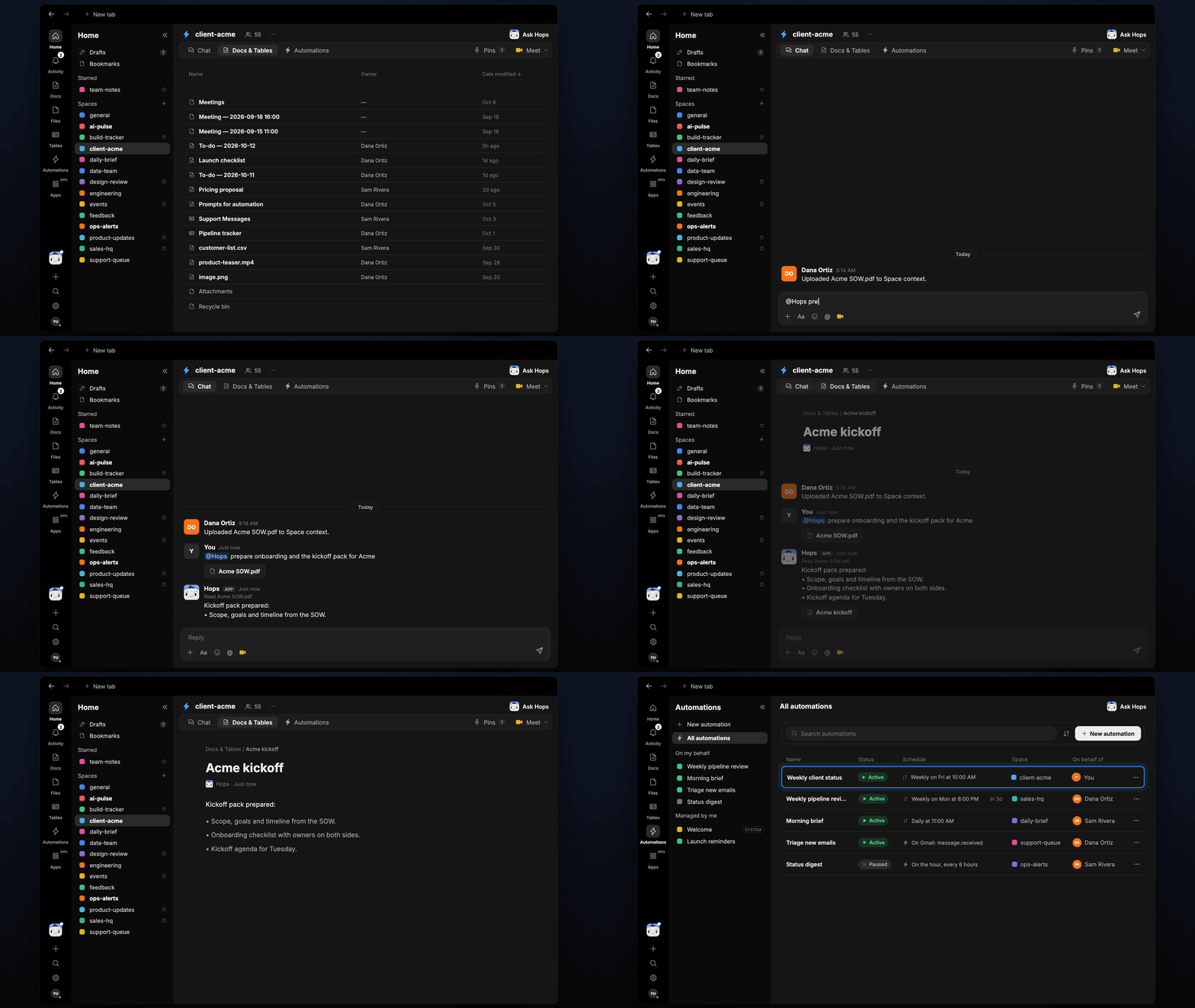
Every new client needs the same onboarding steps and a kickoff deck, and vague scope surfaces too late. Drop the SOW in the client Space and Hops builds both, then keeps the weekly status running.
**How it runs:** One Space per client, with its own context, skill and automations.
## What it does
* **Reads the SOW.** Hops lists scope, deliverables, dates and assumptions from the signed SOW in Google Drive.
* **Builds the onboarding checklist.** Steps have owners on both sides and dates tied to the SOW timeline.
* **Drafts the kickoff agenda.** It uses the goals, contacts and calendar availability from Google Calendar.
* **Flags anything vague.** Unclear scope, missing dates or undefined deliverables are listed so you can resolve them before kickoff.
* **Hands over to weekly status.** Once the engagement starts, the Space keeps a weekly update running.
 ## Ask Hops
Copy a prompt into any chat with Hops, or mention `@Hops` in a Space.
```text theme={null}
Prepare onboarding and the kickoff pack for Acme.
```
```text theme={null}
What in the Globex SOW is vague or open to interpretation?
```
```text theme={null}
List the deliverables and dates from the Northwind SOW.
```
```text theme={null}
Draft the kickoff agenda for Tuesday and find a time that works for the Acme team.
```
```text theme={null}
Which onboarding items are still open for Acme?
```
Example reply:
> Kickoff pack prepared from Acme SOW\.pdf:
>
> * Scope, goals and timeline from the SOW.
> * Onboarding checklist with owners on both sides.
> * Kickoff agenda for Tuesday.
> * 2 vague items flagged in scope.
## What you get
* **A dedicated Space per client.** The SOW, contacts and history are pinned in Space context, so everything Hops writes uses them.
* **A saved Doc.** The kickoff pack and agenda are saved to **Docs** in the Space.
* **An onboarding Table.** The checklist lives in **Tables**, with owner, due date and status for each step.
* **A weekly post.** Every Friday at 10:00 AM Hops posts the client status to the Space chat once the engagement starts.
## Connections needed
Connect these apps. Each card opens Connections in the app.
The signed SOW and kickoff files.
Client threads and contacts.
Kickoff timing and attendees.
Where the weekly status goes.
## Set it up
Connect Google Drive, Gmail, Google Calendar and Slack in **Connections**.
See [Connections](/docs/connections/overview).
Create a **client-acme** Space for each client. Pin the SOW and contacts in Space context.
See [Spaces](/docs/spaces/overview) and [Space context](/docs/spaces/space-context).
Give Hops these instructions:
```text theme={null}
You run client onboarding. From the SOW, list scope, deliverables, dates and assumptions. Build an onboarding checklist with owners and a kickoff agenda. Flag anything vague in the scope.
```
See [Build a skill](/docs/agents/build-a-skill).
Run it every Friday at 10:00 AM once the engagement starts. Hops posts the weekly client status and updates the onboarding Table.
See [Automation](/docs/spaces/automation).
## Related topics
- [Explore use cases](/use-cases/overview.md)
- [Agencies & consulting](/teams/professional-services.md)
- [Partner onboarding](/teams/operations/use-cases/partner-onboarding.md)
- [Skills](/agents/skills.md)
- [Spaces overview](/spaces/overview.md)
This documentation is built and hosted on [Mintlify](https://mintlify.com), a developer documentation platform.
## Ask Hops
Copy a prompt into any chat with Hops, or mention `@Hops` in a Space.
```text theme={null}
Prepare onboarding and the kickoff pack for Acme.
```
```text theme={null}
What in the Globex SOW is vague or open to interpretation?
```
```text theme={null}
List the deliverables and dates from the Northwind SOW.
```
```text theme={null}
Draft the kickoff agenda for Tuesday and find a time that works for the Acme team.
```
```text theme={null}
Which onboarding items are still open for Acme?
```
Example reply:
> Kickoff pack prepared from Acme SOW\.pdf:
>
> * Scope, goals and timeline from the SOW.
> * Onboarding checklist with owners on both sides.
> * Kickoff agenda for Tuesday.
> * 2 vague items flagged in scope.
## What you get
* **A dedicated Space per client.** The SOW, contacts and history are pinned in Space context, so everything Hops writes uses them.
* **A saved Doc.** The kickoff pack and agenda are saved to **Docs** in the Space.
* **An onboarding Table.** The checklist lives in **Tables**, with owner, due date and status for each step.
* **A weekly post.** Every Friday at 10:00 AM Hops posts the client status to the Space chat once the engagement starts.
## Connections needed
Connect these apps. Each card opens Connections in the app.
The signed SOW and kickoff files.
Client threads and contacts.
Kickoff timing and attendees.
Where the weekly status goes.
## Set it up
Connect Google Drive, Gmail, Google Calendar and Slack in **Connections**.
See [Connections](/docs/connections/overview).
Create a **client-acme** Space for each client. Pin the SOW and contacts in Space context.
See [Spaces](/docs/spaces/overview) and [Space context](/docs/spaces/space-context).
Give Hops these instructions:
```text theme={null}
You run client onboarding. From the SOW, list scope, deliverables, dates and assumptions. Build an onboarding checklist with owners and a kickoff agenda. Flag anything vague in the scope.
```
See [Build a skill](/docs/agents/build-a-skill).
Run it every Friday at 10:00 AM once the engagement starts. Hops posts the weekly client status and updates the onboarding Table.
See [Automation](/docs/spaces/automation).
## Related topics
- [Explore use cases](/use-cases/overview.md)
- [Agencies & consulting](/teams/professional-services.md)
- [Partner onboarding](/teams/operations/use-cases/partner-onboarding.md)
- [Skills](/agents/skills.md)
- [Spaces overview](/spaces/overview.md)
This documentation is built and hosted on [Mintlify](https://mintlify.com), a developer documentation platform.