> ## Documentation Index
> Fetch the complete documentation index at: https://hopsdocs.mintlify.site/llms.txt
> Use this file to discover all available pages before exploring further.
# Diligence tracker
> Track diligence requests against the files that arrive.
Diligence lives in a long request list and a data room that changes every day. Hops matches uploaded files to each request, marks what is fulfilled or overdue and drafts the follow-ups, in a dedicated Space for each deal.
**How it runs:** One Space per deal, with its own context, skill and automations.
## What it does
* **Matches files to requests.** Hops reads new uploads in Google Drive or Dropbox and links each file to the request it answers.
* **Marks every request.** Each one is fulfilled, partial or overdue, with the file or email that supports the status.
* **Groups follow-ups by area.** Missing items are grouped by area such as finance, legal, HR and IT, so each follow-up goes to the right person.
* **Watches email too.** Hops checks Gmail for answers that arrived as attachments or replies instead of data room uploads.
* **Shows what changed.** Each run lists what is new since the last update.
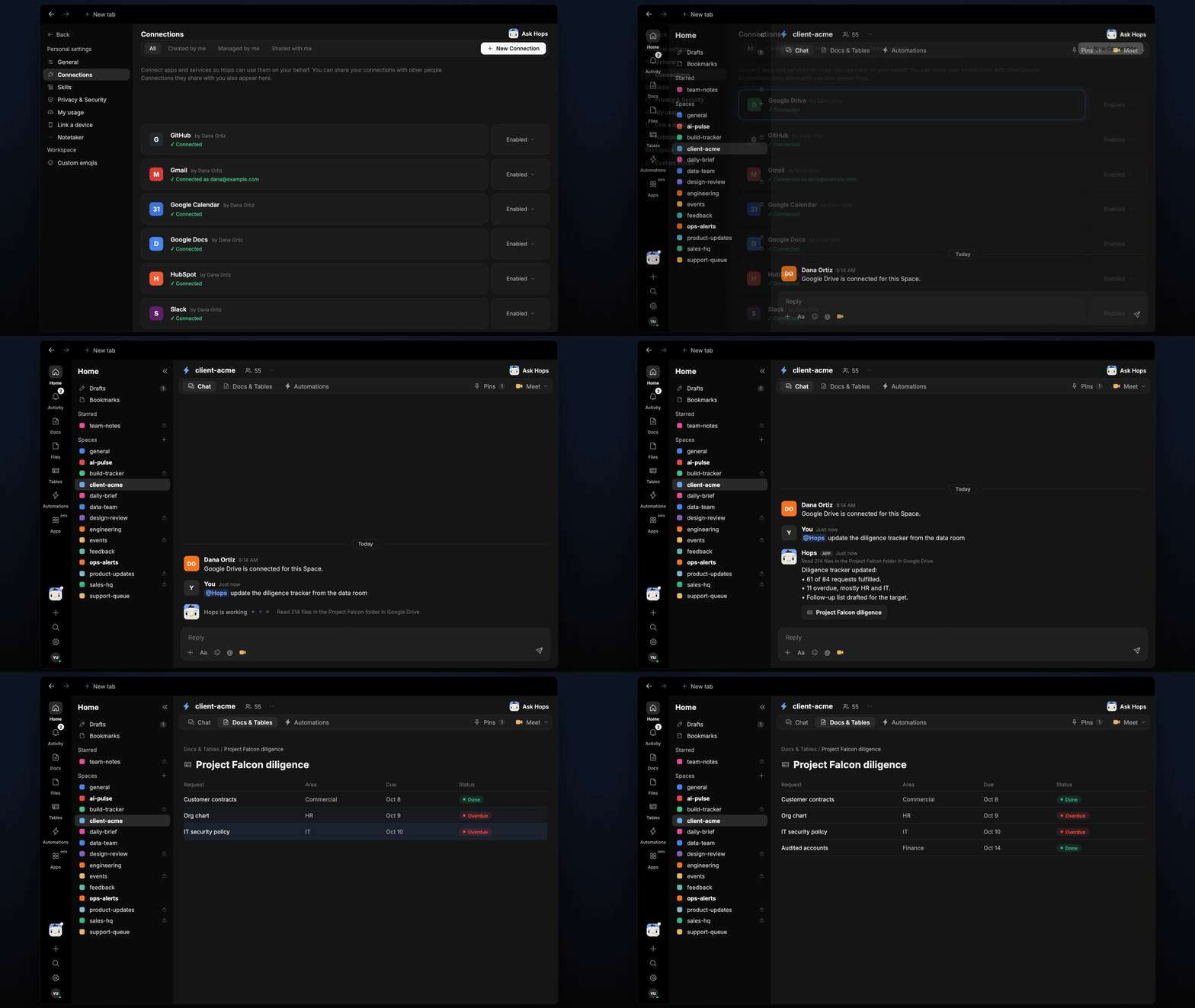 ## Ask Hops
Copy a prompt into any chat with Hops, or mention `@Hops` in a Space.
```text theme={null}
Update the diligence tracker from the Project Falcon folder.
```
```text theme={null}
Which requests are overdue, grouped by area?
```
```text theme={null}
What did the target upload since yesterday?
```
```text theme={null}
Draft a follow-up email to Northwind's CFO for the missing finance items.
```
```text theme={null}
Which requests are only partly fulfilled, and what is missing from each?
```
Example reply:
> Tracker updated from 214 files in the Project Falcon folder:
>
> * 61 of 84 requests fulfilled.
> * 11 overdue, mostly HR and IT.
> * Follow-up list drafted by area.
## What you get
* **A dedicated Space per deal.** Each Space holds the request list, data room links and deal team, so every run uses the right context.
* **An evening update.** Every weekday at 6pm Hops posts what changed and what is overdue to the deal Space chat.
* **An updated Table.** The diligence tracker lives in **Tables**, with one row per request: status, matched file and owner.
* **A saved Doc.** The follow-up list by area is saved to **Docs** for each run.
## Connections needed
Connect these apps. Each card opens Connections in the app.
The data room folder (or Dropbox).
Answers sent by email and follow-up drafts.
Where the evening update goes.
## Set it up
Connect Google Drive or Dropbox, Gmail and Slack in **Connections**.
See [Connections](/docs/connections/overview).
Create a Space for each deal, for example **project-falcon**. Pin the request list in Space context.
See [Spaces](/docs/spaces/overview) and [Space context](/docs/spaces/space-context).
Give Hops these instructions:
```text theme={null}
You track diligence. Match uploaded files to requests, mark each fulfilled, partial or overdue, and draft a follow-up list grouped by area.
```
See [Build a skill](/docs/agents/build-a-skill).
Run it every weekday at 6pm in each deal Space. Hops posts what changed, updates the tracker Table and saves the follow-up list.
See [Automation](/docs/spaces/automation).
## Related topics
- [Agencies & consulting](/teams/professional-services.md)
- [Vendors and purchase orders](/teams/operations/use-cases/vendor-onboarding.md)
- [Investment memo](/teams/vc-pe/use-cases/investment-memo.md)
- [Monthly close](/teams/finance/use-cases/monthly-close.md)
- [VC & PE](/teams/vc-pe.md)
This documentation is built and hosted on [Mintlify](https://mintlify.com), a developer documentation platform.
## Ask Hops
Copy a prompt into any chat with Hops, or mention `@Hops` in a Space.
```text theme={null}
Update the diligence tracker from the Project Falcon folder.
```
```text theme={null}
Which requests are overdue, grouped by area?
```
```text theme={null}
What did the target upload since yesterday?
```
```text theme={null}
Draft a follow-up email to Northwind's CFO for the missing finance items.
```
```text theme={null}
Which requests are only partly fulfilled, and what is missing from each?
```
Example reply:
> Tracker updated from 214 files in the Project Falcon folder:
>
> * 61 of 84 requests fulfilled.
> * 11 overdue, mostly HR and IT.
> * Follow-up list drafted by area.
## What you get
* **A dedicated Space per deal.** Each Space holds the request list, data room links and deal team, so every run uses the right context.
* **An evening update.** Every weekday at 6pm Hops posts what changed and what is overdue to the deal Space chat.
* **An updated Table.** The diligence tracker lives in **Tables**, with one row per request: status, matched file and owner.
* **A saved Doc.** The follow-up list by area is saved to **Docs** for each run.
## Connections needed
Connect these apps. Each card opens Connections in the app.
The data room folder (or Dropbox).
Answers sent by email and follow-up drafts.
Where the evening update goes.
## Set it up
Connect Google Drive or Dropbox, Gmail and Slack in **Connections**.
See [Connections](/docs/connections/overview).
Create a Space for each deal, for example **project-falcon**. Pin the request list in Space context.
See [Spaces](/docs/spaces/overview) and [Space context](/docs/spaces/space-context).
Give Hops these instructions:
```text theme={null}
You track diligence. Match uploaded files to requests, mark each fulfilled, partial or overdue, and draft a follow-up list grouped by area.
```
See [Build a skill](/docs/agents/build-a-skill).
Run it every weekday at 6pm in each deal Space. Hops posts what changed, updates the tracker Table and saves the follow-up list.
See [Automation](/docs/spaces/automation).
## Related topics
- [Agencies & consulting](/teams/professional-services.md)
- [Vendors and purchase orders](/teams/operations/use-cases/vendor-onboarding.md)
- [Investment memo](/teams/vc-pe/use-cases/investment-memo.md)
- [Monthly close](/teams/finance/use-cases/monthly-close.md)
- [VC & PE](/teams/vc-pe.md)
This documentation is built and hosted on [Mintlify](https://mintlify.com), a developer documentation platform.