> ## Documentation Index
> Fetch the complete documentation index at: https://hopsdocs.mintlify.site/llms.txt
> Use this file to discover all available pages before exploring further.
# Deck review with the partner
> Collect the partner's comments on a deck and turn them into a fix list.
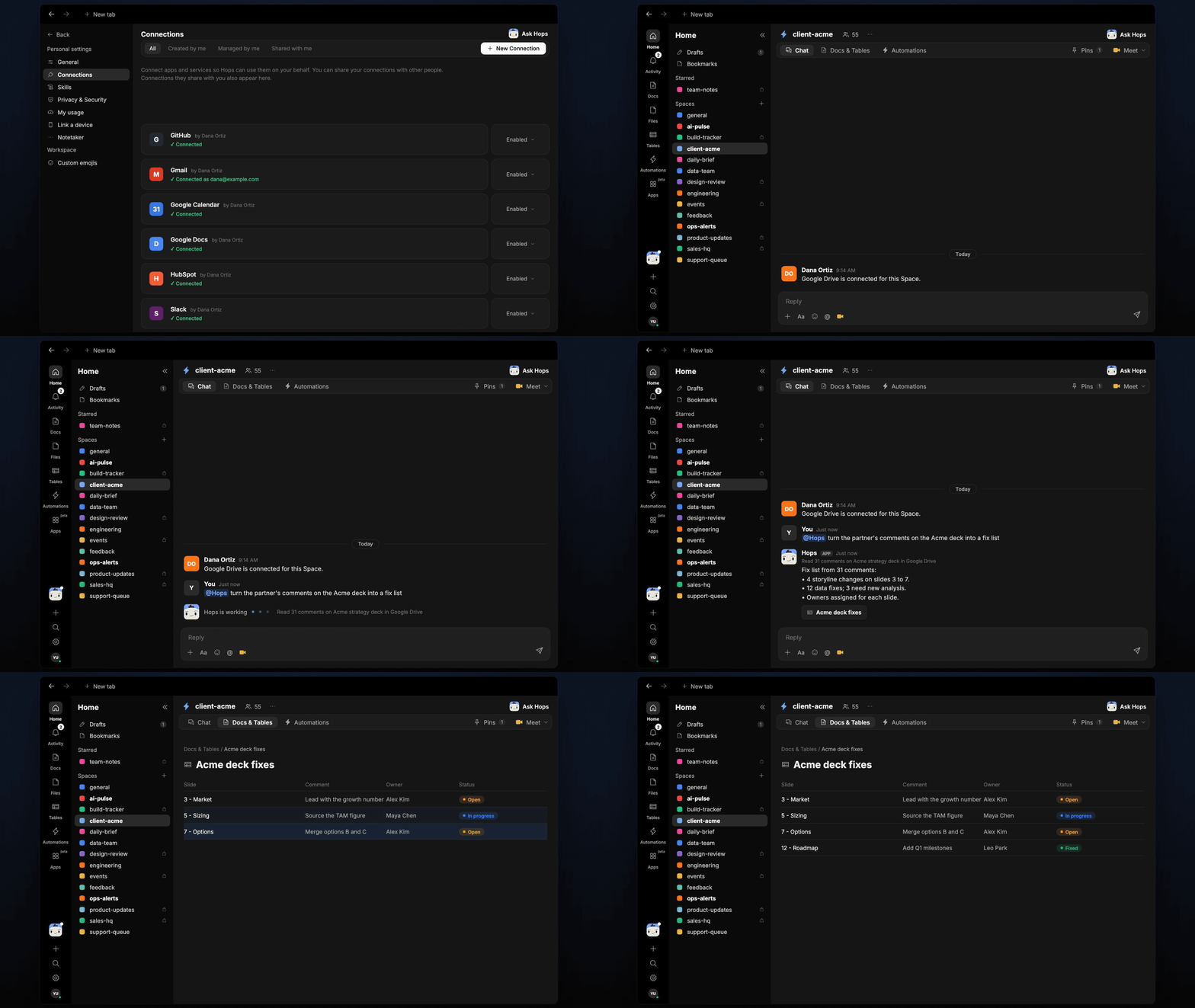
Partner reviews leave comments scattered across slides, and the fix list gets rebuilt by hand. Hops reads the deck in Google Drive, collects every comment and turns them into one fix list with owners.
**How it runs:** Ask Hops, with a skill so the output has the same format every time. No automation needed.
## What it does
* **Collects every comment.** Hops reads all comments on the deck in Google Drive or Slides, including replies and resolved threads.
* **Groups by slide.** Comments are organized slide by slide so each owner sees only their part.
* **Separates storyline from data fixes.** Changes to the narrative are listed apart from number and chart fixes.
* **Flags new analysis.** Any comment that needs analysis the team has not done is marked so it gets scheduled, not forgotten.
* **Assigns the slide owner.** Owners come from the deck's authors or the team listed in Space context.
 ## Ask Hops
Copy a prompt into any chat with Hops, or mention `@Hops` in a Space.
```text theme={null}
Turn the partner's comments on the Acme strategy deck into a fix list.
```
```text theme={null}
Which comments on the Globex deck need new analysis?
```
```text theme={null}
List the storyline changes only, slide by slide.
```
```text theme={null}
What is still open from the partner's review of the Northwind deck?
```
```text theme={null}
Draft a short note to the team summarizing what changes before the client meeting.
```
Example reply:
> Fix list from 31 comments on the Acme strategy deck:
>
> * 4 storyline changes on slides 3 to 7.
> * 12 data fixes; 3 need new analysis.
> * Owners assigned for each slide.
## What you get
* **A fix list in chat**, in the same thread, grouped by slide with an owner for each item.
* **A saved Doc or Table, when you ask for one.** Say "save this as a doc" or "put this in a table" and Hops writes it to **Docs** or **Tables** in the Space so owners can tick items off.
## Connections needed
Connect these apps. Each card opens Connections in the app.
The deck and its comments (or Google Slides).
Sharing the fix list with the team.
## Set it up
Connect Google Drive or Slides, and Slack, in **Connections**.
See [Connections](/docs/connections/overview).
Create a **client-acme** Space and pin the deck and storyline in Space context.
See [Spaces](/docs/spaces/overview) and [Space context](/docs/spaces/space-context).
Give Hops these instructions:
```text theme={null}
You turn deck comments into a fix list. Group comments by slide, separate storyline from data fixes, assign the slide owner and note which need new analysis.
```
See [Build a skill](/docs/agents/build-a-skill).
Ask Hops in chat after each review. Ask again before the client meeting to see what is still open.
## Related topics
- [Explore use cases](/use-cases/overview.md)
- [Agencies & consulting](/teams/professional-services.md)
- [Customer deck](/teams/sales/use-cases/customer-deck.md)
- [Partner onboarding](/teams/operations/use-cases/partner-onboarding.md)
- [VC & PE](/teams/vc-pe.md)
This documentation is built and hosted on [Mintlify](https://mintlify.com), a developer documentation platform.
## Ask Hops
Copy a prompt into any chat with Hops, or mention `@Hops` in a Space.
```text theme={null}
Turn the partner's comments on the Acme strategy deck into a fix list.
```
```text theme={null}
Which comments on the Globex deck need new analysis?
```
```text theme={null}
List the storyline changes only, slide by slide.
```
```text theme={null}
What is still open from the partner's review of the Northwind deck?
```
```text theme={null}
Draft a short note to the team summarizing what changes before the client meeting.
```
Example reply:
> Fix list from 31 comments on the Acme strategy deck:
>
> * 4 storyline changes on slides 3 to 7.
> * 12 data fixes; 3 need new analysis.
> * Owners assigned for each slide.
## What you get
* **A fix list in chat**, in the same thread, grouped by slide with an owner for each item.
* **A saved Doc or Table, when you ask for one.** Say "save this as a doc" or "put this in a table" and Hops writes it to **Docs** or **Tables** in the Space so owners can tick items off.
## Connections needed
Connect these apps. Each card opens Connections in the app.
The deck and its comments (or Google Slides).
Sharing the fix list with the team.
## Set it up
Connect Google Drive or Slides, and Slack, in **Connections**.
See [Connections](/docs/connections/overview).
Create a **client-acme** Space and pin the deck and storyline in Space context.
See [Spaces](/docs/spaces/overview) and [Space context](/docs/spaces/space-context).
Give Hops these instructions:
```text theme={null}
You turn deck comments into a fix list. Group comments by slide, separate storyline from data fixes, assign the slide owner and note which need new analysis.
```
See [Build a skill](/docs/agents/build-a-skill).
Ask Hops in chat after each review. Ask again before the client meeting to see what is still open.
## Related topics
- [Explore use cases](/use-cases/overview.md)
- [Agencies & consulting](/teams/professional-services.md)
- [Customer deck](/teams/sales/use-cases/customer-deck.md)
- [Partner onboarding](/teams/operations/use-cases/partner-onboarding.md)
- [VC & PE](/teams/vc-pe.md)
This documentation is built and hosted on [Mintlify](https://mintlify.com), a developer documentation platform.