> ## Documentation Index
> Fetch the complete documentation index at: https://hopsdocs.mintlify.site/llms.txt
> Use this file to discover all available pages before exploring further.
# Client status and dashboard
> Send the weekly client status and keep the engagement dashboard current.
Clients want a weekly status and a dashboard they trust, and writing both by hand eats Friday. Hops builds them from the team's work in a dedicated Space for each client.
**How it runs:** One Space per client, with its own context, skill and automations.
## What it does
* **Updates each workstream.** Hops reads tasks in Asana or Jira and sets every workstream to on track, at risk or behind, with the reason.
* **Writes the status in under 10 lines.** Progress, risks and next week, in plain language a client can read.
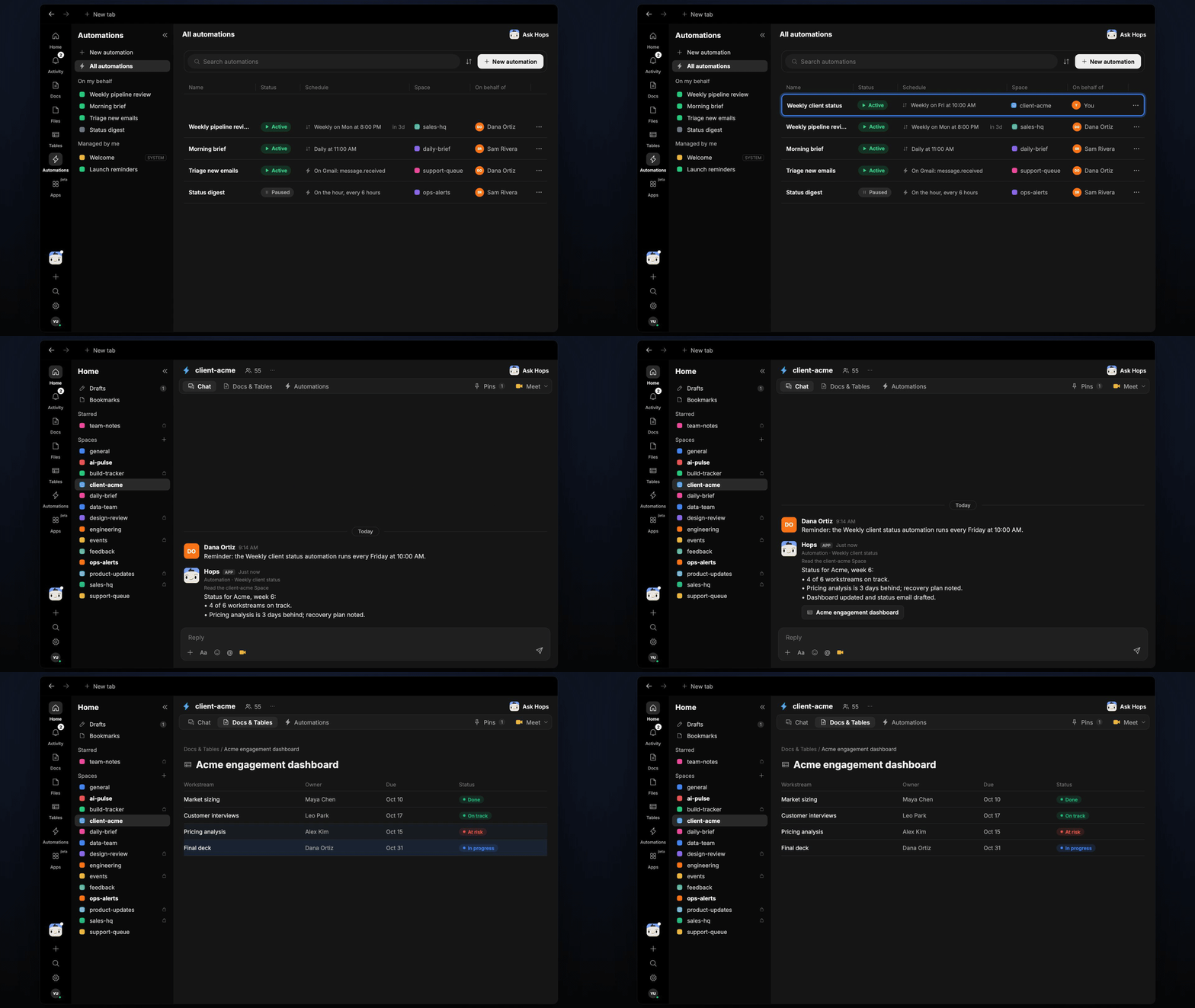
* **Keeps the dashboard current.** Workstream status, dates and owners are refreshed in a table in the client Space.
* **Drafts the client email.** The status is turned into an email in Gmail for you to review and send. Hops never sends it for you.
* **Notes recovery plans.** When a workstream is behind, the status includes what the team is doing about it.
 ## Ask Hops
Copy a prompt into any chat with Hops, or mention `@Hops` in a Space.
```text theme={null}
Write this week's client status for Acme.
```
```text theme={null}
Which Acme workstreams are behind, and what is the recovery plan?
```
```text theme={null}
Update the Acme engagement dashboard from the latest tasks.
```
```text theme={null}
Draft the Friday status email to the Acme sponsor in a friendly, direct tone.
```
```text theme={null}
What changed since last week's status for Globex?
```
Example reply:
> Status for Acme, week 6:
>
> * 4 of 6 workstreams on track.
> * Pricing analysis is 3 days behind; recovery plan noted.
> * Dashboard updated and status email drafted.
## What you get
* **A dedicated Space per client.** Each Space holds the workstream plan, contacts and history, so the status is always written with the right context.
* **A Friday post.** Every Friday at 10:00 AM Hops posts the weekly status to the client Space chat.
* **A saved Doc.** Each week adds a dated status to **Docs**.
* **An updated Table.** The engagement dashboard lives in **Tables**, with one row per workstream.
* **An email draft.** The client status email, ready to review.
## Connections needed
Connect these apps. Each card opens Connections in the app.
Client threads and the status email draft.
Workstream tasks and dates (or Jira).
Team updates and the Friday post.
## Set it up
Connect Gmail, Asana or Jira, and Slack in **Connections**.
See [Connections](/docs/connections/overview).
Create a **client-acme** Space for each client. Pin the workstream plan and contacts in Space context.
See [Spaces](/docs/spaces/overview) and [Space context](/docs/spaces/space-context).
Give Hops these instructions:
```text theme={null}
You write the client status. Update each workstream's status, summarize progress, risks and next week in under 10 lines, and draft the client email.
```
See [Build a skill](/docs/agents/build-a-skill).
Run it every Friday at 10:00 AM in each client Space. Hops posts the status, saves a dated Doc, updates the dashboard Table and drafts the email.
See [Automation](/docs/spaces/automation).
## Related topics
- [Agencies & consulting](/teams/professional-services.md)
- [Explore use cases](/use-cases/overview.md)
- [Engineering dashboard](/teams/product-engineering/use-cases/engineering-dashboard.md)
- [Live revenue dashboard](/teams/founders-executives/use-cases/live-dashboards.md)
- [Client onboarding and kickoff](/teams/professional-services/use-cases/engagement-kickoff.md)
This documentation is built and hosted on [Mintlify](https://mintlify.com), a developer documentation platform.
## Ask Hops
Copy a prompt into any chat with Hops, or mention `@Hops` in a Space.
```text theme={null}
Write this week's client status for Acme.
```
```text theme={null}
Which Acme workstreams are behind, and what is the recovery plan?
```
```text theme={null}
Update the Acme engagement dashboard from the latest tasks.
```
```text theme={null}
Draft the Friday status email to the Acme sponsor in a friendly, direct tone.
```
```text theme={null}
What changed since last week's status for Globex?
```
Example reply:
> Status for Acme, week 6:
>
> * 4 of 6 workstreams on track.
> * Pricing analysis is 3 days behind; recovery plan noted.
> * Dashboard updated and status email drafted.
## What you get
* **A dedicated Space per client.** Each Space holds the workstream plan, contacts and history, so the status is always written with the right context.
* **A Friday post.** Every Friday at 10:00 AM Hops posts the weekly status to the client Space chat.
* **A saved Doc.** Each week adds a dated status to **Docs**.
* **An updated Table.** The engagement dashboard lives in **Tables**, with one row per workstream.
* **An email draft.** The client status email, ready to review.
## Connections needed
Connect these apps. Each card opens Connections in the app.
Client threads and the status email draft.
Workstream tasks and dates (or Jira).
Team updates and the Friday post.
## Set it up
Connect Gmail, Asana or Jira, and Slack in **Connections**.
See [Connections](/docs/connections/overview).
Create a **client-acme** Space for each client. Pin the workstream plan and contacts in Space context.
See [Spaces](/docs/spaces/overview) and [Space context](/docs/spaces/space-context).
Give Hops these instructions:
```text theme={null}
You write the client status. Update each workstream's status, summarize progress, risks and next week in under 10 lines, and draft the client email.
```
See [Build a skill](/docs/agents/build-a-skill).
Run it every Friday at 10:00 AM in each client Space. Hops posts the status, saves a dated Doc, updates the dashboard Table and drafts the email.
See [Automation](/docs/spaces/automation).
## Related topics
- [Agencies & consulting](/teams/professional-services.md)
- [Explore use cases](/use-cases/overview.md)
- [Engineering dashboard](/teams/product-engineering/use-cases/engineering-dashboard.md)
- [Live revenue dashboard](/teams/founders-executives/use-cases/live-dashboards.md)
- [Client onboarding and kickoff](/teams/professional-services/use-cases/engagement-kickoff.md)
This documentation is built and hosted on [Mintlify](https://mintlify.com), a developer documentation platform.