> ## Documentation Index
> Fetch the complete documentation index at: https://hopsdocs.mintlify.site/llms.txt
> Use this file to discover all available pages before exploring further.
# Client relationship pulse
> Know which client relationships need attention.
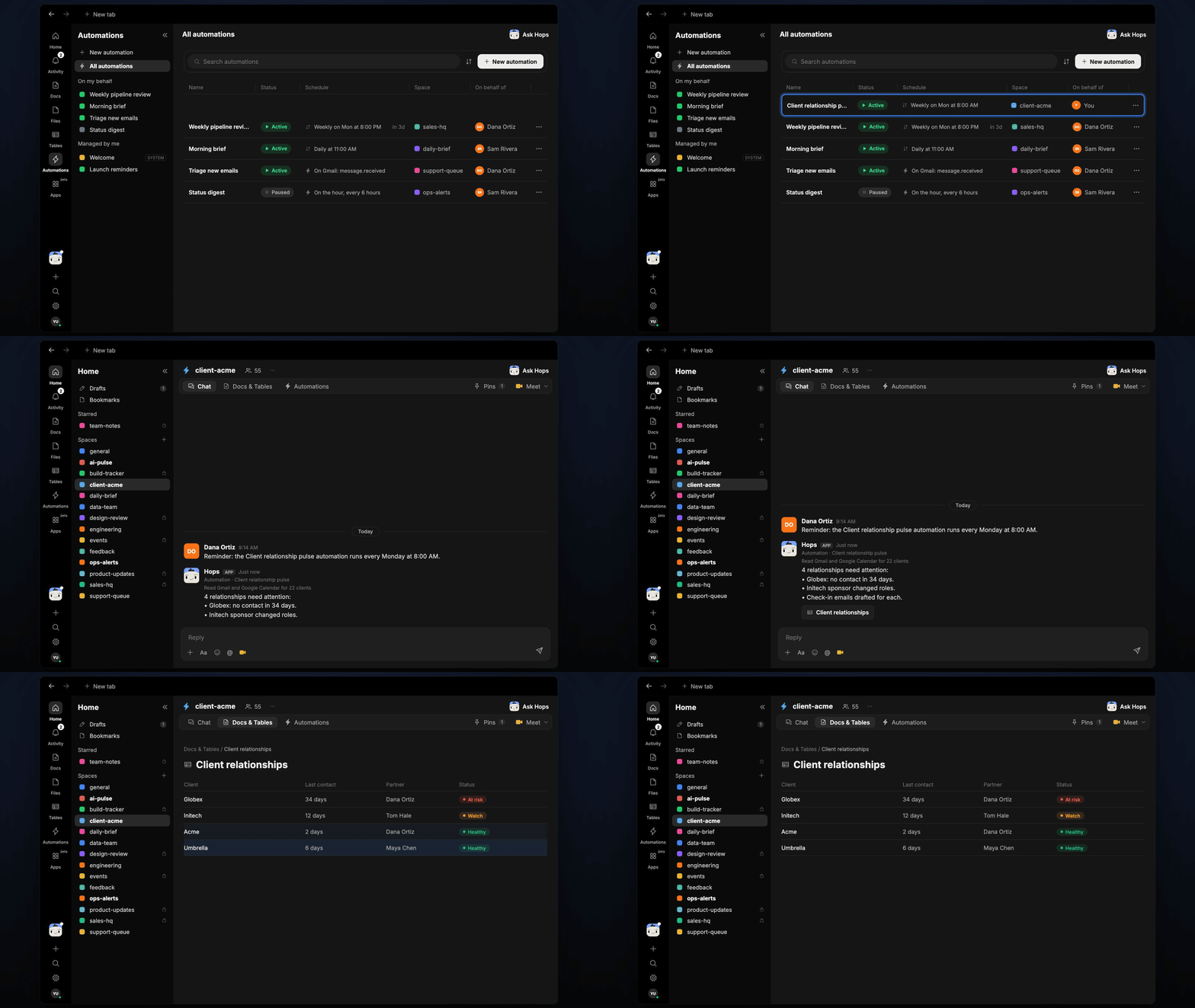
Relationships cool when nobody notices. Every Monday Hops checks when each client last heard from you, who your sponsor is and which relationships are going quiet, then drafts the check-in.
**How it runs:** Scheduled. An automation runs every Monday at 8:00 AM, posts the list of relationships needing attention and saves the pulse table. You can also ask Hops any time.
## What it does
* **Finds the last touch for every client.** Hops checks the most recent meeting in Google Calendar and the most recent email in Gmail for each client.
* **Flags silence.** Any client with no contact for more than 21 days is marked as going quiet.
* **Notices sponsor changes.** If your sponsor changed role or left, Hops flags it and suggests who to reach next.
* **Reads the CRM.** HubSpot owner, stage and open deals give context on how much each relationship matters.
* **Drafts the check-in.** Each flagged client gets a short email draft in your voice, ready to review and send.
 ## Ask Hops
Copy a prompt into any chat with Hops, or mention `@Hops` in a Space.
```text theme={null}
Which client relationships need attention?
```
```text theme={null}
When did we last meet or email Globex, and who is our sponsor there?
```
```text theme={null}
List every client we have not contacted in more than 30 days.
```
```text theme={null}
Draft a check-in email to the Initech sponsor, who just changed roles.
```
```text theme={null}
Show me the relationship pulse for all clients owned by Marcus Lee.
```
Example reply:
> 4 relationships need attention:
>
> * Globex: no contact in 34 days. Last email Sep 10.
> * Initech: sponsor Dana Ortiz changed roles, new contact unknown.
> * Northwind and Acme: no meeting on the calendar for 6 weeks.
> * Check-in emails drafted for each.
## What you get
* **A Monday post.** Every Monday at 8:00 AM Hops posts the clients that need attention to the partners Space chat.
* **An updated Table.** The relationship pulse lives in **Tables** in the Space, with one row per client: last meeting, last email, sponsor and status.
* **Email drafts.** One check-in draft per flagged client, ready to review.
* **Answers on demand.** Ask in chat any time and get the answer in the same thread.
## Connections needed
Connect these apps. Each card opens Connections in the app.
Last email per client and check-in drafts.
Last and upcoming meetings per client.
Client owners, stage and open deals.
Where the Monday post goes.
## Set it up
Connect Gmail, Google Calendar, HubSpot and Slack in **Connections**.
See [Connections](/docs/connections/overview).
Create a **partners** Space. List clients and partners in Space context.
See [Spaces](/docs/spaces/overview) and [Space context](/docs/spaces/space-context).
Give Hops these instructions:
```text theme={null}
You watch client relationships. For each client, find the last meeting and email, note sponsor changes and flag anyone silent for more than 21 days. Draft a check-in for each.
```
See [Build a skill](/docs/agents/build-a-skill).
Run it every Monday at 8:00 AM. Hops posts the clients needing attention and updates the pulse table.
See [Automation](/docs/spaces/automation).
## Related topics
- [Agencies & consulting](/teams/professional-services.md)
- [Spaces overview](/spaces/overview.md)
- [Client onboarding and kickoff](/teams/professional-services/use-cases/engagement-kickoff.md)
- [Client status and dashboard](/teams/professional-services/use-cases/client-status-report.md)
- [Client request inbox](/teams/professional-services/use-cases/client-requests.md)
This documentation is built and hosted on [Mintlify](https://mintlify.com), a developer documentation platform.
## Ask Hops
Copy a prompt into any chat with Hops, or mention `@Hops` in a Space.
```text theme={null}
Which client relationships need attention?
```
```text theme={null}
When did we last meet or email Globex, and who is our sponsor there?
```
```text theme={null}
List every client we have not contacted in more than 30 days.
```
```text theme={null}
Draft a check-in email to the Initech sponsor, who just changed roles.
```
```text theme={null}
Show me the relationship pulse for all clients owned by Marcus Lee.
```
Example reply:
> 4 relationships need attention:
>
> * Globex: no contact in 34 days. Last email Sep 10.
> * Initech: sponsor Dana Ortiz changed roles, new contact unknown.
> * Northwind and Acme: no meeting on the calendar for 6 weeks.
> * Check-in emails drafted for each.
## What you get
* **A Monday post.** Every Monday at 8:00 AM Hops posts the clients that need attention to the partners Space chat.
* **An updated Table.** The relationship pulse lives in **Tables** in the Space, with one row per client: last meeting, last email, sponsor and status.
* **Email drafts.** One check-in draft per flagged client, ready to review.
* **Answers on demand.** Ask in chat any time and get the answer in the same thread.
## Connections needed
Connect these apps. Each card opens Connections in the app.
Last email per client and check-in drafts.
Last and upcoming meetings per client.
Client owners, stage and open deals.
Where the Monday post goes.
## Set it up
Connect Gmail, Google Calendar, HubSpot and Slack in **Connections**.
See [Connections](/docs/connections/overview).
Create a **partners** Space. List clients and partners in Space context.
See [Spaces](/docs/spaces/overview) and [Space context](/docs/spaces/space-context).
Give Hops these instructions:
```text theme={null}
You watch client relationships. For each client, find the last meeting and email, note sponsor changes and flag anyone silent for more than 21 days. Draft a check-in for each.
```
See [Build a skill](/docs/agents/build-a-skill).
Run it every Monday at 8:00 AM. Hops posts the clients needing attention and updates the pulse table.
See [Automation](/docs/spaces/automation).
## Related topics
- [Agencies & consulting](/teams/professional-services.md)
- [Spaces overview](/spaces/overview.md)
- [Client onboarding and kickoff](/teams/professional-services/use-cases/engagement-kickoff.md)
- [Client status and dashboard](/teams/professional-services/use-cases/client-status-report.md)
- [Client request inbox](/teams/professional-services/use-cases/client-requests.md)
This documentation is built and hosted on [Mintlify](https://mintlify.com), a developer documentation platform.