> ## Documentation Index
> Fetch the complete documentation index at: https://hopsdocs.mintlify.site/llms.txt
> Use this file to discover all available pages before exploring further.
# Account risk watch
> Spot risk on client accounts from your team's Slack channels.
The first signs of a troubled engagement show up in team chat: scope creep, slipping dates, unhappy clients. Hops reads your client channels in Slack every week and flags risk before it reaches a partner by surprise.
**How it runs:** Scheduled. An automation runs every Thursday at 4pm, posts the risk watch to the partners Space and saves a dated Doc. You can also ask Hops any time.
## What it does
* **Reads the client channels.** Hops scans the Slack channels for each client account, plus related email threads in Gmail, for the past week.
* **Looks for four kinds of risk.** Scope creep, slipping dates, unhappy client tone and staffing gaps.
* **Rates each account and quotes the evidence.** Every rating links to the message that triggered it, so partners can judge for themselves.
* **Checks the plan.** Hops compares what was said in chat against open tasks in Asana or Jira, so a slipping date shows up even when nobody raised it.
* **Stays quiet on healthy accounts.** Accounts with no new signals are listed as clear, not padded with filler.
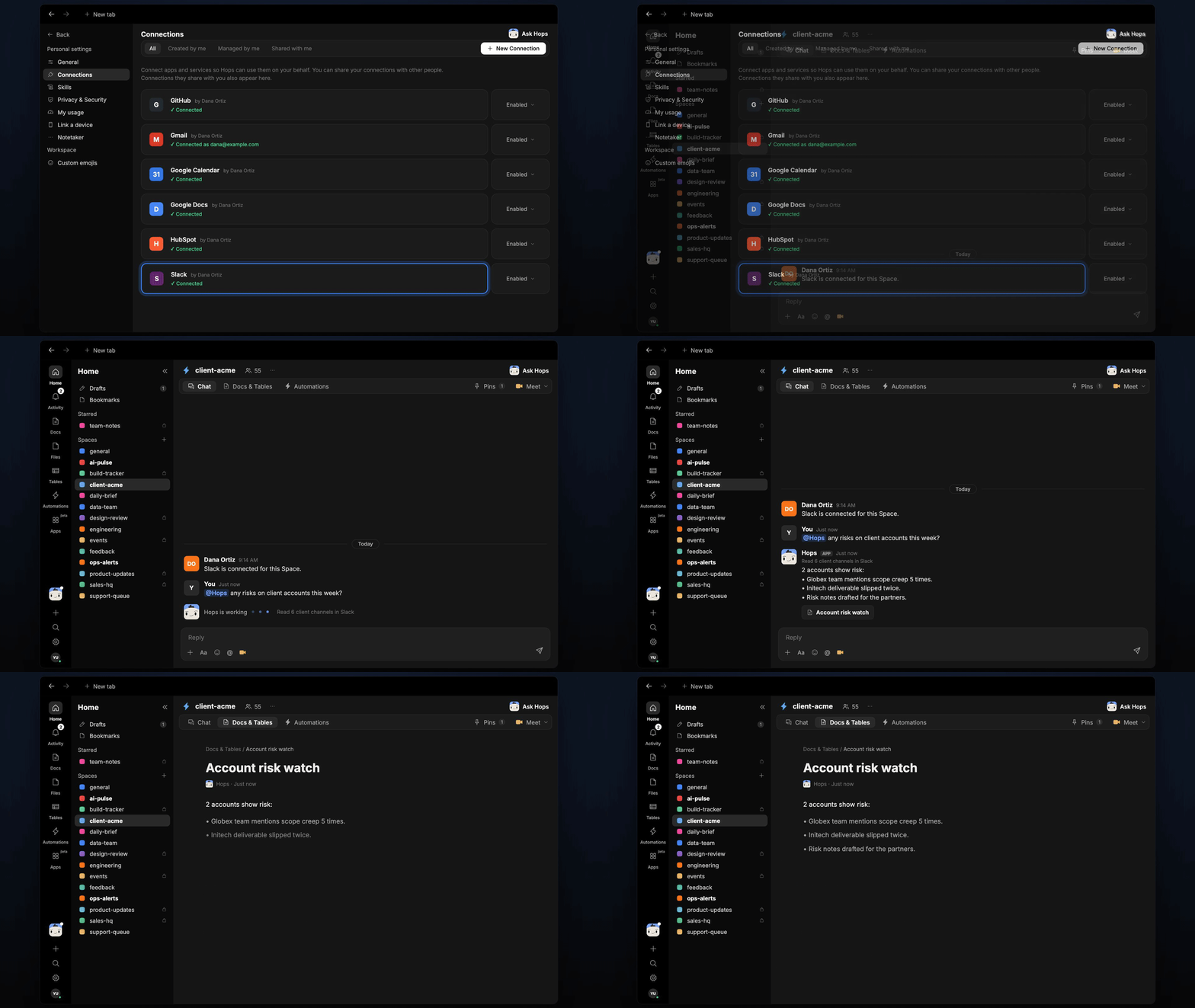 ## Ask Hops
Copy a prompt into any chat with Hops, or mention `@Hops` in a Space.
```text theme={null}
Any risks on client accounts this week?
```
```text theme={null}
Read the Globex channel for the last 30 days and tell me how scope has changed.
```
```text theme={null}
Which accounts have a deliverable that slipped more than once this month?
```
```text theme={null}
Draft risk notes for the Initech engagement that I can send to the partners.
```
```text theme={null}
Compare this week's risk watch to last week's. What got better and what got worse?
```
Example reply:
> 2 accounts show risk:
>
> * Globex: the team mentions scope creep 5 times this week. Latest: "client added a second region" in #client-globex on Wednesday.
> * Initech: the deliverable slipped twice. Owner is Priya Nair, new date is Oct 24.
> * Risk notes drafted for the partners.
## What you get
* **A weekly post.** Every Thursday at 4pm Hops posts the risk watch to the partners Space chat, with each at-risk account and its evidence.
* **A saved Doc.** Each run adds a dated risk watch to **Docs** in the Space, so you can see how risk moved over time.
* **Answers on demand.** Ask in chat any time and get the answer in the same thread.
## Connections needed
Connect these apps. Each card opens Connections in the app.
The client channels Hops reads for risk signals.
Client email threads that confirm or add to what chat shows.
Open tasks and due dates (or Jira).
## Set it up
Connect Slack, Gmail and Asana or Jira in **Connections**.
See [Connections](/docs/connections/overview).
Create a **partners** Space and list your client channels and accounts in Space context.
See [Spaces](/docs/spaces/overview) and [Space context](/docs/spaces/space-context).
Give Hops these instructions:
```text theme={null}
You watch account risk. Read client channels for scope creep, slipping dates, unhappy clients and staffing gaps. Rate each account and quote the evidence.
```
See [Build a skill](/docs/agents/build-a-skill).
Run it every Thursday at 4pm. Hops posts the risk watch to the partners Space and saves a dated Doc.
See [Automation](/docs/spaces/automation).
## Related topics
- [Agencies & consulting](/teams/professional-services.md)
- [Renewal watch](/teams/revops/use-cases/renewal-watch.md)
- [RevOps](/teams/revops.md)
- [Churn signals](/teams/support/use-cases/churn-signals.md)
- [Handoff watch](/teams/sales/use-cases/deal-handoff.md)
This documentation is built and hosted on [Mintlify](https://mintlify.com), a developer documentation platform.
## Ask Hops
Copy a prompt into any chat with Hops, or mention `@Hops` in a Space.
```text theme={null}
Any risks on client accounts this week?
```
```text theme={null}
Read the Globex channel for the last 30 days and tell me how scope has changed.
```
```text theme={null}
Which accounts have a deliverable that slipped more than once this month?
```
```text theme={null}
Draft risk notes for the Initech engagement that I can send to the partners.
```
```text theme={null}
Compare this week's risk watch to last week's. What got better and what got worse?
```
Example reply:
> 2 accounts show risk:
>
> * Globex: the team mentions scope creep 5 times this week. Latest: "client added a second region" in #client-globex on Wednesday.
> * Initech: the deliverable slipped twice. Owner is Priya Nair, new date is Oct 24.
> * Risk notes drafted for the partners.
## What you get
* **A weekly post.** Every Thursday at 4pm Hops posts the risk watch to the partners Space chat, with each at-risk account and its evidence.
* **A saved Doc.** Each run adds a dated risk watch to **Docs** in the Space, so you can see how risk moved over time.
* **Answers on demand.** Ask in chat any time and get the answer in the same thread.
## Connections needed
Connect these apps. Each card opens Connections in the app.
The client channels Hops reads for risk signals.
Client email threads that confirm or add to what chat shows.
Open tasks and due dates (or Jira).
## Set it up
Connect Slack, Gmail and Asana or Jira in **Connections**.
See [Connections](/docs/connections/overview).
Create a **partners** Space and list your client channels and accounts in Space context.
See [Spaces](/docs/spaces/overview) and [Space context](/docs/spaces/space-context).
Give Hops these instructions:
```text theme={null}
You watch account risk. Read client channels for scope creep, slipping dates, unhappy clients and staffing gaps. Rate each account and quote the evidence.
```
See [Build a skill](/docs/agents/build-a-skill).
Run it every Thursday at 4pm. Hops posts the risk watch to the partners Space and saves a dated Doc.
See [Automation](/docs/spaces/automation).
## Related topics
- [Agencies & consulting](/teams/professional-services.md)
- [Renewal watch](/teams/revops/use-cases/renewal-watch.md)
- [RevOps](/teams/revops.md)
- [Churn signals](/teams/support/use-cases/churn-signals.md)
- [Handoff watch](/teams/sales/use-cases/deal-handoff.md)
This documentation is built and hosted on [Mintlify](https://mintlify.com), a developer documentation platform.