> ## Documentation Index
> Fetch the complete documentation index at: https://hopsdocs.mintlify.site/llms.txt
> Use this file to discover all available pages before exploring further.
# Ship announcements
> Announce what shipped to the team and customers the moment it merges.
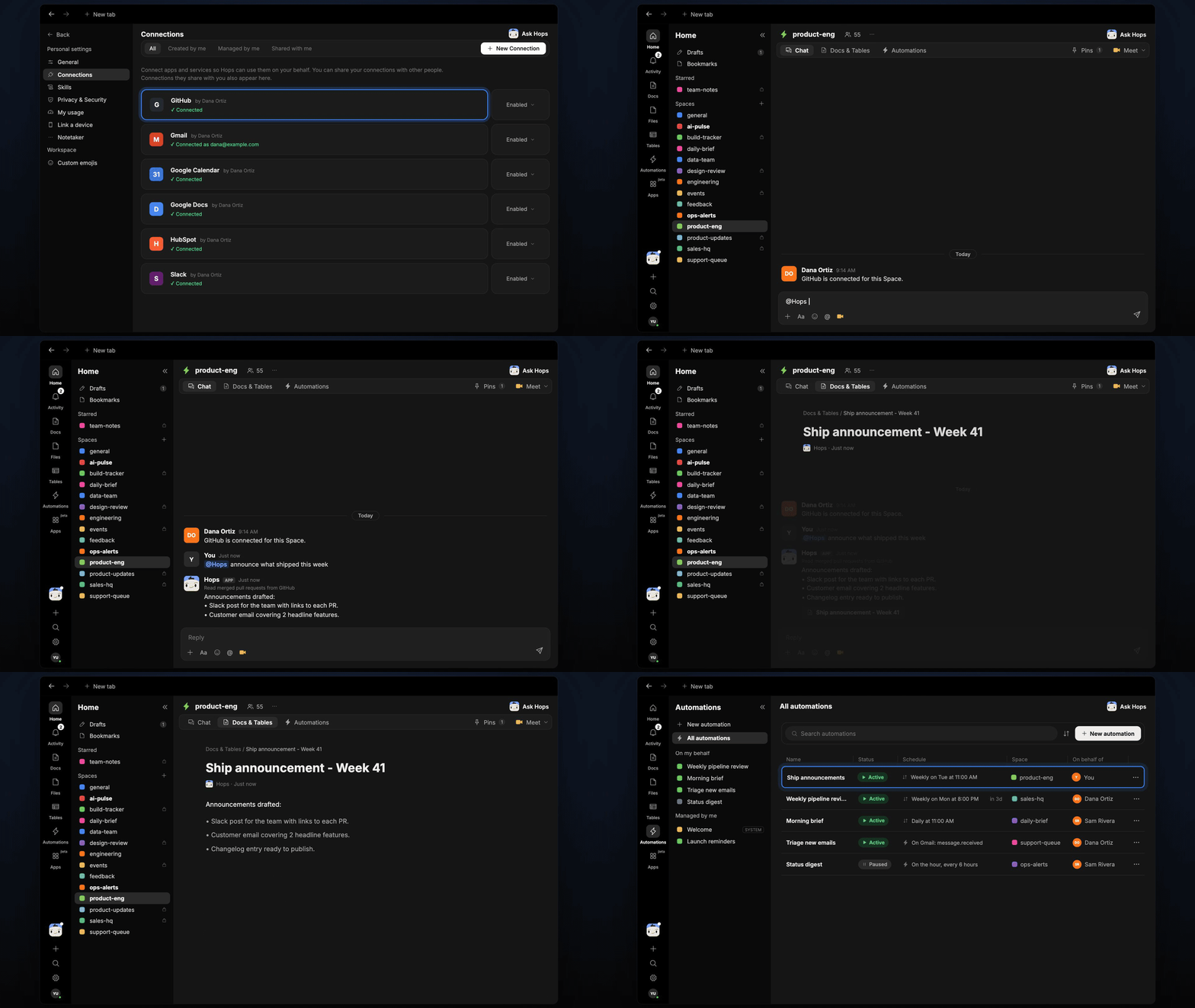
Shipped work goes unannounced because writing the post is the last thing anyone wants to do. After the weekly release, Hops reads the merged pull requests and drafts the team post and the customer announcement.
**How it runs:** Scheduled. An automation runs every Tuesday at 11am after the weekly release, posts the announcement and saves a Doc. You can also ask Hops any time.
## What it does
* **Reads what merged.** Hops lists the pull requests merged in GitHub since the last announcement.
* **Writes an internal Slack post.** A short note for the team on what shipped and who built it.
* **Writes a customer announcement for user-facing changes only.** It is benefit-led and under 120 words.
* **Drafts a changelog entry.** The same changes are written in your changelog format.
* **Leaves sending to you.** The customer email is a Gmail draft. Nothing goes out until you review it.
 ## Ask Hops
Copy a prompt into any chat with Hops, or mention `@Hops` in a Space.
```text theme={null}
Draft this week's ship announcement for Acme from the merged pull requests.
```
```text theme={null}
Write the internal Slack post for what we shipped since last Tuesday.
```
```text theme={null}
Write a customer email about the two headline features, under 120 words.
```
```text theme={null}
Which merged pull requests are user-facing and which are internal?
```
```text theme={null}
Draft a changelog entry for this week's release.
```
Example reply:
> Ship announcement for the Oct 14 release:
>
> * Slack post drafted for #product-updates.
> * Customer email drafted for 2 headline features (96 words).
> * Changelog entry drafted.
> * 11 internal changes left out.
## What you get
* **A post after the release.** The internal announcement is posted in Slack on Tuesday at 11am.
* **A saved Doc.** The Slack post, customer text and changelog entry are saved as a Doc in **Docs**.
* **A Gmail draft.** The customer email is saved as a draft for you to review and send.
## Connections needed
Connect these apps. Each card opens Connections in the app.
Merged pull requests.
The internal team post.
The customer email draft.
## Set it up
Connect GitHub, Slack and Gmail in **Connections**.
See [Connections](/docs/connections/overview).
Create a **product-eng** Space and pin your announcement templates in Space context.
See [Spaces](/docs/spaces/overview) and [Space context](/docs/spaces/space-context).
Give Hops these instructions:
```text theme={null}
You announce releases. From merged PRs, write a short internal Slack post and a customer announcement for user-facing changes only. Keep the customer version benefit-led and under 120 words.
```
See [Build a skill](/docs/agents/build-a-skill).
Create an automation that runs every Tuesday at 11am. It posts the internal announcement to Slack, saves everything as a Doc in **Docs** and leaves the customer email as a Gmail draft.
See [Automation](/docs/spaces/automation).
## Related topics
- [Product & Engineering](/teams/product-engineering.md)
- [General](/settings/general.md)
This documentation is built and hosted on [Mintlify](https://mintlify.com), a developer documentation platform.
## Ask Hops
Copy a prompt into any chat with Hops, or mention `@Hops` in a Space.
```text theme={null}
Draft this week's ship announcement for Acme from the merged pull requests.
```
```text theme={null}
Write the internal Slack post for what we shipped since last Tuesday.
```
```text theme={null}
Write a customer email about the two headline features, under 120 words.
```
```text theme={null}
Which merged pull requests are user-facing and which are internal?
```
```text theme={null}
Draft a changelog entry for this week's release.
```
Example reply:
> Ship announcement for the Oct 14 release:
>
> * Slack post drafted for #product-updates.
> * Customer email drafted for 2 headline features (96 words).
> * Changelog entry drafted.
> * 11 internal changes left out.
## What you get
* **A post after the release.** The internal announcement is posted in Slack on Tuesday at 11am.
* **A saved Doc.** The Slack post, customer text and changelog entry are saved as a Doc in **Docs**.
* **A Gmail draft.** The customer email is saved as a draft for you to review and send.
## Connections needed
Connect these apps. Each card opens Connections in the app.
Merged pull requests.
The internal team post.
The customer email draft.
## Set it up
Connect GitHub, Slack and Gmail in **Connections**.
See [Connections](/docs/connections/overview).
Create a **product-eng** Space and pin your announcement templates in Space context.
See [Spaces](/docs/spaces/overview) and [Space context](/docs/spaces/space-context).
Give Hops these instructions:
```text theme={null}
You announce releases. From merged PRs, write a short internal Slack post and a customer announcement for user-facing changes only. Keep the customer version benefit-led and under 120 words.
```
See [Build a skill](/docs/agents/build-a-skill).
Create an automation that runs every Tuesday at 11am. It posts the internal announcement to Slack, saves everything as a Doc in **Docs** and leaves the customer email as a Gmail draft.
See [Automation](/docs/spaces/automation).
## Related topics
- [Product & Engineering](/teams/product-engineering.md)
- [General](/settings/general.md)
This documentation is built and hosted on [Mintlify](https://mintlify.com), a developer documentation platform.