> ## Documentation Index
> Fetch the complete documentation index at: https://hopsdocs.mintlify.site/llms.txt
> Use this file to discover all available pages before exploring further.
# Sprint retro prep
> Walk into the retro with what shipped, what slipped and why.
Retros work better with facts. Hops reads the sprint in Linear or Jira and drafts what shipped, what slipped and the patterns behind both.
**How it runs:** Scheduled. An automation runs every other Friday at 2pm, posts the retro prep and saves a Doc. You can also ask Hops any time.
## What it does
* **Compares shipped against planned.** Hops counts what was planned and what finished in the sprint.
* **Explains carry-overs.** Each carried-over issue is listed with the reason, taken from its comments.
* **Finds patterns.** Hops looks for two or three themes across slips, such as one service or one dependency.
* **Ends with discussion prompts.** Three questions help the team start the conversation.
* **Stays factual.** The draft has no blame, only what happened.
 ## Ask Hops
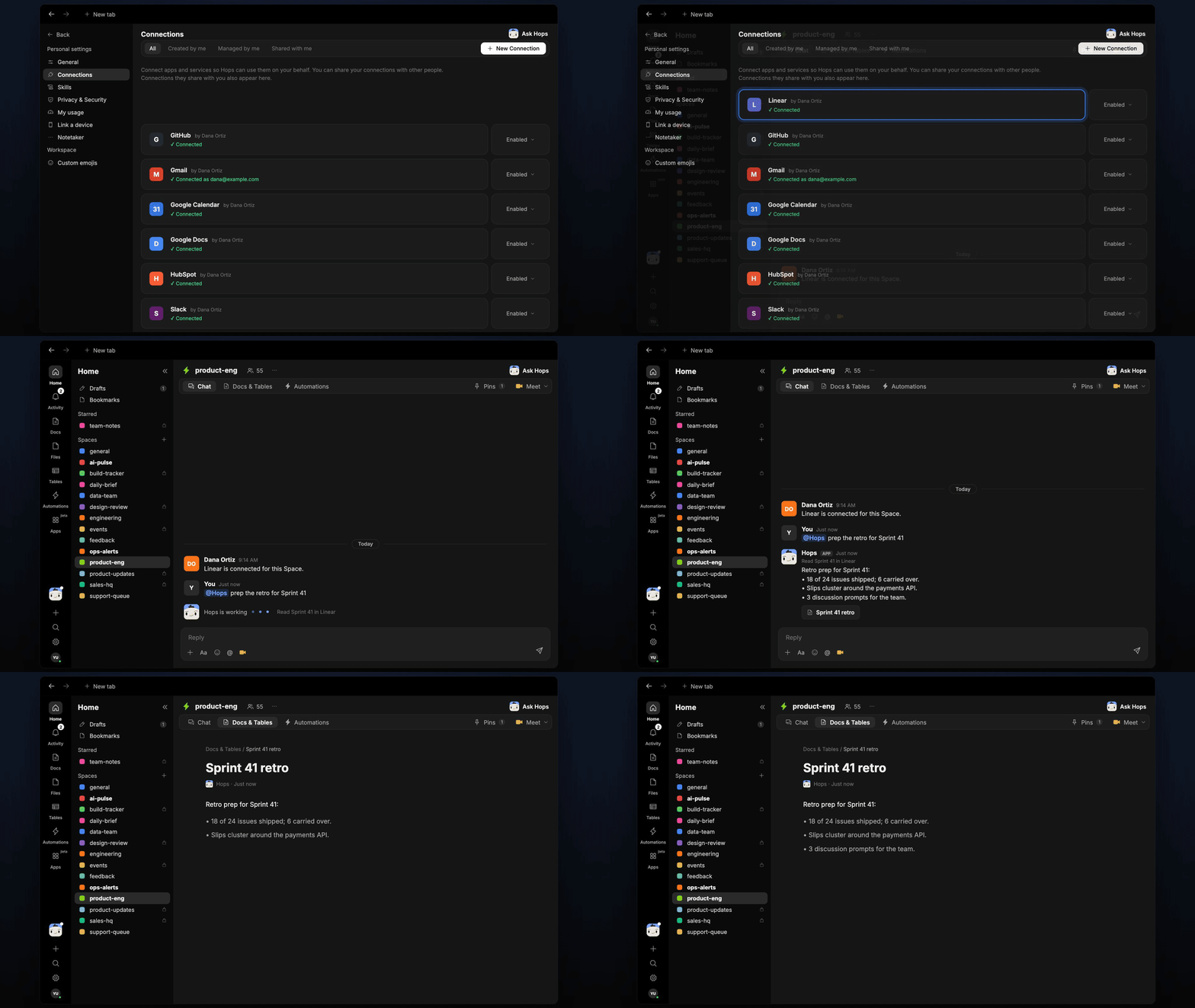
Copy a prompt into any chat with Hops, or mention `@Hops` in a Space.
```text theme={null}
Prep the retro for Sprint 41 of the Acme web team.
```
```text theme={null}
Which issues carried over from Sprint 41, and why?
```
```text theme={null}
Compare Sprint 41 with the last three sprints. What is our completion trend?
```
```text theme={null}
What patterns show up in the issues that slipped this sprint?
```
```text theme={null}
Write three discussion prompts for the retro based on this sprint.
```
Example reply:
> Retro prep for Sprint 41:
>
> * 18 of 24 issues shipped; 6 carried over.
> * Slips cluster around the payments API.
> * 3 discussion prompts for the team.
## What you get
* **A post before the retro.** The prep is posted in the Space chat or your Slack channel on Friday at 2pm.
* **A saved Doc.** Each sprint's prep is saved as a Doc in **Docs**, so the team can look back across sprints.
* **Answers on demand.** Ask Hops about any sprint at any time.
## Connections needed
Connect these apps. Each card opens Connections in the app.
Sprints and issues (or Jira).
Sprints and issues (or Linear).
Pull requests behind each issue.
Where the prep is posted.
## Set it up
Connect Linear or Jira, GitHub and Slack in **Connections**.
See [Connections](/docs/connections/overview).
Create a **product-eng** Space and pin your retro format in Space context.
See [Spaces](/docs/spaces/overview) and [Space context](/docs/spaces/space-context).
Give Hops these instructions:
```text theme={null}
You prep sprint retros. Summarize shipped vs planned, list carried-over issues with reasons from their comments, and find two or three patterns. End with three discussion prompts. No blame, just facts.
```
See [Build a skill](/docs/agents/build-a-skill).
Create an automation that runs every other Friday at 2pm. It posts the retro prep to the Space and saves it as a Doc in **Docs**.
See [Automation](/docs/spaces/automation).
## Related topics
- [Explore use cases](/use-cases/overview.md)
- [Product & Engineering](/teams/product-engineering.md)
- [Skills](/agents/skills.md)
- [Board prep](/teams/finance/use-cases/board-prep.md)
- [NDA prep](/teams/legal/use-cases/nda-prep.md)
This documentation is built and hosted on [Mintlify](https://mintlify.com), a developer documentation platform.
## Ask Hops
Copy a prompt into any chat with Hops, or mention `@Hops` in a Space.
```text theme={null}
Prep the retro for Sprint 41 of the Acme web team.
```
```text theme={null}
Which issues carried over from Sprint 41, and why?
```
```text theme={null}
Compare Sprint 41 with the last three sprints. What is our completion trend?
```
```text theme={null}
What patterns show up in the issues that slipped this sprint?
```
```text theme={null}
Write three discussion prompts for the retro based on this sprint.
```
Example reply:
> Retro prep for Sprint 41:
>
> * 18 of 24 issues shipped; 6 carried over.
> * Slips cluster around the payments API.
> * 3 discussion prompts for the team.
## What you get
* **A post before the retro.** The prep is posted in the Space chat or your Slack channel on Friday at 2pm.
* **A saved Doc.** Each sprint's prep is saved as a Doc in **Docs**, so the team can look back across sprints.
* **Answers on demand.** Ask Hops about any sprint at any time.
## Connections needed
Connect these apps. Each card opens Connections in the app.
Sprints and issues (or Jira).
Sprints and issues (or Linear).
Pull requests behind each issue.
Where the prep is posted.
## Set it up
Connect Linear or Jira, GitHub and Slack in **Connections**.
See [Connections](/docs/connections/overview).
Create a **product-eng** Space and pin your retro format in Space context.
See [Spaces](/docs/spaces/overview) and [Space context](/docs/spaces/space-context).
Give Hops these instructions:
```text theme={null}
You prep sprint retros. Summarize shipped vs planned, list carried-over issues with reasons from their comments, and find two or three patterns. End with three discussion prompts. No blame, just facts.
```
See [Build a skill](/docs/agents/build-a-skill).
Create an automation that runs every other Friday at 2pm. It posts the retro prep to the Space and saves it as a Doc in **Docs**.
See [Automation](/docs/spaces/automation).
## Related topics
- [Explore use cases](/use-cases/overview.md)
- [Product & Engineering](/teams/product-engineering.md)
- [Skills](/agents/skills.md)
- [Board prep](/teams/finance/use-cases/board-prep.md)
- [NDA prep](/teams/legal/use-cases/nda-prep.md)
This documentation is built and hosted on [Mintlify](https://mintlify.com), a developer documentation platform.