> ## Documentation Index
> Fetch the complete documentation index at: https://hopsdocs.mintlify.site/llms.txt
> Use this file to discover all available pages before exploring further.
# Incident postmortems
> Draft the postmortem from Sentry errors and the incident thread.
Postmortems slip because nobody wants to rebuild the timeline from memory. Hops reads the Sentry errors and the incident thread, then drafts a blameless postmortem for the team to edit.
**How it runs:** Triggered. An automation runs when an incident thread is closed, and you can also ask Hops directly.
## What it does
* **Builds the timeline from real sources.** Hops uses Sentry errors, Datadog monitors and the messages in the incident Slack thread.
* **Follows your template.** Sections are summary, impact, timeline, root cause, what went well and follow-ups with owners.
* **Stays blameless.** The draft describes systems and decisions, not people.
* **Marks what is unconfirmed.** Guesses are labeled so the team can confirm them in review.
* **Proposes follow-ups.** Action items are drafted with owners and can be filed in Linear or Jira once approved.
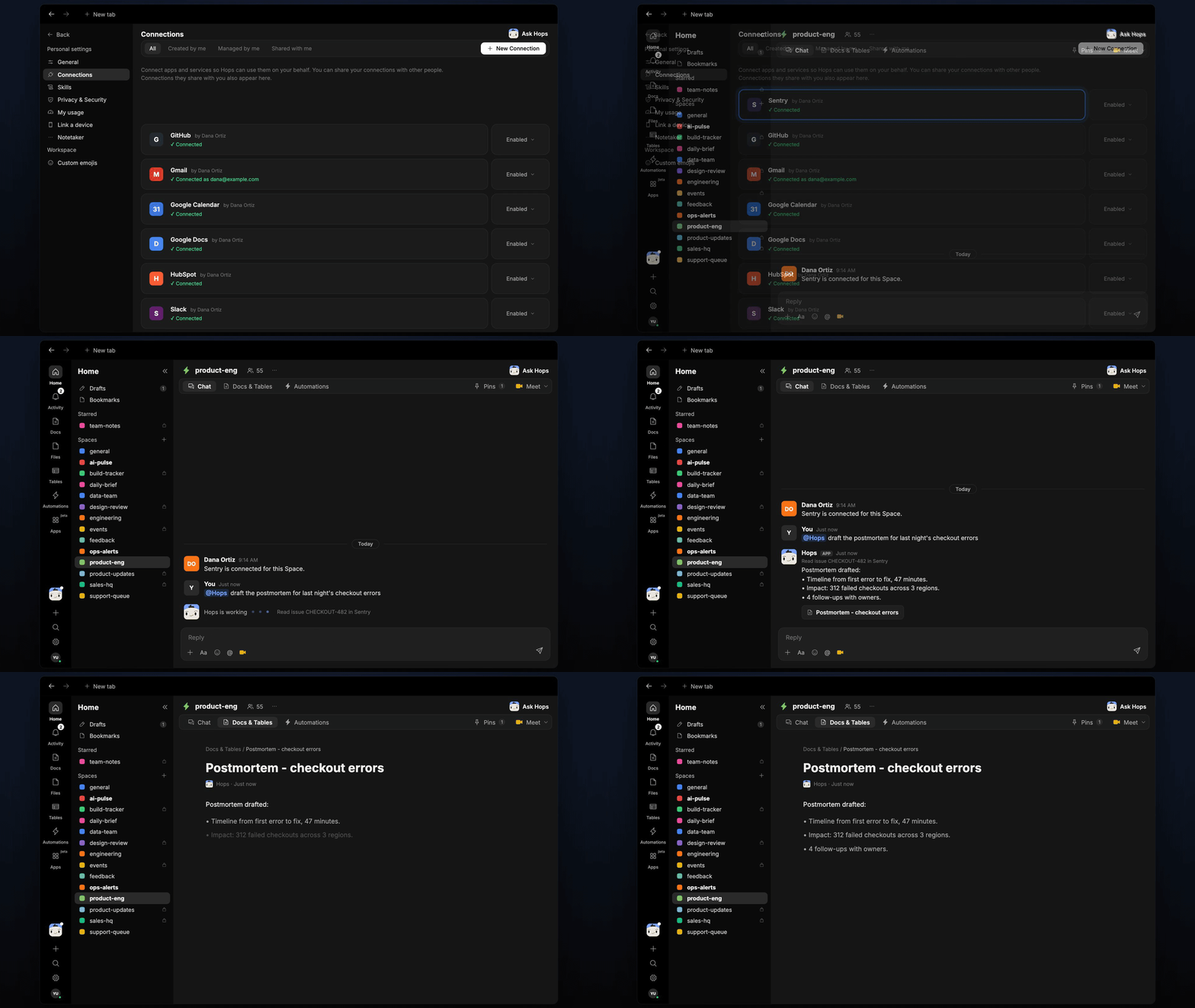 ## Ask Hops
Copy a prompt into any chat with Hops, or mention `@Hops` in a Space.
```text theme={null}
Draft the postmortem for the Acme checkout outage from Sentry issue CHECKOUT-482 and the incident thread.
```
```text theme={null}
Build a timeline of the Northwind API incident from Sentry and the Slack thread.
```
```text theme={null}
What follow-ups came out of the last three postmortems, and which are still open?
```
```text theme={null}
Which parts of this postmortem are unconfirmed and need a human to check?
```
```text theme={null}
Turn the follow-ups in this postmortem into Linear issues, but wait for my approval.
```
Example reply:
> Draft postmortem for CHECKOUT-482 is ready:
>
> * **Impact:** checkout failed for about 11% of orders over 38 minutes.
> * **Root cause:** a connection pool limit hit after the 09:40 deploy (unconfirmed).
> * **Follow-ups:** 4 drafted with owners, none filed yet.
> * 2 timeline entries need confirmation from the incident lead.
## What you get
* **A post the morning after.** At 9am the day after the thread closes, the draft is posted in the Space.
* **A saved Doc.** The postmortem is saved as a Doc in **Docs**, using your template.
* **Optional follow-up tickets.** Hops can draft the follow-ups as Linear or Jira issues once you approve them.
## Connections needed
Connect these apps. Each card opens Connections in the app.
Errors and event timestamps.
The incident thread.
Follow-up issues (or Jira).
Follow-up issues (or Linear).
Monitors and metrics during the incident.
## Set it up
Connect Sentry, Slack, Linear or Jira, and Datadog in **Connections**.
See [Connections](/docs/connections/overview).
Create a **product-eng** Space and pin your postmortem template in Space context.
See [Spaces](/docs/spaces/overview) and [Space context](/docs/spaces/space-context).
Give Hops these instructions:
```text theme={null}
You write blameless postmortems. Build the timeline from Sentry and the incident thread. Sections: summary, impact, timeline, root cause, what went well, follow-ups with owners. Mark anything unconfirmed.
```
See [Build a skill](/docs/agents/build-a-skill).
Create an automation that runs when an incident thread is closed. The next morning at 9am it posts the draft to the Space and saves it as a Doc in **Docs**.
See [Automation](/docs/spaces/automation).
## Related topics
- [Product & Engineering](/teams/product-engineering.md)
- [Production alert triage](/teams/product-engineering/use-cases/prod-alert-triage.md)
- [Core concepts](/getting-started/core-concepts.md)
- [Troubleshooting](/help/troubleshooting.md)
- [Skills](/agents/skills.md)
This documentation is built and hosted on [Mintlify](https://mintlify.com), a developer documentation platform.
## Ask Hops
Copy a prompt into any chat with Hops, or mention `@Hops` in a Space.
```text theme={null}
Draft the postmortem for the Acme checkout outage from Sentry issue CHECKOUT-482 and the incident thread.
```
```text theme={null}
Build a timeline of the Northwind API incident from Sentry and the Slack thread.
```
```text theme={null}
What follow-ups came out of the last three postmortems, and which are still open?
```
```text theme={null}
Which parts of this postmortem are unconfirmed and need a human to check?
```
```text theme={null}
Turn the follow-ups in this postmortem into Linear issues, but wait for my approval.
```
Example reply:
> Draft postmortem for CHECKOUT-482 is ready:
>
> * **Impact:** checkout failed for about 11% of orders over 38 minutes.
> * **Root cause:** a connection pool limit hit after the 09:40 deploy (unconfirmed).
> * **Follow-ups:** 4 drafted with owners, none filed yet.
> * 2 timeline entries need confirmation from the incident lead.
## What you get
* **A post the morning after.** At 9am the day after the thread closes, the draft is posted in the Space.
* **A saved Doc.** The postmortem is saved as a Doc in **Docs**, using your template.
* **Optional follow-up tickets.** Hops can draft the follow-ups as Linear or Jira issues once you approve them.
## Connections needed
Connect these apps. Each card opens Connections in the app.
Errors and event timestamps.
The incident thread.
Follow-up issues (or Jira).
Follow-up issues (or Linear).
Monitors and metrics during the incident.
## Set it up
Connect Sentry, Slack, Linear or Jira, and Datadog in **Connections**.
See [Connections](/docs/connections/overview).
Create a **product-eng** Space and pin your postmortem template in Space context.
See [Spaces](/docs/spaces/overview) and [Space context](/docs/spaces/space-context).
Give Hops these instructions:
```text theme={null}
You write blameless postmortems. Build the timeline from Sentry and the incident thread. Sections: summary, impact, timeline, root cause, what went well, follow-ups with owners. Mark anything unconfirmed.
```
See [Build a skill](/docs/agents/build-a-skill).
Create an automation that runs when an incident thread is closed. The next morning at 9am it posts the draft to the Space and saves it as a Doc in **Docs**.
See [Automation](/docs/spaces/automation).
## Related topics
- [Product & Engineering](/teams/product-engineering.md)
- [Production alert triage](/teams/product-engineering/use-cases/prod-alert-triage.md)
- [Core concepts](/getting-started/core-concepts.md)
- [Troubleshooting](/help/troubleshooting.md)
- [Skills](/agents/skills.md)
This documentation is built and hosted on [Mintlify](https://mintlify.com), a developer documentation platform.