> ## Documentation Index
> Fetch the complete documentation index at: https://hopsdocs.mintlify.site/llms.txt
> Use this file to discover all available pages before exploring further.
# Issue triage
> New issues labelled, prioritized and assigned every morning.
New issues pile up unlabeled, with no owner and no priority. Hops triages them every morning so the team starts the day with a sorted queue.
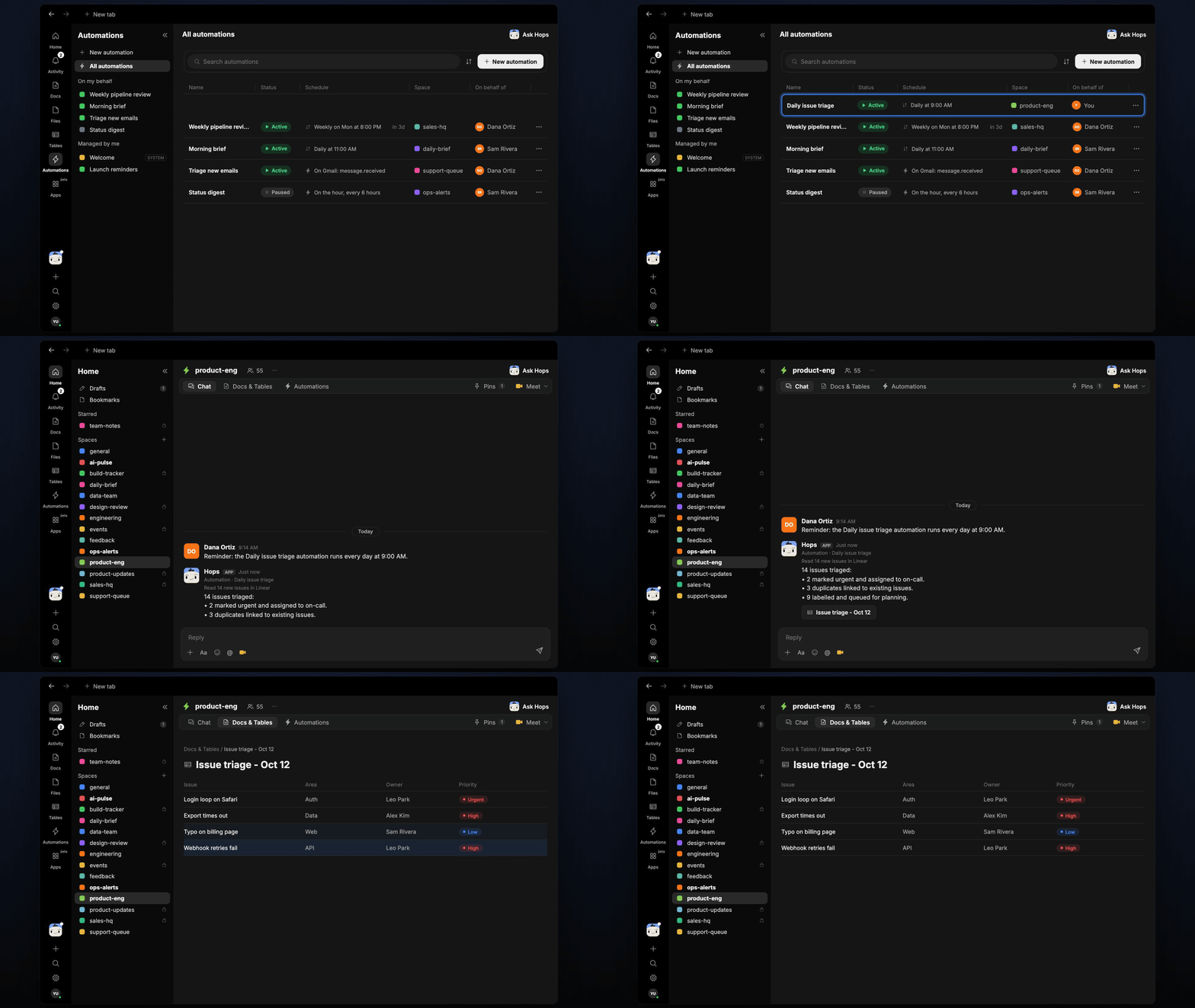
**How it runs:** Scheduled. An automation runs every day at 9am, posts the triage summary and updates a Table. You can also ask Hops any time.
## What it does
* **Reads every new issue.** Hops checks Linear, Jira or GitHub Issues for items created since the last run.
* **Labels by area.** Each issue gets the area label that matches your area map.
* **Sets priority from impact and reach.** Hops explains the reasoning in one line.
* **Links duplicates and suggests owners.** Duplicates are linked, and owners come from the area-to-owner map in Space context.
* **Flags outages as Urgent.** Anything that looks like an outage is called out at the top of the summary.
 ## Ask Hops
Copy a prompt into any chat with Hops, or mention `@Hops` in a Space.
```text theme={null}
Triage the new issues in the Acme web project from the last 24 hours.
```
```text theme={null}
Which new issues look like duplicates of existing ones?
```
```text theme={null}
Suggest owners for the 6 unassigned issues using our area map.
```
```text theme={null}
Are any of this week's new issues possible outages?
```
```text theme={null}
Show me this week's triaged issues grouped by area.
```
Example reply:
> Triaged 14 new issues:
>
> * 1 Urgent: checkout returns 500 for EU customers.
> * 3 duplicates linked to existing issues.
> * 9 labeled and assigned, 1 needs a human to pick an area.
> * Biggest area this week: billing, 5 issues.
## What you get
* **A morning post.** The summary appears in the Space chat or your Slack channel at 9am.
* **An updated Table.** Triaged issues are added to a triage log in **Tables** in the Space, with area, priority and owner.
* **Answers on demand.** Ask Hops to re-triage or explain a decision at any time.
## Connections needed
Connect these apps. Each card opens Connections in the app.
New issues and labels.
New issues and labels (or Linear).
GitHub Issues (or Linear or Jira).
Where the triage summary is posted.
## Set it up
Connect Linear, Jira or GitHub Issues, and Slack in **Connections**.
See [Connections](/docs/connections/overview).
Create a **product-eng** Space and pin the area-to-owner map in Space context.
See [Spaces](/docs/spaces/overview) and [Space context](/docs/spaces/space-context).
Give Hops these instructions:
```text theme={null}
You triage new issues. Label each by area, set priority from impact and reach, link duplicates, and suggest an owner from the area map. Flag anything that looks like an outage as Urgent.
```
See [Build a skill](/docs/agents/build-a-skill).
Create an automation that runs every day at 9am. It posts the triage summary to the Space and updates the triage log in **Tables**.
See [Automation](/docs/spaces/automation).
## Related topics
- [Product & Engineering](/teams/product-engineering.md)
- [Dispute triage](/teams/support/use-cases/dispute-triage.md)
- [Production alert triage](/teams/product-engineering/use-cases/prod-alert-triage.md)
- [Support](/teams/support.md)
- [Sprint retro prep](/teams/product-engineering/use-cases/retro-prep.md)
This documentation is built and hosted on [Mintlify](https://mintlify.com), a developer documentation platform.
## Ask Hops
Copy a prompt into any chat with Hops, or mention `@Hops` in a Space.
```text theme={null}
Triage the new issues in the Acme web project from the last 24 hours.
```
```text theme={null}
Which new issues look like duplicates of existing ones?
```
```text theme={null}
Suggest owners for the 6 unassigned issues using our area map.
```
```text theme={null}
Are any of this week's new issues possible outages?
```
```text theme={null}
Show me this week's triaged issues grouped by area.
```
Example reply:
> Triaged 14 new issues:
>
> * 1 Urgent: checkout returns 500 for EU customers.
> * 3 duplicates linked to existing issues.
> * 9 labeled and assigned, 1 needs a human to pick an area.
> * Biggest area this week: billing, 5 issues.
## What you get
* **A morning post.** The summary appears in the Space chat or your Slack channel at 9am.
* **An updated Table.** Triaged issues are added to a triage log in **Tables** in the Space, with area, priority and owner.
* **Answers on demand.** Ask Hops to re-triage or explain a decision at any time.
## Connections needed
Connect these apps. Each card opens Connections in the app.
New issues and labels.
New issues and labels (or Linear).
GitHub Issues (or Linear or Jira).
Where the triage summary is posted.
## Set it up
Connect Linear, Jira or GitHub Issues, and Slack in **Connections**.
See [Connections](/docs/connections/overview).
Create a **product-eng** Space and pin the area-to-owner map in Space context.
See [Spaces](/docs/spaces/overview) and [Space context](/docs/spaces/space-context).
Give Hops these instructions:
```text theme={null}
You triage new issues. Label each by area, set priority from impact and reach, link duplicates, and suggest an owner from the area map. Flag anything that looks like an outage as Urgent.
```
See [Build a skill](/docs/agents/build-a-skill).
Create an automation that runs every day at 9am. It posts the triage summary to the Space and updates the triage log in **Tables**.
See [Automation](/docs/spaces/automation).
## Related topics
- [Product & Engineering](/teams/product-engineering.md)
- [Dispute triage](/teams/support/use-cases/dispute-triage.md)
- [Production alert triage](/teams/product-engineering/use-cases/prod-alert-triage.md)
- [Support](/teams/support.md)
- [Sprint retro prep](/teams/product-engineering/use-cases/retro-prep.md)
This documentation is built and hosted on [Mintlify](https://mintlify.com), a developer documentation platform.