> ## Documentation Index
> Fetch the complete documentation index at: https://hopsdocs.mintlify.site/llms.txt
> Use this file to discover all available pages before exploring further.
# Monday trading brief
> Sales, stock and fulfilment in one brief every Monday morning.
Operators start Monday piecing together last week's sales, stock and fulfilment from different tools. Hops builds the trading brief automatically so the team starts the week with the same numbers.
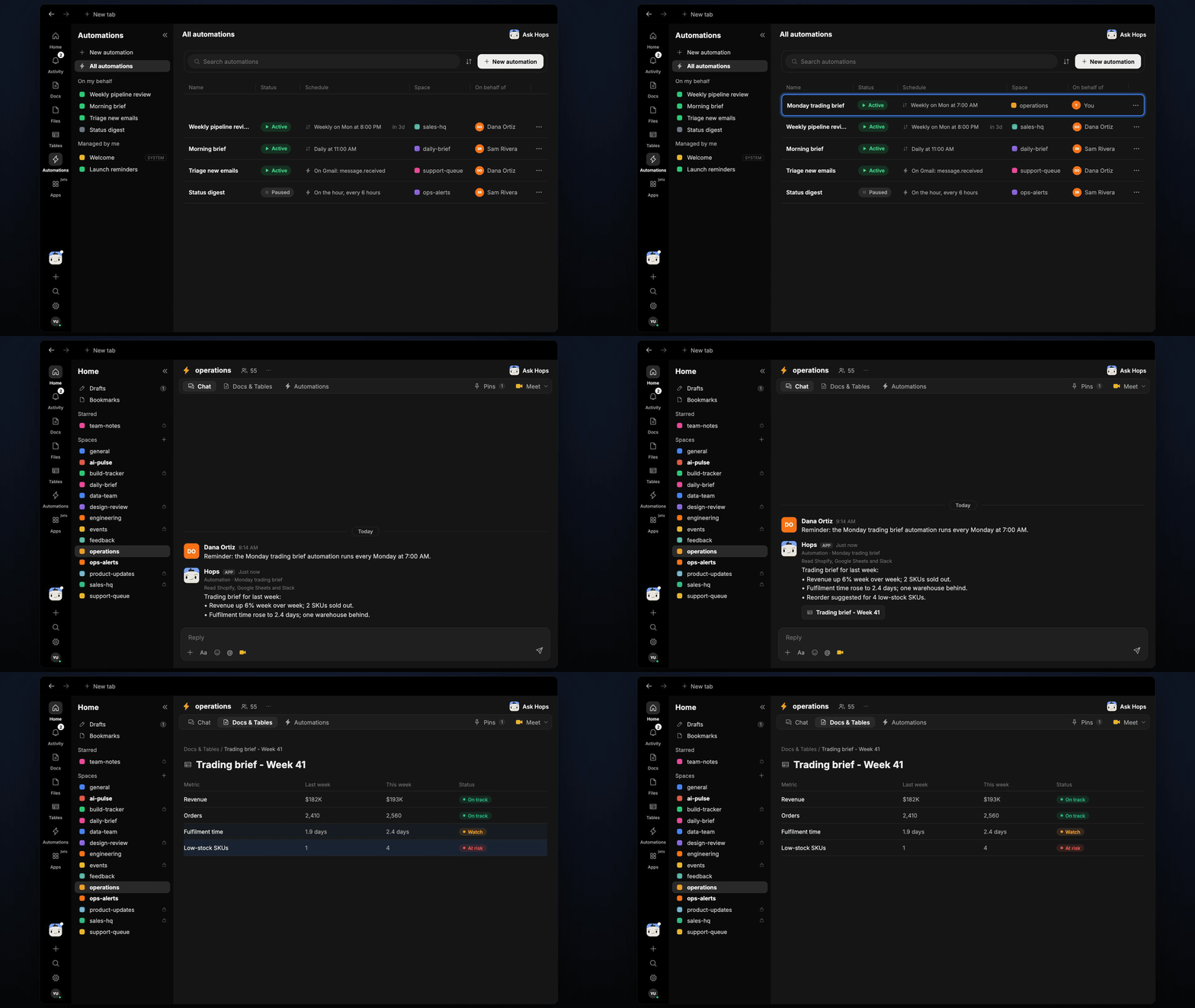
**How it runs:** Scheduled. An automation runs every Monday at 7am, posts the brief to the operations Space and saves it as a dated Doc. You can also ask Hops any time.
## What it does
* **Compares last week to the week before.** Revenue, orders, fulfilment time and stock are shown as week-over-week changes.
* **Reads your store and inventory.** Hops pulls sales from Shopify (or your store) and stock from Google Sheets.
* **Flags anything past its threshold.** Thresholds come from the metrics list pinned in Space context.
* **Suggests one action each.** For example a reorder for low-stock SKUs or a check on a slow warehouse.
* **Keeps the format identical every week.** The team always knows where to look.
 ## Ask Hops
Copy a prompt into any chat with Hops, or mention `@Hops` in a Space.
```text theme={null}
Build this week's trading brief.
```
```text theme={null}
Which SKUs are low on stock and need a reorder?
```
```text theme={null}
How did fulfilment time change versus the week before?
```
```text theme={null}
Show revenue and orders by channel for last week.
```
```text theme={null}
What is behind the drop in conversion on the Acme collection?
```
Example reply:
> Trading brief for last week:
>
> * Revenue up 6% week over week; 2 SKUs sold out.
> * Fulfilment time rose to 2.4 days; one warehouse behind.
> * Reorder suggested for 4 low-stock SKUs.
## What you get
* **An answer in chat**, in the same thread, whenever you ask.
* **A Monday post** in the operations Space at 7am with the brief.
* **A dated brief Doc** in **Docs** of the Space, so you can look back week by week.
## Connections needed
Connect these apps. Each card opens Connections in the app.
Sales and orders (or your store).
Inventory and stock levels.
Posts the brief to the team.
## Set it up
Create an **operations** Space. List the metrics and thresholds in Space context.
See [Spaces](/docs/spaces/overview) and [Space context](/docs/spaces/space-context).
Connect the apps above in **Connections**.
See [Connections](/docs/connections/overview).
Give Hops these instructions:
```text theme={null}
You write the Monday trading brief. Compare last week to the week before for revenue, orders, fulfilment time and stock. Flag anything past its threshold and suggest one action each.
```
See [Build a skill](/docs/agents/build-a-skill).
Every Monday at 7am Hops posts the brief to the operations Space and saves it as a dated Doc.
See [Automation](/docs/spaces/automation).
## Related topics
- [Operations & project management](/teams/operations.md)
- [Explore use cases](/use-cases/overview.md)
- [Monday book brief](/teams/support/use-cases/monday-book-brief.md)
- [Support](/teams/support.md)
- [Founders & executives](/teams/founders-executives.md)
This documentation is built and hosted on [Mintlify](https://mintlify.com), a developer documentation platform.
## Ask Hops
Copy a prompt into any chat with Hops, or mention `@Hops` in a Space.
```text theme={null}
Build this week's trading brief.
```
```text theme={null}
Which SKUs are low on stock and need a reorder?
```
```text theme={null}
How did fulfilment time change versus the week before?
```
```text theme={null}
Show revenue and orders by channel for last week.
```
```text theme={null}
What is behind the drop in conversion on the Acme collection?
```
Example reply:
> Trading brief for last week:
>
> * Revenue up 6% week over week; 2 SKUs sold out.
> * Fulfilment time rose to 2.4 days; one warehouse behind.
> * Reorder suggested for 4 low-stock SKUs.
## What you get
* **An answer in chat**, in the same thread, whenever you ask.
* **A Monday post** in the operations Space at 7am with the brief.
* **A dated brief Doc** in **Docs** of the Space, so you can look back week by week.
## Connections needed
Connect these apps. Each card opens Connections in the app.
Sales and orders (or your store).
Inventory and stock levels.
Posts the brief to the team.
## Set it up
Create an **operations** Space. List the metrics and thresholds in Space context.
See [Spaces](/docs/spaces/overview) and [Space context](/docs/spaces/space-context).
Connect the apps above in **Connections**.
See [Connections](/docs/connections/overview).
Give Hops these instructions:
```text theme={null}
You write the Monday trading brief. Compare last week to the week before for revenue, orders, fulfilment time and stock. Flag anything past its threshold and suggest one action each.
```
See [Build a skill](/docs/agents/build-a-skill).
Every Monday at 7am Hops posts the brief to the operations Space and saves it as a dated Doc.
See [Automation](/docs/spaces/automation).
## Related topics
- [Operations & project management](/teams/operations.md)
- [Explore use cases](/use-cases/overview.md)
- [Monday book brief](/teams/support/use-cases/monday-book-brief.md)
- [Support](/teams/support.md)
- [Founders & executives](/teams/founders-executives.md)
This documentation is built and hosted on [Mintlify](https://mintlify.com), a developer documentation platform.