> ## Documentation Index
> Fetch the complete documentation index at: https://hopsdocs.mintlify.site/llms.txt
> Use this file to discover all available pages before exploring further.
# Partner onboarding
> Turn a signed partner agreement into an onboarding checklist with owners.
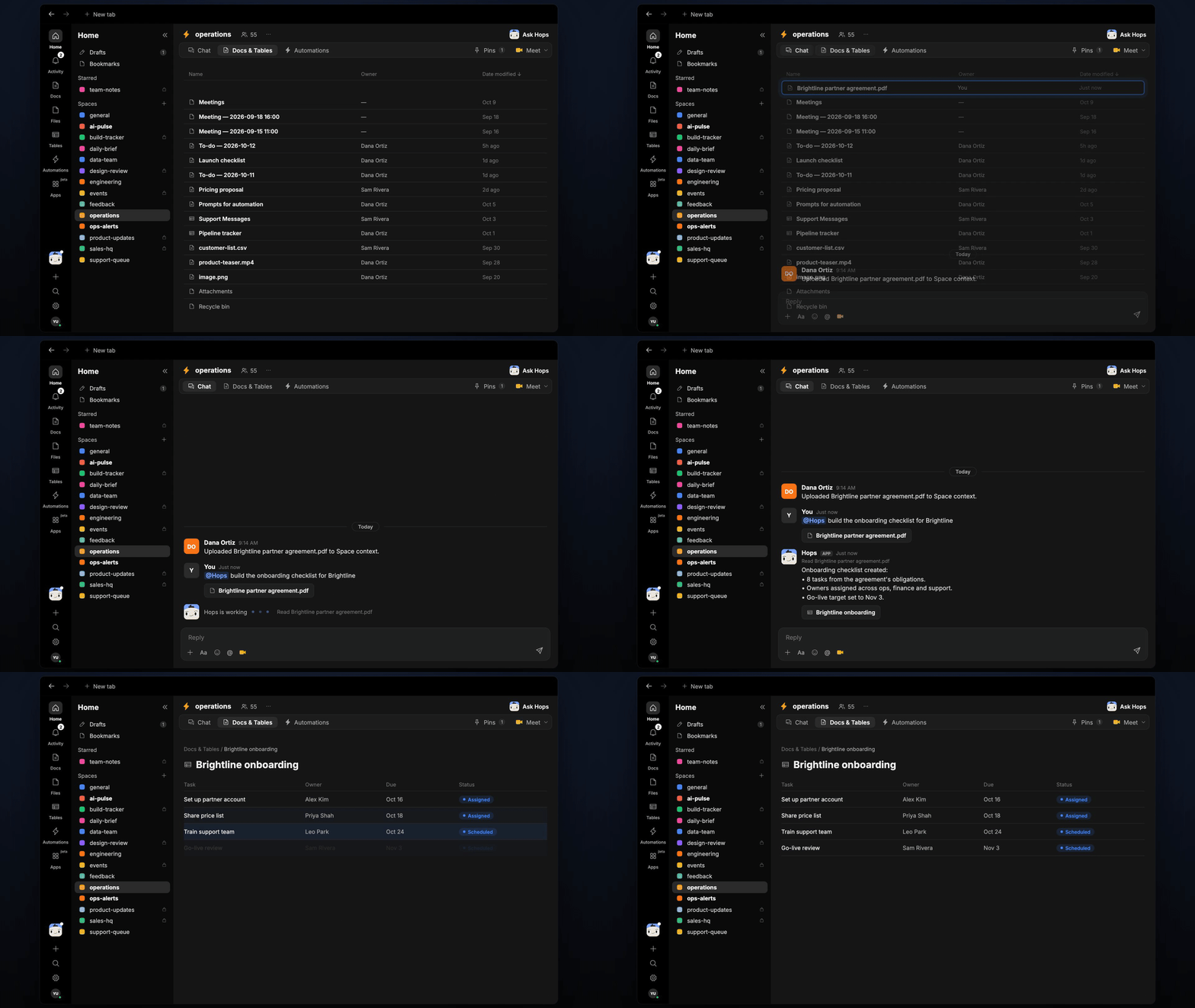
A signed partner agreement is full of obligations that nobody turns into tasks. Hops reads the agreement, builds an onboarding checklist with owners and due dates and keeps each partner's progress in view.
**How it runs:** One Space per partner, with its own context, skill and automations.
## What it does
* **Reads the agreement.** Hops pulls every obligation from the signed agreement in Google Drive.
* **Turns obligations into tasks.** Each one gets an owner and a due date in Asana or Jira.
* **Adds your standard steps.** It adds the onboarding steps pinned in Space context for every partner.
* **Flags unowned obligations.** Anything with no clear owner is called out so it does not slip.
* **Reports progress weekly.** Each Friday it posts what is done, late and blocked for that partner.
 ## Ask Hops
Copy a prompt into any chat with Hops, or mention `@Hops` in a Space.
```text theme={null}
Build the onboarding checklist for Brightline from the signed agreement.
```
```text theme={null}
Which Brightline obligations have no owner yet?
```
```text theme={null}
What is overdue for Northwind's onboarding?
```
```text theme={null}
Add our standard onboarding steps to the Globex partner checklist.
```
```text theme={null}
Summarize onboarding progress for this partner and what is blocking it.
```
Example reply:
> Brightline onboarding checklist:
>
> * 14 obligations found; 12 assigned, 2 have no owner.
> * Next due: certificate of insurance, Nov 5, owner Dana Ortiz.
> * Standard steps added: portal access, pricing sheet, kickoff call.
## What you get
* **A dedicated Space per partner** with its own context, Docs and Tables.
* **An onboarding checklist Table** in **Tables** with each obligation, owner, due date and status.
* **A weekly progress post** in the Space chat every Friday, plus a saved progress Doc in **Docs**.
* **Tasks in Asana or Jira** for each obligation, when you ask Hops to create them.
## Connections needed
Connect these apps. Each card opens Connections in the app.
Signed partner agreements.
Onboarding tasks (or Jira).
Posts weekly progress.
## Set it up
Create an **operations** Space for each partner. Add the signed agreement and your standard onboarding steps to Space context.
See [Spaces](/docs/spaces/overview) and [Space context](/docs/spaces/space-context).
Connect the apps above in **Connections**.
See [Connections](/docs/connections/overview).
Give Hops these instructions:
```text theme={null}
You onboard partners. Read the agreement, list every obligation as a task with an owner and due date, and add our standard onboarding steps. Flag any obligation with no clear owner.
```
See [Build a skill](/docs/agents/build-a-skill).
Every Friday Hops posts onboarding progress for the partner in the Space chat and saves a progress Doc.
See [Automation](/docs/spaces/automation).
## Related topics
- [Operations & project management](/teams/operations.md)
- [New hire onboarding](/teams/hr-people-ops/use-cases/new-hire-onboarding.md)
- [Explore use cases](/use-cases/overview.md)
- [Agencies & consulting](/teams/professional-services.md)
- [Client onboarding and kickoff](/teams/professional-services/use-cases/engagement-kickoff.md)
This documentation is built and hosted on [Mintlify](https://mintlify.com), a developer documentation platform.
## Ask Hops
Copy a prompt into any chat with Hops, or mention `@Hops` in a Space.
```text theme={null}
Build the onboarding checklist for Brightline from the signed agreement.
```
```text theme={null}
Which Brightline obligations have no owner yet?
```
```text theme={null}
What is overdue for Northwind's onboarding?
```
```text theme={null}
Add our standard onboarding steps to the Globex partner checklist.
```
```text theme={null}
Summarize onboarding progress for this partner and what is blocking it.
```
Example reply:
> Brightline onboarding checklist:
>
> * 14 obligations found; 12 assigned, 2 have no owner.
> * Next due: certificate of insurance, Nov 5, owner Dana Ortiz.
> * Standard steps added: portal access, pricing sheet, kickoff call.
## What you get
* **A dedicated Space per partner** with its own context, Docs and Tables.
* **An onboarding checklist Table** in **Tables** with each obligation, owner, due date and status.
* **A weekly progress post** in the Space chat every Friday, plus a saved progress Doc in **Docs**.
* **Tasks in Asana or Jira** for each obligation, when you ask Hops to create them.
## Connections needed
Connect these apps. Each card opens Connections in the app.
Signed partner agreements.
Onboarding tasks (or Jira).
Posts weekly progress.
## Set it up
Create an **operations** Space for each partner. Add the signed agreement and your standard onboarding steps to Space context.
See [Spaces](/docs/spaces/overview) and [Space context](/docs/spaces/space-context).
Connect the apps above in **Connections**.
See [Connections](/docs/connections/overview).
Give Hops these instructions:
```text theme={null}
You onboard partners. Read the agreement, list every obligation as a task with an owner and due date, and add our standard onboarding steps. Flag any obligation with no clear owner.
```
See [Build a skill](/docs/agents/build-a-skill).
Every Friday Hops posts onboarding progress for the partner in the Space chat and saves a progress Doc.
See [Automation](/docs/spaces/automation).
## Related topics
- [Operations & project management](/teams/operations.md)
- [New hire onboarding](/teams/hr-people-ops/use-cases/new-hire-onboarding.md)
- [Explore use cases](/use-cases/overview.md)
- [Agencies & consulting](/teams/professional-services.md)
- [Client onboarding and kickoff](/teams/professional-services/use-cases/engagement-kickoff.md)
This documentation is built and hosted on [Mintlify](https://mintlify.com), a developer documentation platform.