> ## Documentation Index
> Fetch the complete documentation index at: https://hopsdocs.mintlify.site/llms.txt
> Use this file to discover all available pages before exploring further.
# Social approvals
> Draft social posts in brand voice and track approvals.
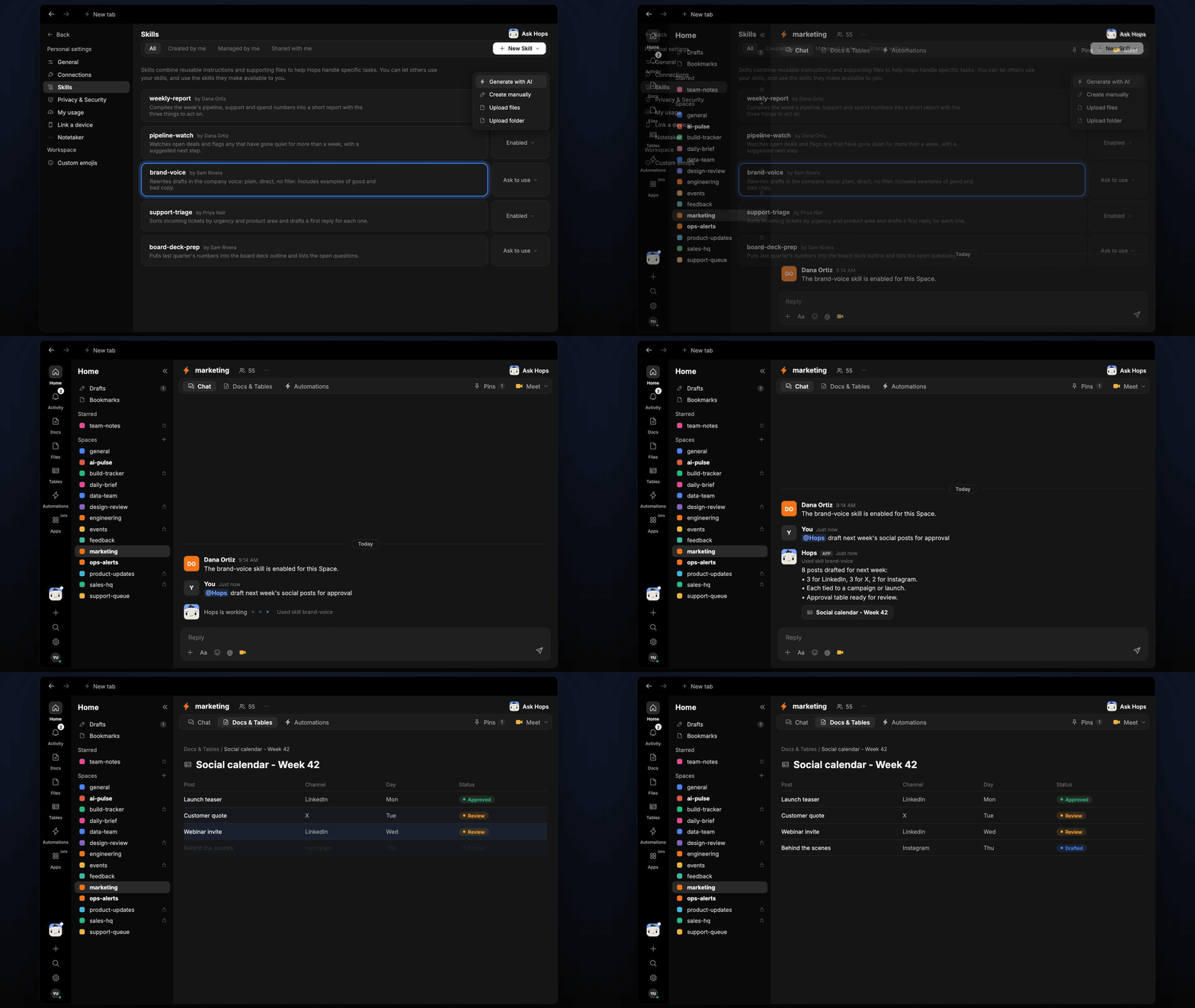
Social posts need drafts, edits and sign-off, and approvals get lost in threads. With the brand-voice skill, Hops drafts the week's posts and keeps an approval table up to date.
**How it runs:** Scheduled. An automation runs every Thursday at 10am, posts the next week's drafts for approval and saves the approval Table. You can also ask Hops any time.
## What it does
* **Drafts for each channel.** Hops writes LinkedIn, X and Instagram posts tied to the content calendar in Space context.
* **Writes in the brand voice.** The brand-voice skill keeps tone consistent, and each post stays within the channel's length limit.
* **Picks images.** Hops suggests visuals from the approved folders in Google Drive for each post.
* **Tracks approvals.** Every post is logged with channel, day and status, and approval requests go out in Slack.
* **Shows what is stuck.** Posts still waiting on sign-off are listed with who they are waiting on.
 ## Ask Hops
Copy a prompt into any chat with Hops, or mention `@Hops` in a Space.
```text theme={null}
Draft next week's social posts for approval.
```
```text theme={null}
Write three LinkedIn posts announcing the Acme webinar, in our brand voice.
```
```text theme={null}
Which social posts are still waiting on approval?
```
```text theme={null}
Suggest an image from Drive for the Globex customer story post.
```
```text theme={null}
Move Tuesday's X post to Thursday and update the approval table.
```
Example reply:
> 8 posts drafted for next week:
>
> * 3 for LinkedIn, 3 for X, 2 for Instagram.
> * Each tied to a campaign or launch.
> * Approval requests sent in Slack, 8 pending.
## What you get
* **A Thursday post** in Slack with the next week's drafts and approval requests.
* **An approval Table** in **Tables** in the Space with each post, channel, day and status, updated as approvals come in.
* **Drafts in a Doc, when you ask for one.** Say "save the drafts as a doc" and Hops writes the full copy to **Docs**.
* **Answers on demand.** Ask Hops to draft or check status any time.
## Connections needed
Connect these apps. Each card opens Connections in the app.
Approval requests and replies.
Approved images and the content calendar.
## Set it up
Connect Slack and Google Drive in **Connections**.
See [Connections](/docs/connections/overview).
Create a **marketing** Space. Pin the content calendar in Space context.
See [Spaces](/docs/spaces/overview) and [Space context](/docs/spaces/space-context).
Give Hops these instructions:
```text theme={null}
Use the brand-voice skill. Draft posts for each channel tied to the content calendar. Keep each under the channel's length. Log every post in the approval table with channel, day and status.
```
See [Build a skill](/docs/agents/build-a-skill).
Every Thursday at 10am Hops drafts the next week's posts. It posts them in Slack for approval and updates the approval Table.
See [Automation](/docs/spaces/automation).
## Related topics
- [Marketing](/teams/marketing/overview.md)
- [Campaign launch](/teams/marketing/use-cases/campaign-launch.md)
- [Invoice approvals](/teams/finance/use-cases/invoice-approvals.md)
- [Copy review and approval](/teams/marketing/use-cases/brand-copywriting.md)
- [Content repurposing](/teams/marketing/use-cases/content-repurposing.md)
This documentation is built and hosted on [Mintlify](https://mintlify.com), a developer documentation platform.
## Ask Hops
Copy a prompt into any chat with Hops, or mention `@Hops` in a Space.
```text theme={null}
Draft next week's social posts for approval.
```
```text theme={null}
Write three LinkedIn posts announcing the Acme webinar, in our brand voice.
```
```text theme={null}
Which social posts are still waiting on approval?
```
```text theme={null}
Suggest an image from Drive for the Globex customer story post.
```
```text theme={null}
Move Tuesday's X post to Thursday and update the approval table.
```
Example reply:
> 8 posts drafted for next week:
>
> * 3 for LinkedIn, 3 for X, 2 for Instagram.
> * Each tied to a campaign or launch.
> * Approval requests sent in Slack, 8 pending.
## What you get
* **A Thursday post** in Slack with the next week's drafts and approval requests.
* **An approval Table** in **Tables** in the Space with each post, channel, day and status, updated as approvals come in.
* **Drafts in a Doc, when you ask for one.** Say "save the drafts as a doc" and Hops writes the full copy to **Docs**.
* **Answers on demand.** Ask Hops to draft or check status any time.
## Connections needed
Connect these apps. Each card opens Connections in the app.
Approval requests and replies.
Approved images and the content calendar.
## Set it up
Connect Slack and Google Drive in **Connections**.
See [Connections](/docs/connections/overview).
Create a **marketing** Space. Pin the content calendar in Space context.
See [Spaces](/docs/spaces/overview) and [Space context](/docs/spaces/space-context).
Give Hops these instructions:
```text theme={null}
Use the brand-voice skill. Draft posts for each channel tied to the content calendar. Keep each under the channel's length. Log every post in the approval table with channel, day and status.
```
See [Build a skill](/docs/agents/build-a-skill).
Every Thursday at 10am Hops drafts the next week's posts. It posts them in Slack for approval and updates the approval Table.
See [Automation](/docs/spaces/automation).
## Related topics
- [Marketing](/teams/marketing/overview.md)
- [Campaign launch](/teams/marketing/use-cases/campaign-launch.md)
- [Invoice approvals](/teams/finance/use-cases/invoice-approvals.md)
- [Copy review and approval](/teams/marketing/use-cases/brand-copywriting.md)
- [Content repurposing](/teams/marketing/use-cases/content-repurposing.md)
This documentation is built and hosted on [Mintlify](https://mintlify.com), a developer documentation platform.