> ## Documentation Index
> Fetch the complete documentation index at: https://hopsdocs.mintlify.site/llms.txt
> Use this file to discover all available pages before exploring further.
# Paid campaign report
> A weekly table of spend, results and what to change.
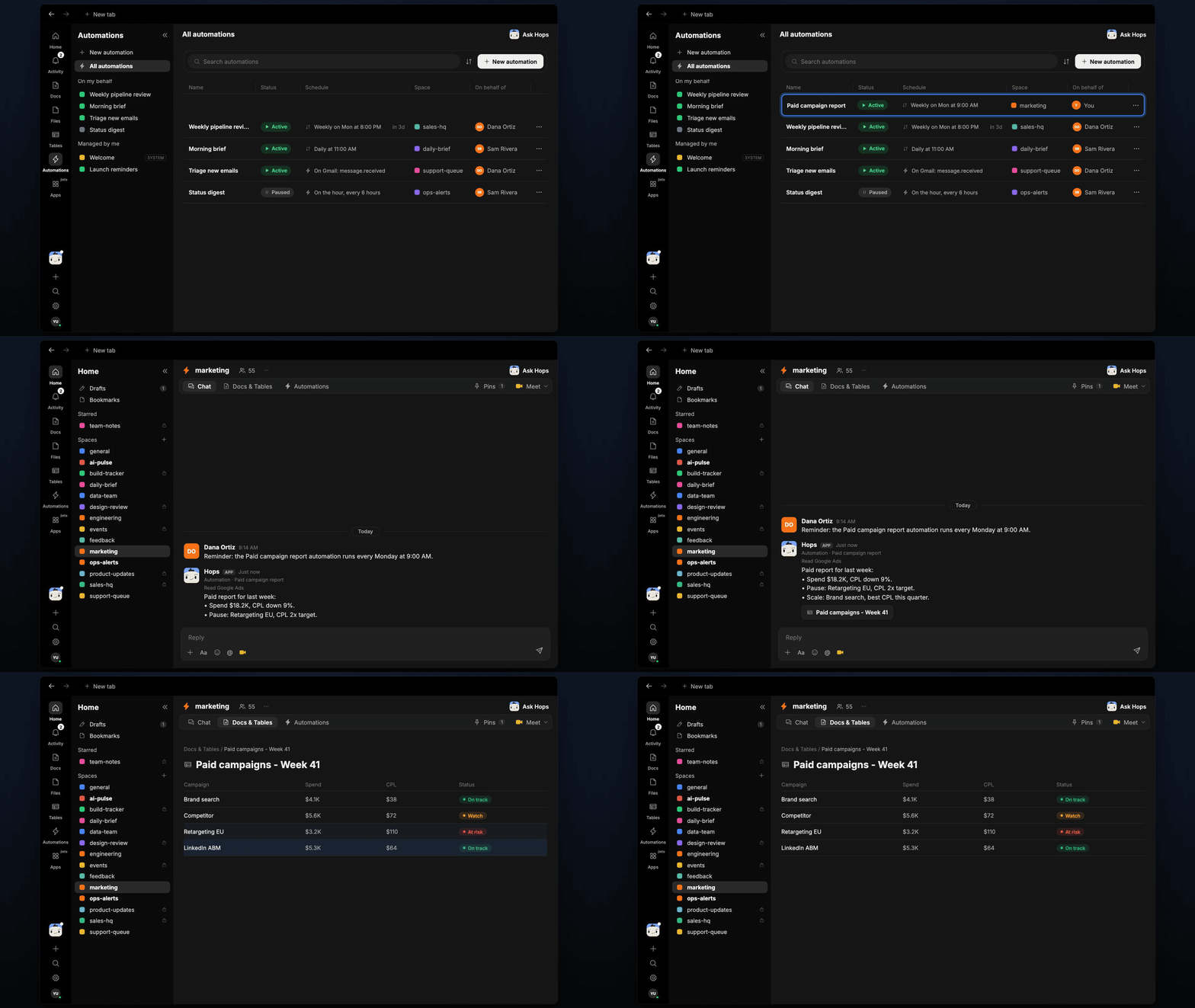
Every Monday someone pulls ad numbers from several platforms into a sheet. Hops builds the report automatically, compares each campaign with target and suggests what to pause or scale.
**How it runs:** Scheduled. An automation runs every Monday at 9:00 AM, posts the summary and saves the campaign Table. You can also ask Hops any time.
## What it does
* **Pulls numbers from each platform.** Hops reads Google Ads and LinkedIn Ads for spend and leads, and Google Analytics for site results.
* **Builds one table.** Each campaign gets spend, leads, CPL and status against the target pinned in Space context.
* **Recommends changes.** Hops suggests up to two campaigns to pause and two to scale, with the reason for each.
* **Compares with last week.** Changes in spend and CPL are shown so trends stand out.
* **Calls out gaps.** If a platform has no data for the period or a campaign has no target set, Hops says so instead of guessing.
 ## Ask Hops
Copy a prompt into any chat with Hops, or mention `@Hops` in a Space.
```text theme={null}
Build the paid campaign report for last week.
```
```text theme={null}
Which campaigns are over our CPL target this month?
```
```text theme={null}
Compare Google Ads and LinkedIn Ads results for the Acme webinar campaign.
```
```text theme={null}
Which two campaigns should we pause, and which should we scale?
```
```text theme={null}
How did Brand search perform over the last 4 weeks?
```
Example reply:
> Paid report for last week:
>
> * Spend \$18.2K, CPL down 9%.
> * Pause: Retargeting EU, CPL 2x target.
> * Scale: Brand search, best CPL this quarter.
## What you get
* **A Monday post** in the Space chat (or Slack) with the headline numbers and the pause and scale suggestions.
* **A campaign Table** in **Tables** in the Space with spend, leads, CPL and status per campaign, updated every run.
* **Answers on demand.** Ask Hops for a report or a single campaign any time.
## Connections needed
Connect these apps. Each card opens Connections in the app.
Spend, leads and CPL by campaign.
LinkedIn campaign spend and results.
Site traffic and conversions.
## Set it up
Connect Google Ads, LinkedIn Ads and Google Analytics in **Connections**.
See [Connections](/docs/connections/overview).
Create a **marketing** Space. Pin CPL targets in Space context.
See [Spaces](/docs/spaces/overview) and [Space context](/docs/spaces/space-context).
Give Hops these instructions:
```text theme={null}
You report on paid campaigns. Table of spend, leads, CPL and status vs target per campaign. Suggest up to two campaigns to pause and two to scale, with reasons.
```
See [Build a skill](/docs/agents/build-a-skill).
Runs every Monday at 9:00 AM. It posts the summary to the Space chat and updates the campaign Table.
See [Automation](/docs/spaces/automation).
## Related topics
- [Marketing](/teams/marketing/overview.md)
- [Commission checks](/teams/revops/use-cases/commissions.md)
- [Campaign launch](/teams/marketing/use-cases/campaign-launch.md)
- [Explore use cases](/use-cases/overview.md)
- [Skills](/agents/skills.md)
This documentation is built and hosted on [Mintlify](https://mintlify.com), a developer documentation platform.
## Ask Hops
Copy a prompt into any chat with Hops, or mention `@Hops` in a Space.
```text theme={null}
Build the paid campaign report for last week.
```
```text theme={null}
Which campaigns are over our CPL target this month?
```
```text theme={null}
Compare Google Ads and LinkedIn Ads results for the Acme webinar campaign.
```
```text theme={null}
Which two campaigns should we pause, and which should we scale?
```
```text theme={null}
How did Brand search perform over the last 4 weeks?
```
Example reply:
> Paid report for last week:
>
> * Spend \$18.2K, CPL down 9%.
> * Pause: Retargeting EU, CPL 2x target.
> * Scale: Brand search, best CPL this quarter.
## What you get
* **A Monday post** in the Space chat (or Slack) with the headline numbers and the pause and scale suggestions.
* **A campaign Table** in **Tables** in the Space with spend, leads, CPL and status per campaign, updated every run.
* **Answers on demand.** Ask Hops for a report or a single campaign any time.
## Connections needed
Connect these apps. Each card opens Connections in the app.
Spend, leads and CPL by campaign.
LinkedIn campaign spend and results.
Site traffic and conversions.
## Set it up
Connect Google Ads, LinkedIn Ads and Google Analytics in **Connections**.
See [Connections](/docs/connections/overview).
Create a **marketing** Space. Pin CPL targets in Space context.
See [Spaces](/docs/spaces/overview) and [Space context](/docs/spaces/space-context).
Give Hops these instructions:
```text theme={null}
You report on paid campaigns. Table of spend, leads, CPL and status vs target per campaign. Suggest up to two campaigns to pause and two to scale, with reasons.
```
See [Build a skill](/docs/agents/build-a-skill).
Runs every Monday at 9:00 AM. It posts the summary to the Space chat and updates the campaign Table.
See [Automation](/docs/spaces/automation).
## Related topics
- [Marketing](/teams/marketing/overview.md)
- [Commission checks](/teams/revops/use-cases/commissions.md)
- [Campaign launch](/teams/marketing/use-cases/campaign-launch.md)
- [Explore use cases](/use-cases/overview.md)
- [Skills](/agents/skills.md)
This documentation is built and hosted on [Mintlify](https://mintlify.com), a developer documentation platform.