> ## Documentation Index
> Fetch the complete documentation index at: https://hopsdocs.mintlify.site/llms.txt
> Use this file to discover all available pages before exploring further.
# Messaging accuracy
> Catch outdated claims and pricing on your site every week.
Websites drift from the product: old prices, retired integrations and features that changed. Every Monday Hops checks your key pages against current pricing and product docs and flags anything outdated.
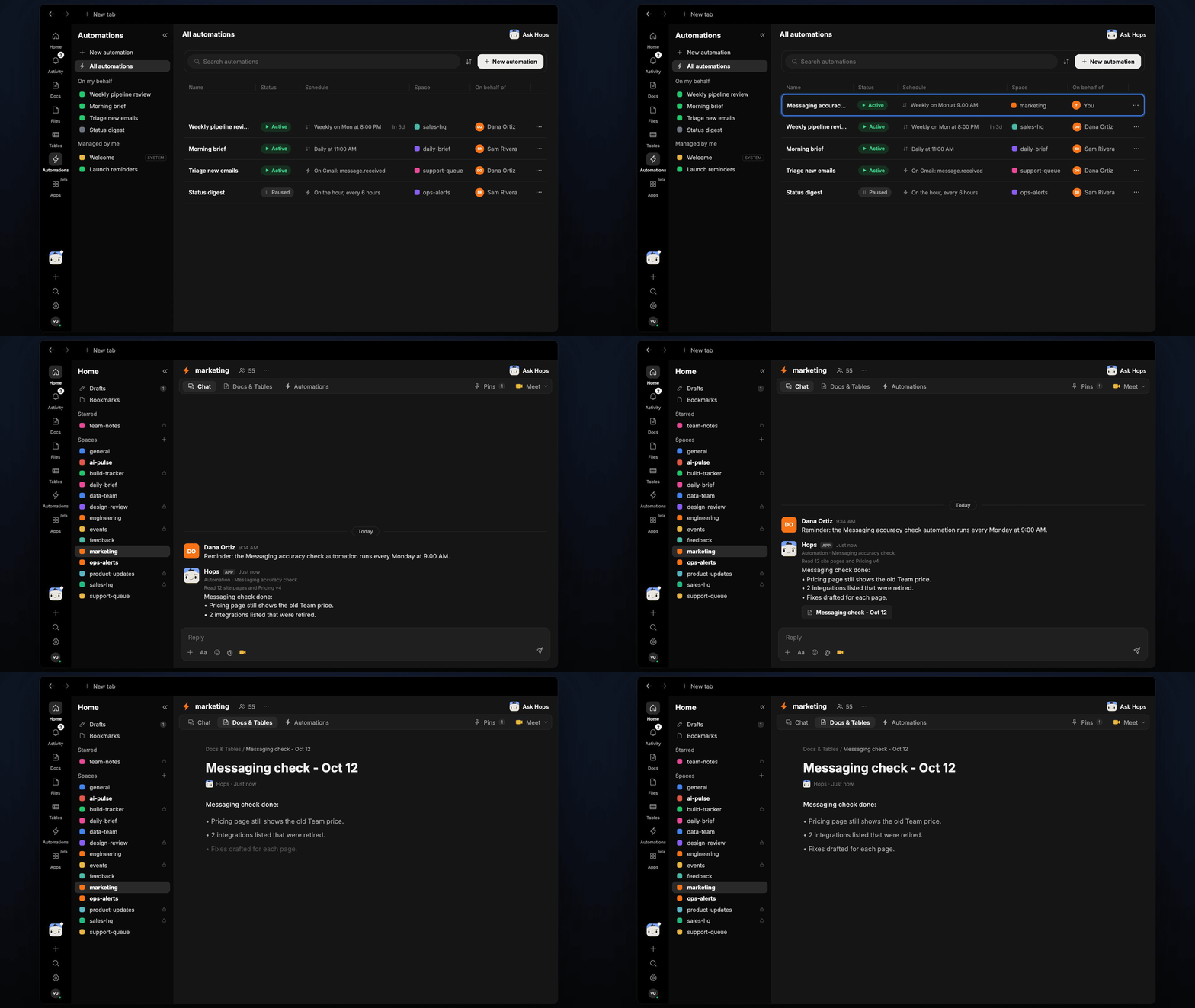
**How it runs:** Scheduled. An automation runs every Monday at 9:00 AM, posts the outdated claims and saves a dated Doc. You can also ask Hops any time.
## What it does
* **Reads your key pages.** Hops fetches the site pages you list, such as pricing, product and integrations.
* **Compares with the source of truth.** Claims are checked against the current pricing and product overview pinned in Space context.
* **Flags exact text.** Each finding quotes the outdated line, says what it should be and links the page.
* **Catches more than prices.** Retired integrations, renamed features, old limits and stale stats all get flagged.
* **Drafts the fix.** Hops writes replacement copy for each finding so the web team can paste it in.
 ## Ask Hops
Copy a prompt into any chat with Hops, or mention `@Hops` in a Space.
```text theme={null}
Check our site messaging for accuracy against Pricing v4.
```
```text theme={null}
Does the pricing page still show the old Team price?
```
```text theme={null}
Which integrations on our site have been retired?
```
```text theme={null}
Compare the Acme landing page with the current product overview and list anything outdated.
```
```text theme={null}
What did last Monday's messaging check find, and which fixes are still open?
```
Example reply:
> Messaging check done on 12 pages:
>
> * Pricing page still shows the old Team price.
> * 2 integrations listed that were retired.
> * Fixes drafted for each page.
## What you get
* **A Monday post** in Slack (or the Space chat) listing outdated claims by page.
* **A dated Doc** in **Docs** in the Space with each finding, the exact text and the drafted fix.
* **Answers on demand.** Ask Hops to check a page or claim any time.
## Connections needed
Connect these apps. Each card opens Connections in the app.
Pricing and product docs to check against.
Where the weekly findings get posted.
Hops reads your public site pages with web research, so no card is needed for those.
## Set it up
Connect Google Docs and Slack in **Connections**.
See [Connections](/docs/connections/overview).
Create a **marketing** Space. Pin current pricing, the product overview and the list of pages to check in Space context.
See [Spaces](/docs/spaces/overview) and [Space context](/docs/spaces/space-context).
Give Hops these instructions:
```text theme={null}
You check messaging. Compare key site pages with current pricing and product docs. Flag outdated prices, features and claims with the exact text and a suggested fix.
```
See [Build a skill](/docs/agents/build-a-skill).
Runs every Monday at 9:00 AM. It posts findings to the Space chat and saves a dated Doc.
See [Automation](/docs/spaces/automation).
## Related topics
- [Marketing](/teams/marketing/overview.md)
- [Tables](/artifacts/tables.md)
- [Post-call follow-up](/teams/sales/use-cases/post-call-follow-up.md)
This documentation is built and hosted on [Mintlify](https://mintlify.com), a developer documentation platform.
## Ask Hops
Copy a prompt into any chat with Hops, or mention `@Hops` in a Space.
```text theme={null}
Check our site messaging for accuracy against Pricing v4.
```
```text theme={null}
Does the pricing page still show the old Team price?
```
```text theme={null}
Which integrations on our site have been retired?
```
```text theme={null}
Compare the Acme landing page with the current product overview and list anything outdated.
```
```text theme={null}
What did last Monday's messaging check find, and which fixes are still open?
```
Example reply:
> Messaging check done on 12 pages:
>
> * Pricing page still shows the old Team price.
> * 2 integrations listed that were retired.
> * Fixes drafted for each page.
## What you get
* **A Monday post** in Slack (or the Space chat) listing outdated claims by page.
* **A dated Doc** in **Docs** in the Space with each finding, the exact text and the drafted fix.
* **Answers on demand.** Ask Hops to check a page or claim any time.
## Connections needed
Connect these apps. Each card opens Connections in the app.
Pricing and product docs to check against.
Where the weekly findings get posted.
Hops reads your public site pages with web research, so no card is needed for those.
## Set it up
Connect Google Docs and Slack in **Connections**.
See [Connections](/docs/connections/overview).
Create a **marketing** Space. Pin current pricing, the product overview and the list of pages to check in Space context.
See [Spaces](/docs/spaces/overview) and [Space context](/docs/spaces/space-context).
Give Hops these instructions:
```text theme={null}
You check messaging. Compare key site pages with current pricing and product docs. Flag outdated prices, features and claims with the exact text and a suggested fix.
```
See [Build a skill](/docs/agents/build-a-skill).
Runs every Monday at 9:00 AM. It posts findings to the Space chat and saves a dated Doc.
See [Automation](/docs/spaces/automation).
## Related topics
- [Marketing](/teams/marketing/overview.md)
- [Tables](/artifacts/tables.md)
- [Post-call follow-up](/teams/sales/use-cases/post-call-follow-up.md)
This documentation is built and hosted on [Mintlify](https://mintlify.com), a developer documentation platform.