> ## Documentation Index
> Fetch the complete documentation index at: https://hopsdocs.mintlify.site/llms.txt
> Use this file to discover all available pages before exploring further.
# Localization review
> Review translated copy for tone, terms and errors.
Translations miss tone and product terms, and the errors reach customers before anyone who speaks the language sees them. With a localization skill, Hops reviews each locale against your glossary and lists the fixes.
**How it runs:** Scheduled. An automation runs every weekday at 2pm before launches, posts new locale issues and saves the review as a Table. You can also ask Hops any time.
## What it does
* **Checks the glossary.** Hops compares product terms in each locale with the glossary in Space context and flags wrong or inconsistent translations.
* **Reviews tone.** It notes where copy is too formal, too casual or off from the brand voice for that market.
* **Lists every issue with a fix.** Each row shows the original, the translation, the problem and the suggested correction.
* **Never retranslates whole pages.** Hops fixes the specific lines, so approved translations stay as they are.
* **Watches for new files.** Before launches, Hops picks up new or changed locale files in Google Docs and reviews only what changed.
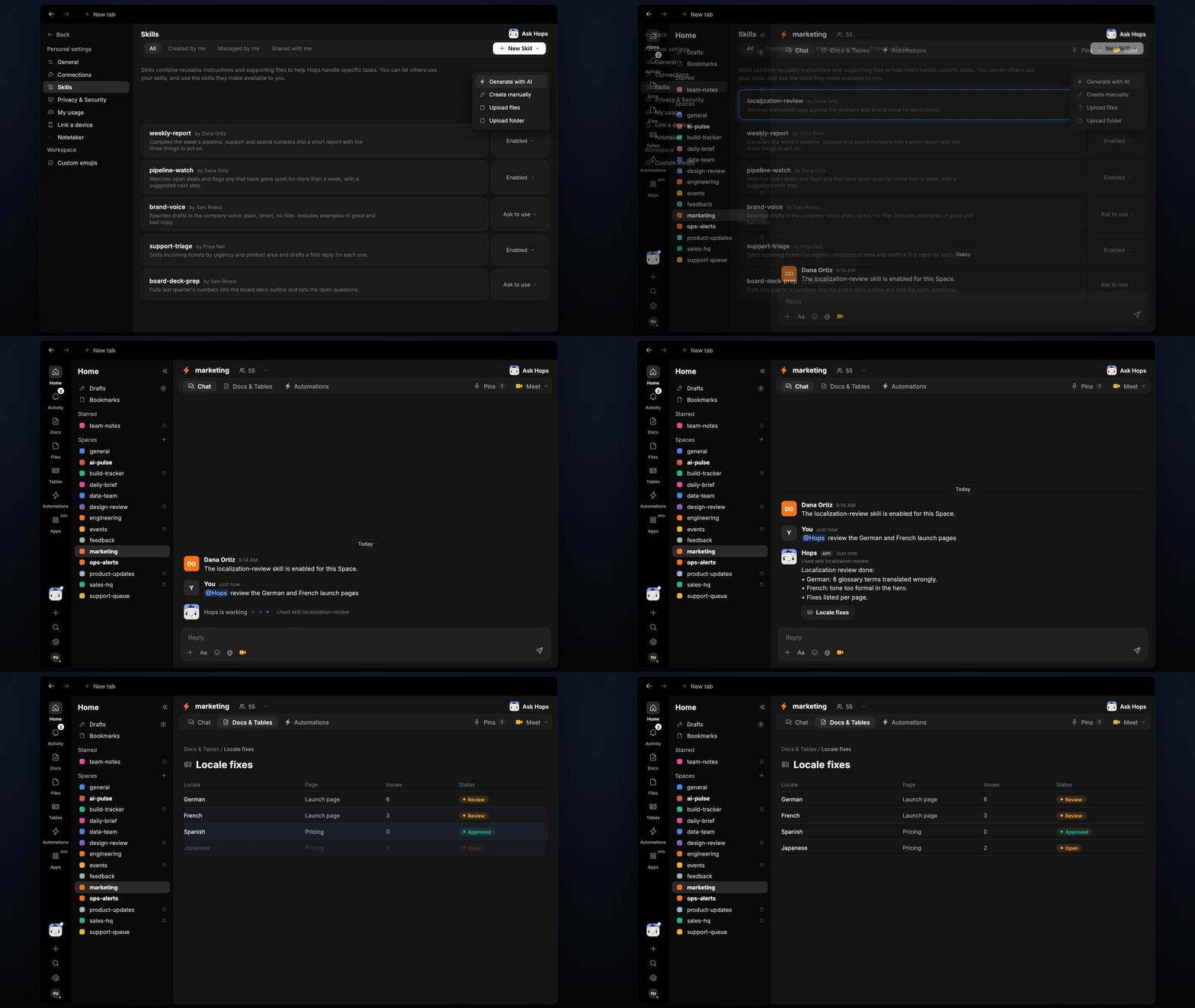 ## Ask Hops
Copy a prompt into any chat with Hops, or mention `@Hops` in a Space.
```text theme={null}
Review the German and French launch pages against our glossary.
```
```text theme={null}
Which glossary terms did the Spanish translation get wrong?
```
```text theme={null}
Is the Japanese hero copy too formal for our brand voice? Suggest fixes.
```
```text theme={null}
What changed in the Globex landing page locale files since yesterday, and are the new lines correct?
```
```text theme={null}
List every open localization fix for the Acme launch, grouped by locale.
```
Example reply:
> Localization review done:
>
> * German: 6 glossary terms translated wrongly.
> * French: tone too formal in the hero.
> * Fixes listed per page, with the original and the suggested line.
## What you get
* **A 2pm post** in Slack (or the Space chat) when new locale issues are found, grouped by locale.
* **A fixes Table** in **Tables** in the Space with locale, page, original, translation, issue and fix, updated each run.
* **A review Doc, when you ask for one.** Say "save this as a doc" and Hops writes the summary to **Docs**.
* **Answers on demand.** Ask Hops to review a locale any time.
## Connections needed
Connect these apps. Each card opens Connections in the app.
Locale files and the glossary.
Where review results get posted.
## Set it up
Connect Google Docs and Slack in **Connections**.
See [Connections](/docs/connections/overview).
Create a **marketing** Space. Pin the glossary in Space context.
See [Spaces](/docs/spaces/overview) and [Space context](/docs/spaces/space-context).
Give Hops these instructions:
```text theme={null}
You review translations. Check glossary terms, tone and errors for each locale. List each issue with the original, the translation and a fix. Never retranslate whole pages.
```
See [Build a skill](/docs/agents/build-a-skill).
Before launches, Hops reviews new locale files every weekday at 2pm. It posts new issues to the Space chat and updates the fixes Table.
See [Automation](/docs/spaces/automation).
## Related topics
- [Marketing](/teams/marketing/overview.md)
- [Pipeline review](/teams/revops/use-cases/pipeline-review.md)
- [Spec review](/teams/product-engineering/use-cases/spec-review.md)
- [Performance review prep](/teams/hr-people-ops/use-cases/performance-reviews.md)
- [Copy review and approval](/teams/marketing/use-cases/brand-copywriting.md)
This documentation is built and hosted on [Mintlify](https://mintlify.com), a developer documentation platform.
## Ask Hops
Copy a prompt into any chat with Hops, or mention `@Hops` in a Space.
```text theme={null}
Review the German and French launch pages against our glossary.
```
```text theme={null}
Which glossary terms did the Spanish translation get wrong?
```
```text theme={null}
Is the Japanese hero copy too formal for our brand voice? Suggest fixes.
```
```text theme={null}
What changed in the Globex landing page locale files since yesterday, and are the new lines correct?
```
```text theme={null}
List every open localization fix for the Acme launch, grouped by locale.
```
Example reply:
> Localization review done:
>
> * German: 6 glossary terms translated wrongly.
> * French: tone too formal in the hero.
> * Fixes listed per page, with the original and the suggested line.
## What you get
* **A 2pm post** in Slack (or the Space chat) when new locale issues are found, grouped by locale.
* **A fixes Table** in **Tables** in the Space with locale, page, original, translation, issue and fix, updated each run.
* **A review Doc, when you ask for one.** Say "save this as a doc" and Hops writes the summary to **Docs**.
* **Answers on demand.** Ask Hops to review a locale any time.
## Connections needed
Connect these apps. Each card opens Connections in the app.
Locale files and the glossary.
Where review results get posted.
## Set it up
Connect Google Docs and Slack in **Connections**.
See [Connections](/docs/connections/overview).
Create a **marketing** Space. Pin the glossary in Space context.
See [Spaces](/docs/spaces/overview) and [Space context](/docs/spaces/space-context).
Give Hops these instructions:
```text theme={null}
You review translations. Check glossary terms, tone and errors for each locale. List each issue with the original, the translation and a fix. Never retranslate whole pages.
```
See [Build a skill](/docs/agents/build-a-skill).
Before launches, Hops reviews new locale files every weekday at 2pm. It posts new issues to the Space chat and updates the fixes Table.
See [Automation](/docs/spaces/automation).
## Related topics
- [Marketing](/teams/marketing/overview.md)
- [Pipeline review](/teams/revops/use-cases/pipeline-review.md)
- [Spec review](/teams/product-engineering/use-cases/spec-review.md)
- [Performance review prep](/teams/hr-people-ops/use-cases/performance-reviews.md)
- [Copy review and approval](/teams/marketing/use-cases/brand-copywriting.md)
This documentation is built and hosted on [Mintlify](https://mintlify.com), a developer documentation platform.