> ## Documentation Index
> Fetch the complete documentation index at: https://hopsdocs.mintlify.site/llms.txt
> Use this file to discover all available pages before exploring further.
# Customer proof finder
> Find quotes, logos and stats you can use, with permission status.
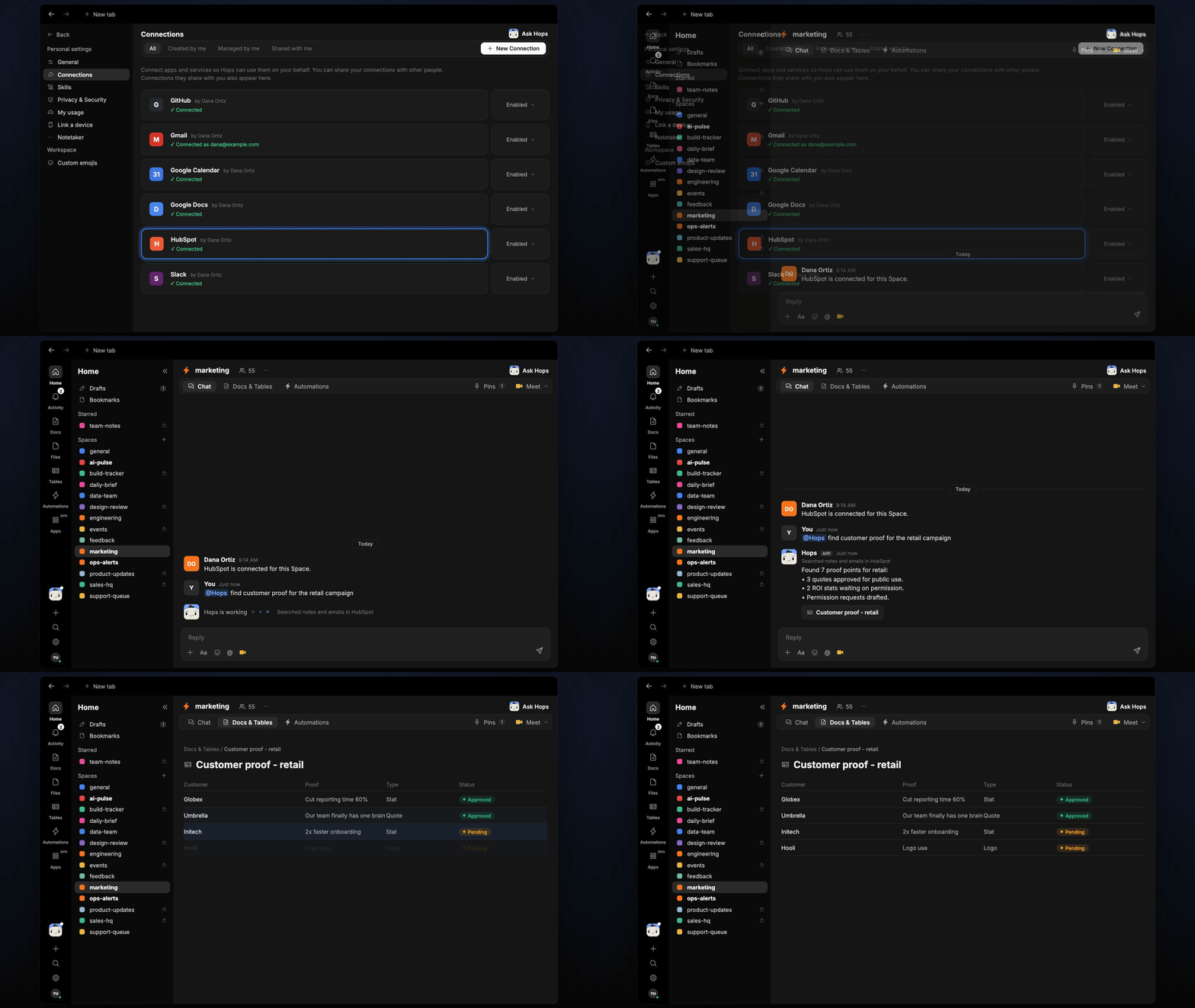
Proof points are scattered across calls, notes and emails, and nobody remembers which ones customers agreed to share. Hops searches your CRM and inbox for quotes and results and tracks permission status for each.
**How it runs:** Ask Hops. No skill or automation needed. Connect your apps and ask in any chat.
## What it does
* **Searches notes and emails.** Hops reads HubSpot (or Salesforce) notes and Gmail threads for quotes, results and ROI numbers.
* **Tracks the type and source.** Each proof point is labeled as a quote, logo or stat, with the account, the person and where it came from.
* **Checks permission status.** Hops separates what is approved for public use from what is still waiting on a customer's yes.
* **Drafts permission requests.** For anything not yet approved, Hops writes a short email draft you can review and send.
* **Filters by campaign.** Ask for a segment, such as retail or fintech, and Hops returns only matching proof.
 ## Ask Hops
Copy a prompt into any chat with Hops, or mention `@Hops` in a Space.
```text theme={null}
Find customer proof for the retail campaign, with permission status.
```
```text theme={null}
Do we have a quote from Globex we can use publicly?
```
```text theme={null}
List every ROI stat from customers in the last 6 months and who approved it.
```
```text theme={null}
Draft permission requests for the Northwind results we want in the case study.
```
```text theme={null}
Which customers said something positive about onboarding in the past quarter?
```
Example reply:
> Found 7 proof points for retail:
>
> * 3 quotes approved for public use, including Globex.
> * 2 ROI stats waiting on permission, from Acme and Northwind.
> * Permission requests drafted in Gmail for both.
## What you get
* **An answer in chat**, in the same thread, with the source note or email and permission status for each proof point.
* **Email drafts** for permission requests, ready to review in Gmail.
* **A saved Doc or Table, when you ask for one.** Say "save this as a table" and Hops writes the proof library to **Tables** in the Space, or a summary to **Docs**.
## Connections needed
Connect these apps. Each card opens Connections in the app.
Notes, deals and contacts (or Salesforce).
Customer emails and permission request drafts.
Customer feedback shared in channels.
## Set it up
Connect HubSpot or Salesforce, Gmail and Slack in **Connections**.
See [Connections](/docs/connections/overview).
Create a **marketing** Space and pin your approved customer list and any permission rules in Space context.
See [Spaces](/docs/spaces/overview) and [Space context](/docs/spaces/space-context).
Ask Hops for proof in chat. That's it.
## Related topics
- [Marketing](/teams/marketing/overview.md)
- [Brand asset finder](/teams/marketing/use-cases/brand-assets.md)
- [Customer deck](/teams/sales/use-cases/customer-deck.md)
- [Ship announcements](/teams/product-engineering/use-cases/ship-announcements.md)
- [Feedback mining](/teams/product-engineering/use-cases/feedback-mining.md)
This documentation is built and hosted on [Mintlify](https://mintlify.com), a developer documentation platform.
## Ask Hops
Copy a prompt into any chat with Hops, or mention `@Hops` in a Space.
```text theme={null}
Find customer proof for the retail campaign, with permission status.
```
```text theme={null}
Do we have a quote from Globex we can use publicly?
```
```text theme={null}
List every ROI stat from customers in the last 6 months and who approved it.
```
```text theme={null}
Draft permission requests for the Northwind results we want in the case study.
```
```text theme={null}
Which customers said something positive about onboarding in the past quarter?
```
Example reply:
> Found 7 proof points for retail:
>
> * 3 quotes approved for public use, including Globex.
> * 2 ROI stats waiting on permission, from Acme and Northwind.
> * Permission requests drafted in Gmail for both.
## What you get
* **An answer in chat**, in the same thread, with the source note or email and permission status for each proof point.
* **Email drafts** for permission requests, ready to review in Gmail.
* **A saved Doc or Table, when you ask for one.** Say "save this as a table" and Hops writes the proof library to **Tables** in the Space, or a summary to **Docs**.
## Connections needed
Connect these apps. Each card opens Connections in the app.
Notes, deals and contacts (or Salesforce).
Customer emails and permission request drafts.
Customer feedback shared in channels.
## Set it up
Connect HubSpot or Salesforce, Gmail and Slack in **Connections**.
See [Connections](/docs/connections/overview).
Create a **marketing** Space and pin your approved customer list and any permission rules in Space context.
See [Spaces](/docs/spaces/overview) and [Space context](/docs/spaces/space-context).
Ask Hops for proof in chat. That's it.
## Related topics
- [Marketing](/teams/marketing/overview.md)
- [Brand asset finder](/teams/marketing/use-cases/brand-assets.md)
- [Customer deck](/teams/sales/use-cases/customer-deck.md)
- [Ship announcements](/teams/product-engineering/use-cases/ship-announcements.md)
- [Feedback mining](/teams/product-engineering/use-cases/feedback-mining.md)
This documentation is built and hosted on [Mintlify](https://mintlify.com), a developer documentation platform.