> ## Documentation Index
> Fetch the complete documentation index at: https://hopsdocs.mintlify.site/llms.txt
> Use this file to discover all available pages before exploring further.
# Content repurposing
> Turn one piece of content into blog, social, email and more, with the brand context already loaded.
You have a long-form asset like a webinar, launch post or customer story, and turning it into shorter formats means rewriting the brand voice every time. Hops repurposes it for each channel with the brand guide already loaded.
**How it runs:** Scheduled. An automation runs every week, posts the repurposed drafts for review and saves them as a Doc. You can also ask Hops any time.
## What it does
* **Reads the source asset.** Hops works from a file in Space context or a link in Google Drive, such as a webinar recording, post or customer story.
* **Writes for each channel.** It drafts blog, email, LinkedIn and X versions, each at the right length and format.
* **Matches the brand voice.** Tone follows the brand guide and style guide pinned in Space context.
* **Never invents stats.** The original claims stay intact, and every draft cites the source asset so the team can trace it.
* **Scans for new content.** Each week Hops finds newly published content and drafts a repurposed version for each channel, ready for review.
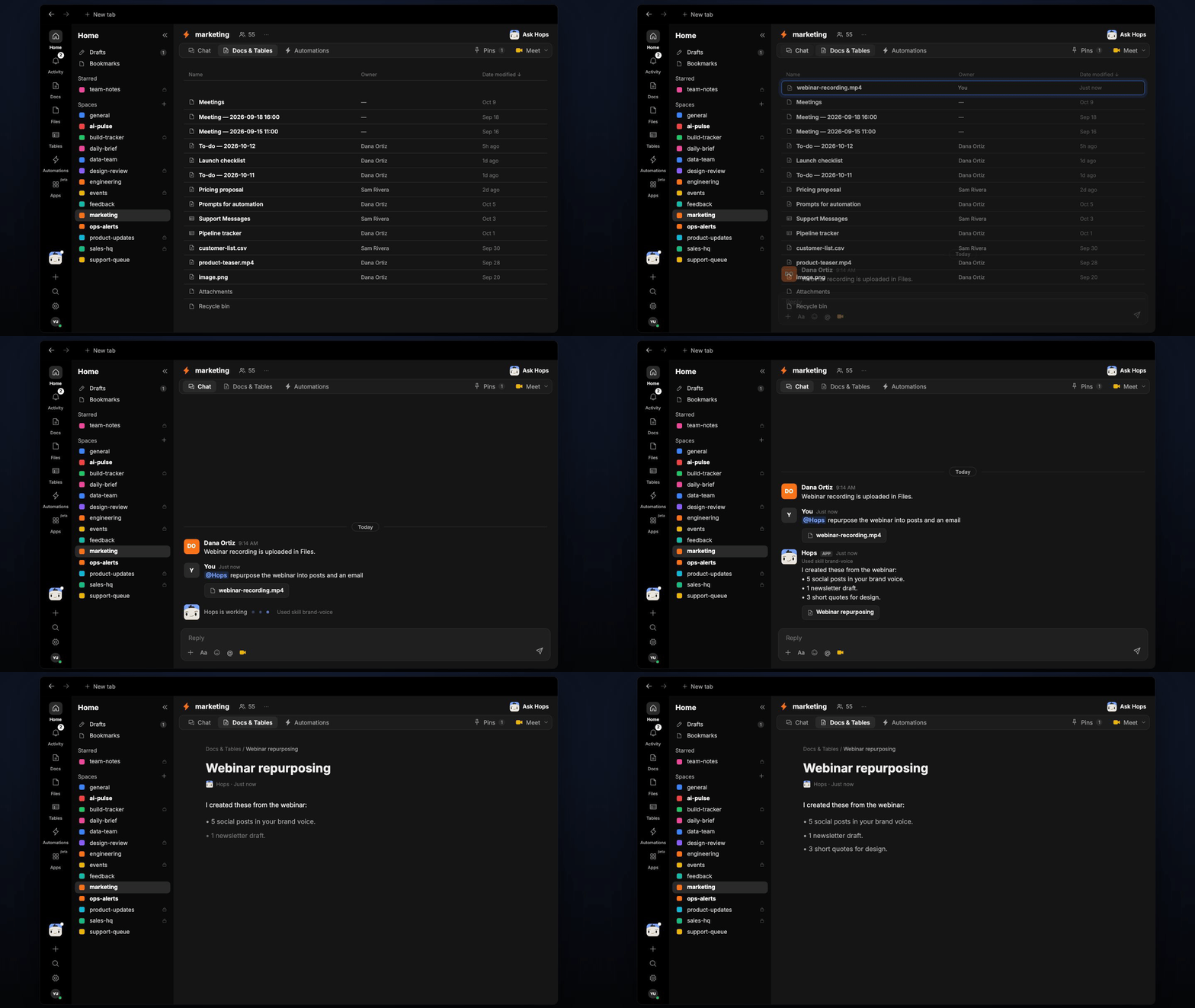 ## Ask Hops
Copy a prompt into any chat with Hops, or mention `@Hops` in a Space.
```text theme={null}
Repurpose the Acme webinar recording into 5 social posts and a newsletter draft.
```
```text theme={null}
Turn our latest launch post into a LinkedIn post, an X thread and a customer email.
```
```text theme={null}
Pull 3 short quotes from the Globex customer story for design.
```
```text theme={null}
What did we publish this week that we have not repurposed yet?
```
```text theme={null}
Rewrite this blog post as a 150 word email in our brand voice.
```
Example reply:
> I created these from the webinar:
>
> * 5 social posts in your brand voice.
> * 1 newsletter draft.
> * 3 short quotes for design.
> * All cite the webinar recording as the source.
## What you get
* **A weekly post** in Slack (or the Space chat) with the drafts ready for review.
* **A dated Doc** in **Docs** in the Space with every channel draft and the source asset it came from.
* **Answers on demand.** Ask Hops to repurpose any asset in chat.
## Connections needed
Connect these apps. Each card opens Connections in the app.
Source assets and the brand guide.
Finds newly published content.
Where approved posts get scheduled.
Content review channel.
## Set it up
Connect Google Drive, your CMS, your social scheduling tool and Slack in **Connections**.
See [Connections](/docs/connections/overview).
Create a **marketing** Space for content operations. Pin the brand guide, style guide and a running list of source assets in Space context.
See [Spaces](/docs/spaces/overview) and [Space context](/docs/spaces/space-context).
Give Hops these instructions:
```text theme={null}
You repurpose long-form marketing content into blog, email, LinkedIn, and X formats. Always match the tone in the brand guide. Keep the original claim structure. Never invent stats. Cite the source asset in the artifact so the team can trace it.
```
See [Build a skill](/docs/agents/build-a-skill).
Every week Hops scans new published content and drafts a repurposed version for each channel. It posts to the content review channel and saves a dated Doc.
See [Automation](/docs/spaces/automation).
## Related topics
- [Marketing](/teams/marketing/overview.md)
- [Explore use cases](/use-cases/overview.md)
- [Spaces overview](/spaces/overview.md)
- [Skills](/agents/skills.md)
- [Content ideas from search](/teams/marketing/use-cases/content-ideas.md)
This documentation is built and hosted on [Mintlify](https://mintlify.com), a developer documentation platform.
## Ask Hops
Copy a prompt into any chat with Hops, or mention `@Hops` in a Space.
```text theme={null}
Repurpose the Acme webinar recording into 5 social posts and a newsletter draft.
```
```text theme={null}
Turn our latest launch post into a LinkedIn post, an X thread and a customer email.
```
```text theme={null}
Pull 3 short quotes from the Globex customer story for design.
```
```text theme={null}
What did we publish this week that we have not repurposed yet?
```
```text theme={null}
Rewrite this blog post as a 150 word email in our brand voice.
```
Example reply:
> I created these from the webinar:
>
> * 5 social posts in your brand voice.
> * 1 newsletter draft.
> * 3 short quotes for design.
> * All cite the webinar recording as the source.
## What you get
* **A weekly post** in Slack (or the Space chat) with the drafts ready for review.
* **A dated Doc** in **Docs** in the Space with every channel draft and the source asset it came from.
* **Answers on demand.** Ask Hops to repurpose any asset in chat.
## Connections needed
Connect these apps. Each card opens Connections in the app.
Source assets and the brand guide.
Finds newly published content.
Where approved posts get scheduled.
Content review channel.
## Set it up
Connect Google Drive, your CMS, your social scheduling tool and Slack in **Connections**.
See [Connections](/docs/connections/overview).
Create a **marketing** Space for content operations. Pin the brand guide, style guide and a running list of source assets in Space context.
See [Spaces](/docs/spaces/overview) and [Space context](/docs/spaces/space-context).
Give Hops these instructions:
```text theme={null}
You repurpose long-form marketing content into blog, email, LinkedIn, and X formats. Always match the tone in the brand guide. Keep the original claim structure. Never invent stats. Cite the source asset in the artifact so the team can trace it.
```
See [Build a skill](/docs/agents/build-a-skill).
Every week Hops scans new published content and drafts a repurposed version for each channel. It posts to the content review channel and saves a dated Doc.
See [Automation](/docs/spaces/automation).
## Related topics
- [Marketing](/teams/marketing/overview.md)
- [Explore use cases](/use-cases/overview.md)
- [Spaces overview](/spaces/overview.md)
- [Skills](/agents/skills.md)
- [Content ideas from search](/teams/marketing/use-cases/content-ideas.md)
This documentation is built and hosted on [Mintlify](https://mintlify.com), a developer documentation platform.