> ## Documentation Index
> Fetch the complete documentation index at: https://hopsdocs.mintlify.site/llms.txt
> Use this file to discover all available pages before exploring further.
# Content ideas from search
> Turn search terms and ad data into content ideas.
Your ad data shows what people search for, but it rarely makes it into the content plan. Connect Google Ads and Google Analytics and Hops turns search terms into content ideas ranked by demand.
**How it runs:** Scheduled. An automation runs on day 2 of each month at 9am, posts the new ideas and saves them as a Table. You can also ask Hops any time.
## What it does
* **Reads search terms.** Hops pulls last month's search terms from Google Ads and traffic by page from Google Analytics.
* **Finds gaps.** It groups terms into themes and flags the ones with demand and no matching page on your site.
* **Ranks by demand and fit.** Ideas are ordered by search volume and how well they match the content pillars in Space context.
* **Drafts outlines.** The top three ideas get a short outline with a working title, angle and key points.
* **Skips what you already cover.** Themes that already have a strong page are left out or marked as refresh candidates.
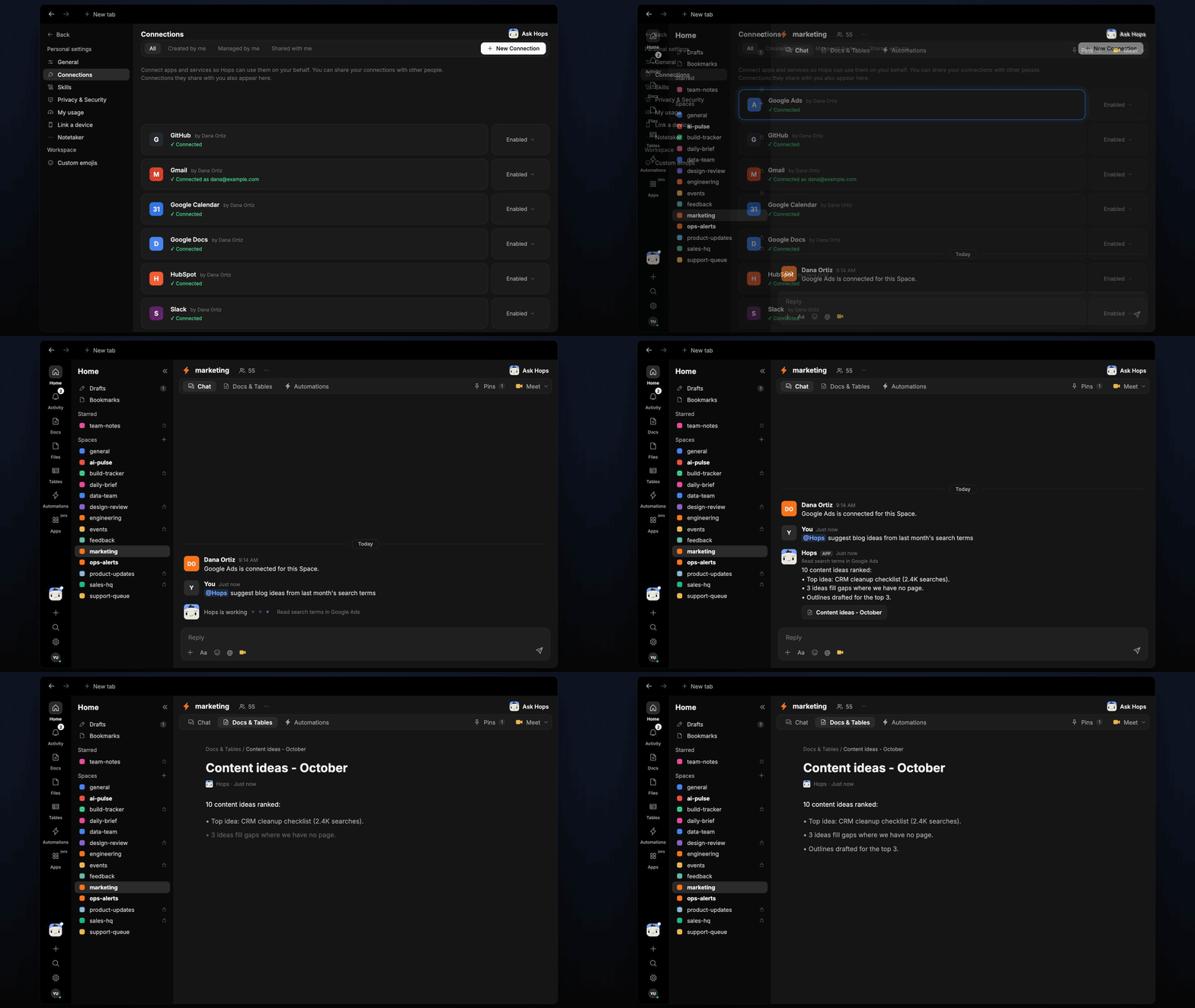 ## Ask Hops
Copy a prompt into any chat with Hops, or mention `@Hops` in a Space.
```text theme={null}
Suggest blog ideas from last month's Google Ads search terms.
```
```text theme={null}
Which search terms bring clicks but have no page on our site?
```
```text theme={null}
Draft outlines for the top 3 ideas, tied to our content pillars.
```
```text theme={null}
Which of our existing posts should we refresh based on search demand?
```
```text theme={null}
What are people searching for around CRM cleanup, and what should we write about Acme-style use cases?
```
Example reply:
> 10 content ideas ranked:
>
> * Top idea: CRM cleanup checklist (2.4K searches).
> * 3 ideas fill gaps where we have no page.
> * Outlines drafted for the top 3.
## What you get
* **A monthly post** in Slack (or the Space chat) with the new ideas ranked by demand.
* **An ideas Table** in **Tables** in the Space with theme, search volume, gap status and fit, added to each month.
* **Outlines in a Doc, when you ask for them.** Say "save the outlines as a doc" and Hops writes them to **Docs**.
* **Answers on demand.** Ask Hops for ideas any time.
## Connections needed
Connect these apps. Each card opens Connections in the app.
Search terms, clicks and spend.
Traffic by page, to find gaps.
Where the monthly ideas get posted.
## Set it up
Connect Google Ads, Google Analytics and Slack in **Connections**.
See [Connections](/docs/connections/overview).
Create a **marketing** Space. Pin your content pillars in Space context.
See [Spaces](/docs/spaces/overview) and [Space context](/docs/spaces/space-context).
Give Hops these instructions:
```text theme={null}
You suggest content. From search terms, find themes with demand and no matching page. Rank by volume and fit with our pillars. Draft a short outline for the top three.
```
See [Build a skill](/docs/agents/build-a-skill).
On day 2 of each month at 9am Hops posts new ideas to Slack and adds them to the ideas Table.
See [Automation](/docs/spaces/automation).
## Related topics
- [Marketing](/teams/marketing/overview.md)
- [Content repurposing](/teams/marketing/use-cases/content-repurposing.md)
- [Connect an app](/connections/connect-an-app.md)
- [Core concepts](/getting-started/core-concepts.md)
- [Integrations catalog](/connections/catalog.md)
This documentation is built and hosted on [Mintlify](https://mintlify.com), a developer documentation platform.
## Ask Hops
Copy a prompt into any chat with Hops, or mention `@Hops` in a Space.
```text theme={null}
Suggest blog ideas from last month's Google Ads search terms.
```
```text theme={null}
Which search terms bring clicks but have no page on our site?
```
```text theme={null}
Draft outlines for the top 3 ideas, tied to our content pillars.
```
```text theme={null}
Which of our existing posts should we refresh based on search demand?
```
```text theme={null}
What are people searching for around CRM cleanup, and what should we write about Acme-style use cases?
```
Example reply:
> 10 content ideas ranked:
>
> * Top idea: CRM cleanup checklist (2.4K searches).
> * 3 ideas fill gaps where we have no page.
> * Outlines drafted for the top 3.
## What you get
* **A monthly post** in Slack (or the Space chat) with the new ideas ranked by demand.
* **An ideas Table** in **Tables** in the Space with theme, search volume, gap status and fit, added to each month.
* **Outlines in a Doc, when you ask for them.** Say "save the outlines as a doc" and Hops writes them to **Docs**.
* **Answers on demand.** Ask Hops for ideas any time.
## Connections needed
Connect these apps. Each card opens Connections in the app.
Search terms, clicks and spend.
Traffic by page, to find gaps.
Where the monthly ideas get posted.
## Set it up
Connect Google Ads, Google Analytics and Slack in **Connections**.
See [Connections](/docs/connections/overview).
Create a **marketing** Space. Pin your content pillars in Space context.
See [Spaces](/docs/spaces/overview) and [Space context](/docs/spaces/space-context).
Give Hops these instructions:
```text theme={null}
You suggest content. From search terms, find themes with demand and no matching page. Rank by volume and fit with our pillars. Draft a short outline for the top three.
```
See [Build a skill](/docs/agents/build-a-skill).
On day 2 of each month at 9am Hops posts new ideas to Slack and adds them to the ideas Table.
See [Automation](/docs/spaces/automation).
## Related topics
- [Marketing](/teams/marketing/overview.md)
- [Content repurposing](/teams/marketing/use-cases/content-repurposing.md)
- [Connect an app](/connections/connect-an-app.md)
- [Core concepts](/getting-started/core-concepts.md)
- [Integrations catalog](/connections/catalog.md)
This documentation is built and hosted on [Mintlify](https://mintlify.com), a developer documentation platform.