> ## Documentation Index
> Fetch the complete documentation index at: https://hopsdocs.mintlify.site/llms.txt
> Use this file to discover all available pages before exploring further.
# Campaign launch
> Plan the launch, track every task in Jira and check readiness before go-live.
Launches involve product, design, web and sales, and tasks slip without anyone noticing until launch week. Hops builds the plan from the brief, tracks each task in Jira and runs a readiness check every day before go-live.
**How it runs:** One Space per campaign, with its own context, skill and automations.
## What it does
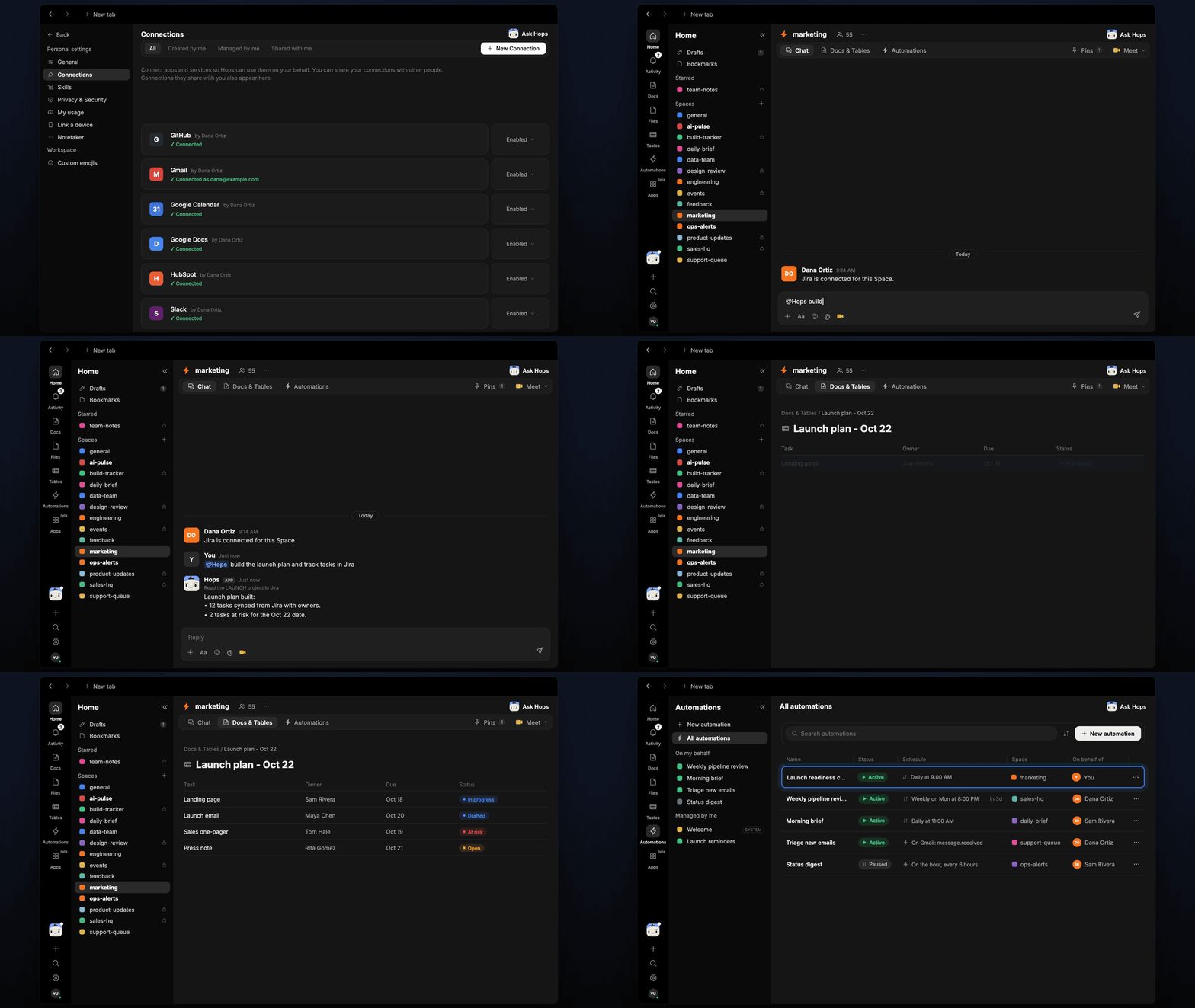
* **Builds the plan from the brief.** Hops turns the launch brief into audience, message, channels and tasks with owners and dates.
* **Syncs task status from Jira.** Hops reads the LAUNCH project (or Asana) and keeps owners, dates and status current.
* **Runs a daily readiness check.** Each morning until launch, Hops lists what is not ready and who owns it.
* **Flags risk to the date.** Tasks that are late or blocked are called out against the launch date, with the dependency that is holding them up.
* **Checks assets.** Hops looks in Google Drive for the creative and copy each task needs and notes anything missing.
 ## Ask Hops
Copy a prompt into any chat with Hops, or mention `@Hops` in a Space.
```text theme={null}
Build the launch plan for the Acme webinar series from the brief and track tasks in Jira.
```
```text theme={null}
What is not ready for the Oct 22 launch, and who owns each item?
```
```text theme={null}
Which launch tasks are at risk, and what is blocking them?
```
```text theme={null}
Are all creative assets for the launch in the Drive folder? List anything missing.
```
```text theme={null}
Write a go or no-go summary for tomorrow's launch review.
```
Example reply:
> Launch readiness for Oct 22:
>
> * 12 tasks tracked in Jira, 9 done.
> * 2 at risk: landing page QA (Priya Nair) and email approval (Dana Ortiz).
> * 1 asset missing: the 1200x630 social image.
## What you get
* **A daily readiness post** in the Space chat (or Slack) listing what is not ready, with owners.
* **A launch plan Doc** in **Docs** in the Space, with audience, message, channels, tasks and dates, updated as things change.
* **A task Table** in **Tables** with owner, due date and status synced from Jira.
* **Answers on demand.** Ask Hops for status or a go or no-go summary any time.
## Connections needed
Connect these apps. Each card opens Connections in the app.
Launch tasks, owners and status (or Asana).
Launch brief, creative and copy assets.
Daily readiness posts and owner nudges.
## Set it up
Connect Jira or Asana, Google Drive and Slack in **Connections**.
See [Connections](/docs/connections/overview).
Create a Space for each launch, such as **Acme webinar launch**. Pin the launch brief and the Jira project in Space context.
See [Spaces](/docs/spaces/overview) and [Space context](/docs/spaces/space-context).
Give Hops these instructions:
```text theme={null}
You run campaign launches. Build the plan from the brief: audience, message, channels, tasks with owners and dates. Sync task status from Jira. Each day before launch, list what is not ready and who owns it.
```
See [Build a skill](/docs/agents/build-a-skill).
Launch readiness check: runs every day at 9am until launch day. It posts what is not ready to the Space chat and updates the task Table and the plan Doc.
See [Automation](/docs/spaces/automation).
## Related topics
- [Marketing](/teams/marketing/overview.md)
- [Explore use cases](/use-cases/overview.md)
- [Spaces overview](/spaces/overview.md)
- [Skills](/agents/skills.md)
- [Social approvals](/teams/marketing/use-cases/social-approvals.md)
This documentation is built and hosted on [Mintlify](https://mintlify.com), a developer documentation platform.
## Ask Hops
Copy a prompt into any chat with Hops, or mention `@Hops` in a Space.
```text theme={null}
Build the launch plan for the Acme webinar series from the brief and track tasks in Jira.
```
```text theme={null}
What is not ready for the Oct 22 launch, and who owns each item?
```
```text theme={null}
Which launch tasks are at risk, and what is blocking them?
```
```text theme={null}
Are all creative assets for the launch in the Drive folder? List anything missing.
```
```text theme={null}
Write a go or no-go summary for tomorrow's launch review.
```
Example reply:
> Launch readiness for Oct 22:
>
> * 12 tasks tracked in Jira, 9 done.
> * 2 at risk: landing page QA (Priya Nair) and email approval (Dana Ortiz).
> * 1 asset missing: the 1200x630 social image.
## What you get
* **A daily readiness post** in the Space chat (or Slack) listing what is not ready, with owners.
* **A launch plan Doc** in **Docs** in the Space, with audience, message, channels, tasks and dates, updated as things change.
* **A task Table** in **Tables** with owner, due date and status synced from Jira.
* **Answers on demand.** Ask Hops for status or a go or no-go summary any time.
## Connections needed
Connect these apps. Each card opens Connections in the app.
Launch tasks, owners and status (or Asana).
Launch brief, creative and copy assets.
Daily readiness posts and owner nudges.
## Set it up
Connect Jira or Asana, Google Drive and Slack in **Connections**.
See [Connections](/docs/connections/overview).
Create a Space for each launch, such as **Acme webinar launch**. Pin the launch brief and the Jira project in Space context.
See [Spaces](/docs/spaces/overview) and [Space context](/docs/spaces/space-context).
Give Hops these instructions:
```text theme={null}
You run campaign launches. Build the plan from the brief: audience, message, channels, tasks with owners and dates. Sync task status from Jira. Each day before launch, list what is not ready and who owns it.
```
See [Build a skill](/docs/agents/build-a-skill).
Launch readiness check: runs every day at 9am until launch day. It posts what is not ready to the Space chat and updates the task Table and the plan Doc.
See [Automation](/docs/spaces/automation).
## Related topics
- [Marketing](/teams/marketing/overview.md)
- [Explore use cases](/use-cases/overview.md)
- [Spaces overview](/spaces/overview.md)
- [Skills](/agents/skills.md)
- [Social approvals](/teams/marketing/use-cases/social-approvals.md)
This documentation is built and hosted on [Mintlify](https://mintlify.com), a developer documentation platform.