> ## Documentation Index
> Fetch the complete documentation index at: https://hopsdocs.mintlify.site/llms.txt
> Use this file to discover all available pages before exploring further.
# Copy review and approval
> Review copy against your brand voice and route it for approval.
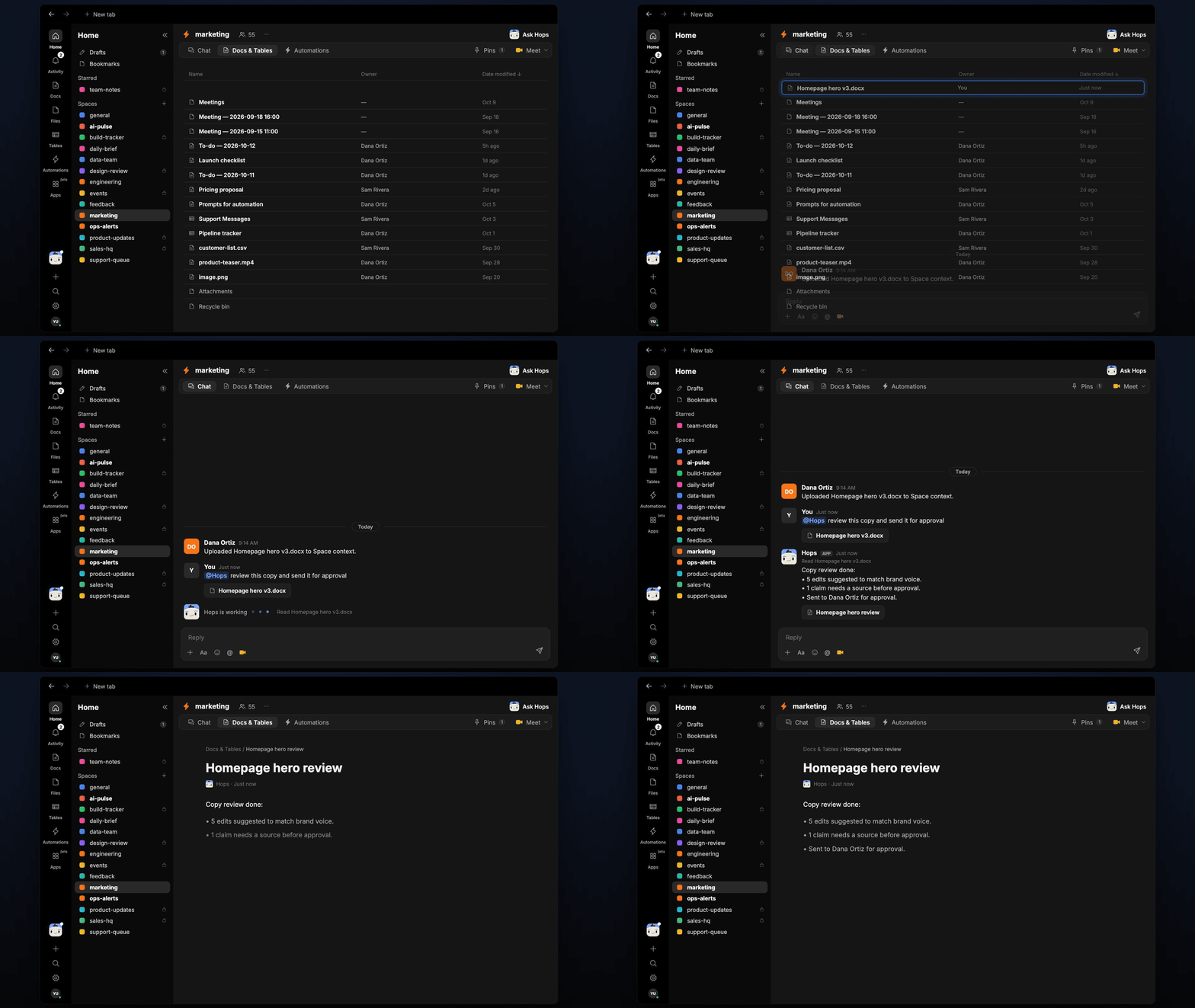
Copy goes through rounds of feedback, and drafts wait on approval without anyone chasing them. Drop the draft into the Space and Hops reviews it against your brand voice, suggests edits and tracks who still needs to approve.
**How it runs:** Scheduled. An automation runs every weekday at 4pm, posts the copy waiting on approval and saves the approval tracker as a Table. You can also ask Hops any time.
## What it does
* **Reviews against the brand voice guide.** Hops checks tone, word choice and style in the Google Doc against the guide pinned in Space context.
* **Explains every edit.** Each suggestion comes with the original text, the proposed change and the reason.
* **Flags claims that need a source.** Stats, comparisons and superlatives are listed so they get backed up before approval.
* **Routes to the approver.** Hops posts the draft to the approver named in Space context and tracks the status.
* **Chases pending approvals.** Every weekday afternoon Hops lists which copy is still waiting and who it is waiting on.
 ## Ask Hops
Copy a prompt into any chat with Hops, or mention `@Hops` in a Space.
```text theme={null}
Review the Homepage hero v3 doc against our brand voice and send it for approval.
```
```text theme={null}
Which copy is still waiting on approval, and who is holding it up?
```
```text theme={null}
Check the Acme launch email for claims that need a source.
```
```text theme={null}
Make this headline shorter and more direct, in our brand voice, with three options.
```
```text theme={null}
Which drafts were approved this week?
```
Example reply:
> Copy review done for Homepage hero v3:
>
> * 5 edits suggested to match brand voice.
> * 1 claim needs a source: "fastest in the category".
> * Sent to Dana Ortiz for approval.
## What you get
* **A 4pm post** in the Space chat (or Slack) listing copy waiting on approval, with owners.
* **An approval Table** in **Tables** in the Space with each piece, its status and approver, updated every run.
* **A review Doc, when you ask for one.** Say "save this review as a doc" and Hops writes the edits to **Docs**.
* **Answers on demand.** Ask Hops to review a draft or check status any time.
## Connections needed
Connect these apps. Each card opens Connections in the app.
Drafts to review and the brand voice guide.
Approval requests and the daily list.
## Set it up
Connect Google Docs and Slack in **Connections**.
See [Connections](/docs/connections/overview).
Create a **marketing** Space. Pin the brand voice guide and the approver names in Space context.
See [Spaces](/docs/spaces/overview) and [Space context](/docs/spaces/space-context).
Give Hops these instructions:
```text theme={null}
You review copy. Check tone, word choice and claims against the brand voice guide. Suggest each edit with a reason. Flag claims that need a source. Route to the approver named in Space context.
```
See [Build a skill](/docs/agents/build-a-skill).
Every weekday at 4pm Hops lists copy waiting on approval. It posts the list to the Space chat and updates the approval Table.
See [Automation](/docs/spaces/automation).
## Related topics
- [Marketing](/teams/marketing/overview.md)
- [Explore use cases](/use-cases/overview.md)
- [Invoice approvals](/teams/finance/use-cases/invoice-approvals.md)
- [Spec review](/teams/product-engineering/use-cases/spec-review.md)
- [Social approvals](/teams/marketing/use-cases/social-approvals.md)
This documentation is built and hosted on [Mintlify](https://mintlify.com), a developer documentation platform.
## Ask Hops
Copy a prompt into any chat with Hops, or mention `@Hops` in a Space.
```text theme={null}
Review the Homepage hero v3 doc against our brand voice and send it for approval.
```
```text theme={null}
Which copy is still waiting on approval, and who is holding it up?
```
```text theme={null}
Check the Acme launch email for claims that need a source.
```
```text theme={null}
Make this headline shorter and more direct, in our brand voice, with three options.
```
```text theme={null}
Which drafts were approved this week?
```
Example reply:
> Copy review done for Homepage hero v3:
>
> * 5 edits suggested to match brand voice.
> * 1 claim needs a source: "fastest in the category".
> * Sent to Dana Ortiz for approval.
## What you get
* **A 4pm post** in the Space chat (or Slack) listing copy waiting on approval, with owners.
* **An approval Table** in **Tables** in the Space with each piece, its status and approver, updated every run.
* **A review Doc, when you ask for one.** Say "save this review as a doc" and Hops writes the edits to **Docs**.
* **Answers on demand.** Ask Hops to review a draft or check status any time.
## Connections needed
Connect these apps. Each card opens Connections in the app.
Drafts to review and the brand voice guide.
Approval requests and the daily list.
## Set it up
Connect Google Docs and Slack in **Connections**.
See [Connections](/docs/connections/overview).
Create a **marketing** Space. Pin the brand voice guide and the approver names in Space context.
See [Spaces](/docs/spaces/overview) and [Space context](/docs/spaces/space-context).
Give Hops these instructions:
```text theme={null}
You review copy. Check tone, word choice and claims against the brand voice guide. Suggest each edit with a reason. Flag claims that need a source. Route to the approver named in Space context.
```
See [Build a skill](/docs/agents/build-a-skill).
Every weekday at 4pm Hops lists copy waiting on approval. It posts the list to the Space chat and updates the approval Table.
See [Automation](/docs/spaces/automation).
## Related topics
- [Marketing](/teams/marketing/overview.md)
- [Explore use cases](/use-cases/overview.md)
- [Invoice approvals](/teams/finance/use-cases/invoice-approvals.md)
- [Spec review](/teams/product-engineering/use-cases/spec-review.md)
- [Social approvals](/teams/marketing/use-cases/social-approvals.md)
This documentation is built and hosted on [Mintlify](https://mintlify.com), a developer documentation platform.