> ## Documentation Index
> Fetch the complete documentation index at: https://hopsdocs.mintlify.site/llms.txt
> Use this file to discover all available pages before exploring further.
# Brand asset finder
> Find the right logo, image or deck in seconds.
Everyone asks where the latest logo is, and old versions keep getting reused. Connect Google Drive and Hops finds the approved asset and shares the link.
**How it runs:** Ask Hops. No skill or automation needed. Connect your apps and ask in any chat.
## What it does
* **Searches the brand folder first.** Hops looks in your approved brand folders in Google Drive for logos, images, templates and decks.
* **Returns the newest approved version.** Every result comes with a link and the date it was last updated.
* **Warns about archived files.** If someone asks for an old version or the file sits in an Archive folder, Hops says so and points to the current one.
* **Matches by what you describe.** Ask for "the dark logo" or "the event slide template" and Hops picks the right file and format, such as SVG or PNG.
* **Respects access.** Hops only reads what your Google Drive connection can see.
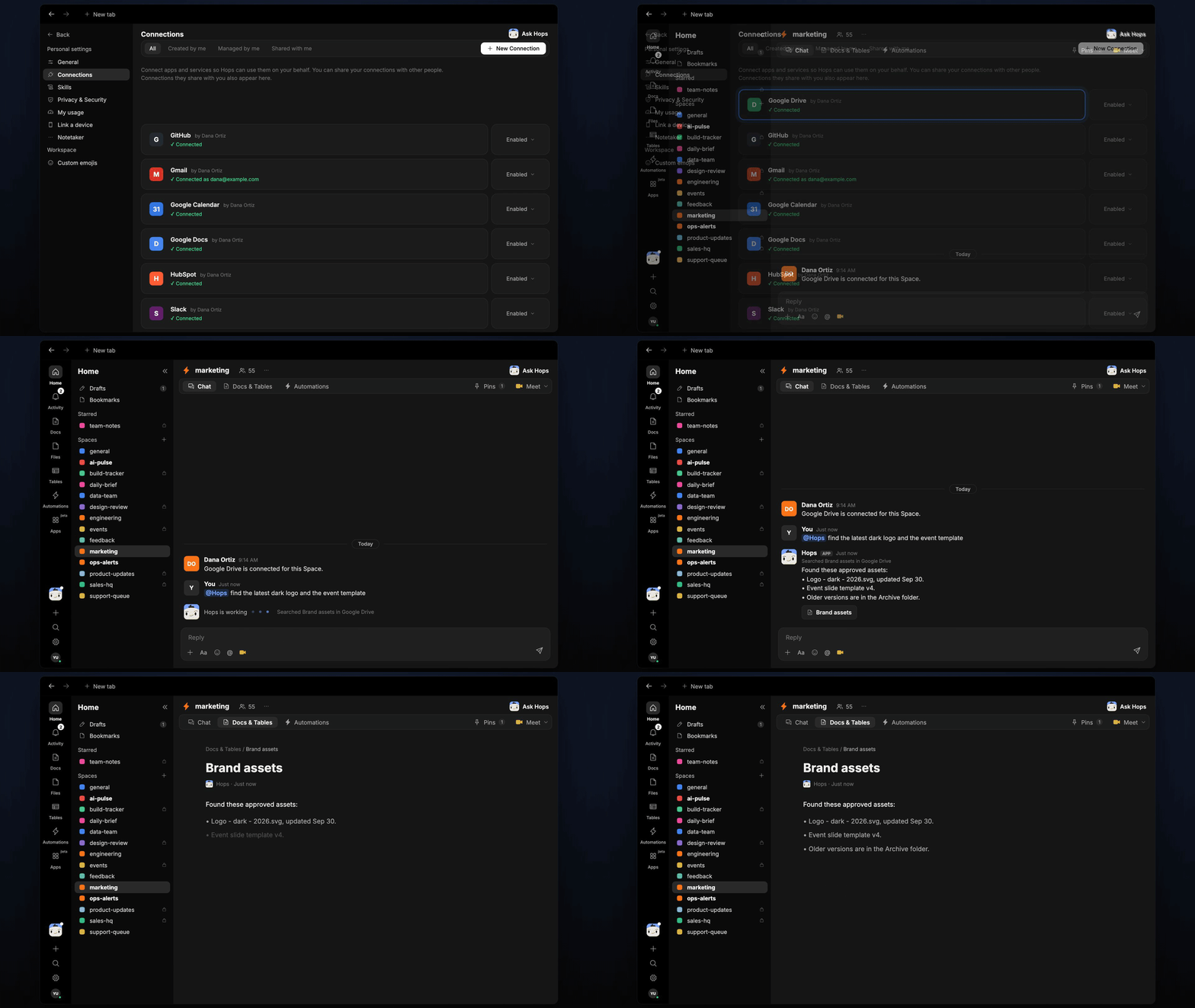 ## Ask Hops
Copy a prompt into any chat with Hops, or mention `@Hops` in a Space.
```text theme={null}
Find the latest dark logo and the event slide template.
```
```text theme={null}
Where is the approved Acme case study deck? Send me the link and the date it was updated.
```
```text theme={null}
Which product screenshots in Drive were updated since the September release?
```
```text theme={null}
Is the Northwind co-branded logo pack still current, or is there a newer one?
```
```text theme={null}
List every brand asset in the Archive folder so we can stop people using them.
```
Example reply:
> Found these approved assets:
>
> * Logo - dark - 2026.svg, updated Sep 30.
> * Event slide template v4, updated Aug 14.
> * Older versions are in the Archive folder. Do not use them.
## What you get
* **An answer in chat**, in the same thread, with a link and last updated date for every asset.
* **A saved Doc, when you ask for one.** Say "save this as a doc" and Hops writes an asset list to **Docs** in the Space.
## Connections needed
Connect these apps. Each card opens Connections in the app.
Brand folders, logos, templates and decks.
Ask for assets where your team already chats.
## Set it up
Connect Google Drive and Slack in **Connections**.
See [Connections](/docs/connections/overview).
Create a **marketing** Space and pin the brand folder link in Space context, so Hops searches there first.
See [Spaces](/docs/spaces/overview) and [Space context](/docs/spaces/space-context).
Ask Hops for an asset in chat. That's it.
## Related topics
- [Marketing](/teams/marketing/overview.md)
- [Content repurposing](/teams/marketing/use-cases/content-repurposing.md)
- [Customer proof finder](/teams/marketing/use-cases/customer-proof.md)
- [Campaign launch](/teams/marketing/use-cases/campaign-launch.md)
- [Core concepts](/getting-started/core-concepts.md)
This documentation is built and hosted on [Mintlify](https://mintlify.com), a developer documentation platform.
## Ask Hops
Copy a prompt into any chat with Hops, or mention `@Hops` in a Space.
```text theme={null}
Find the latest dark logo and the event slide template.
```
```text theme={null}
Where is the approved Acme case study deck? Send me the link and the date it was updated.
```
```text theme={null}
Which product screenshots in Drive were updated since the September release?
```
```text theme={null}
Is the Northwind co-branded logo pack still current, or is there a newer one?
```
```text theme={null}
List every brand asset in the Archive folder so we can stop people using them.
```
Example reply:
> Found these approved assets:
>
> * Logo - dark - 2026.svg, updated Sep 30.
> * Event slide template v4, updated Aug 14.
> * Older versions are in the Archive folder. Do not use them.
## What you get
* **An answer in chat**, in the same thread, with a link and last updated date for every asset.
* **A saved Doc, when you ask for one.** Say "save this as a doc" and Hops writes an asset list to **Docs** in the Space.
## Connections needed
Connect these apps. Each card opens Connections in the app.
Brand folders, logos, templates and decks.
Ask for assets where your team already chats.
## Set it up
Connect Google Drive and Slack in **Connections**.
See [Connections](/docs/connections/overview).
Create a **marketing** Space and pin the brand folder link in Space context, so Hops searches there first.
See [Spaces](/docs/spaces/overview) and [Space context](/docs/spaces/space-context).
Ask Hops for an asset in chat. That's it.
## Related topics
- [Marketing](/teams/marketing/overview.md)
- [Content repurposing](/teams/marketing/use-cases/content-repurposing.md)
- [Customer proof finder](/teams/marketing/use-cases/customer-proof.md)
- [Campaign launch](/teams/marketing/use-cases/campaign-launch.md)
- [Core concepts](/getting-started/core-concepts.md)
This documentation is built and hosted on [Mintlify](https://mintlify.com), a developer documentation platform.