> ## Documentation Index
> Fetch the complete documentation index at: https://hopsdocs.mintlify.site/llms.txt
> Use this file to discover all available pages before exploring further.
# NDA prep
> Draft standard NDAs from your template with deal-specific details filled in.
A counterparty asks for an NDA and someone copies the template by hand. Hops drafts from your mutual-NDA template with the counterparty name, effective date and purpose filled in.
**How it runs:** Ask Hops, with a skill so the output has the same format every time. No automation needed.
## What it does
* **Starts from your template.** Hops uses the mutual-NDA template in Google Drive or SharePoint, never a generic one.
* **Fills the deal details.** Counterparty legal name, effective date, governing law (per playbook) and purpose.
* **Leaves the clauses alone.** Substantive clauses are not edited; any requested change is flagged for legal review.
* **Lists what it assumed.** Missing details are called out so you can confirm before sending.
* **Ready for signature.** The draft can go to DocuSign or your e-signature tool once approved.
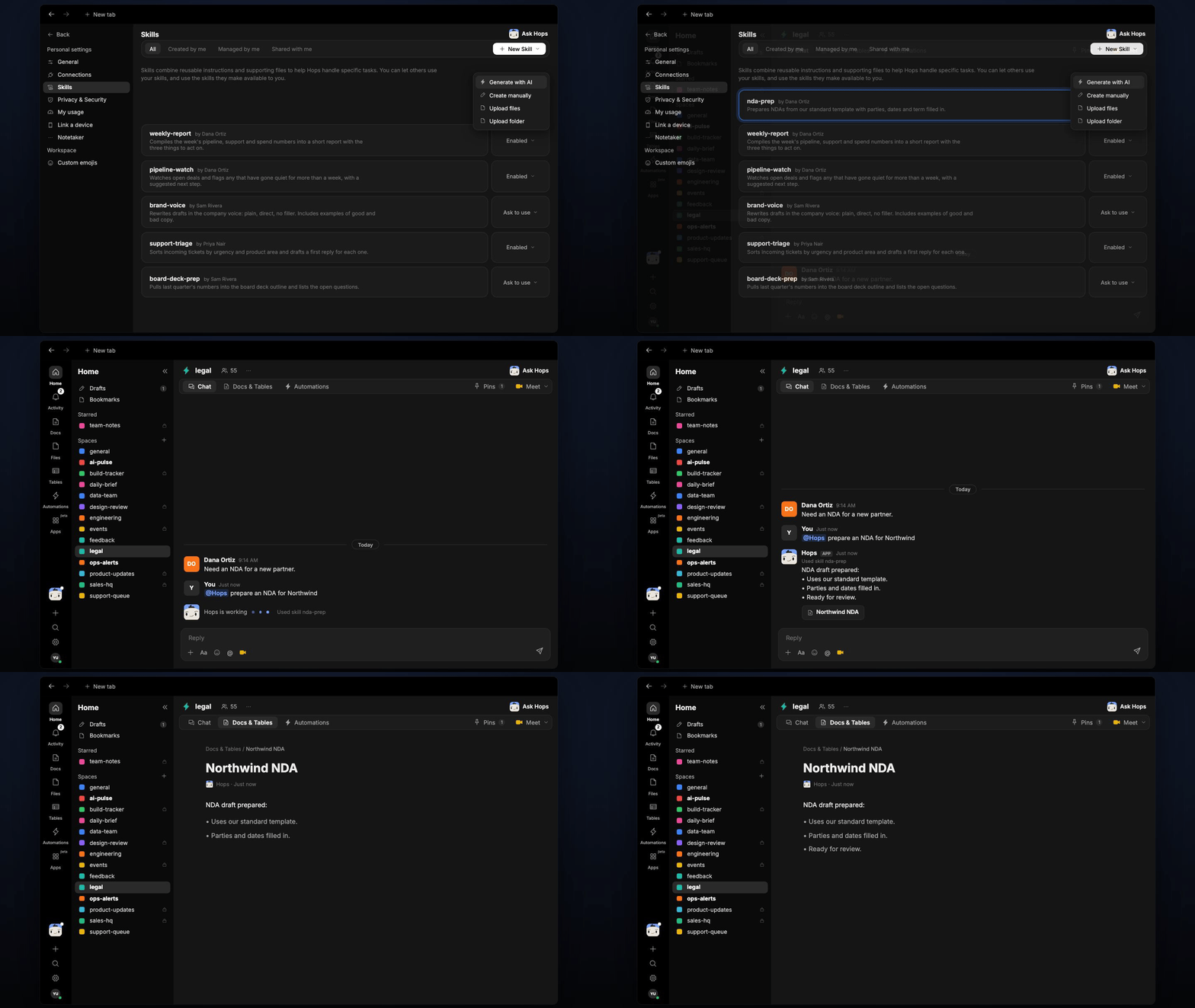 ## Ask Hops
Copy a prompt into any chat with Hops, or mention `@Hops` in a Space.
```text theme={null}
Prepare an NDA for Northwind.
```
```text theme={null}
Draft a mutual NDA with Globex for the partnership discussions, effective Nov 1.
```
```text theme={null}
Prepare an NDA for Acme. They want a 3 year term, what needs legal review?
```
```text theme={null}
Draft NDAs for the three vendors in the attached list.
```
```text theme={null}
Which counterparties in the list already have an NDA on file?
```
Example reply:
> NDA draft prepared:
>
> * Uses our standard mutual-NDA template.
> * Parties, date and purpose filled in.
> * Flagged for legal review: requested 3 year term differs from the template.
## What you get
* **A draft in chat**, in the same thread, with the filled details and anything flagged.
* **A saved Doc, when you ask for one.** Say "save this as a doc" and Hops writes the NDA to **Docs** in the Space.
## Connections needed
Connect these apps. Each card opens Connections in the app.
NDA templates (or SharePoint).
Send for signature (or your e-signature tool).
## Set it up
Connect the apps above in **Connections**.
See [Connections](/docs/connections/overview).
Create a **legal** Space and pin the NDA template and the counterparty list in Space context.
See [Spaces](/docs/spaces/overview) and [Space context](/docs/spaces/space-context).
Give Hops these instructions:
```text theme={null}
You draft NDAs from the mutual-NDA template in the Space Context document. Fill in: counterparty legal name, effective date, governing law (per playbook), and purpose. Never modify the template's substantive clauses. Flag any requested change for legal-team review.
```
See [Build a skill](/docs/agents/build-a-skill).
Ask Hops in chat with the counterparty and purpose.
## Related topics
- [Legal](/teams/legal.md)
- [Explore use cases](/use-cases/overview.md)
- [Spaces overview](/spaces/overview.md)
- [Skills](/agents/skills.md)
- [Board prep](/teams/finance/use-cases/board-prep.md)
This documentation is built and hosted on [Mintlify](https://mintlify.com), a developer documentation platform.
## Ask Hops
Copy a prompt into any chat with Hops, or mention `@Hops` in a Space.
```text theme={null}
Prepare an NDA for Northwind.
```
```text theme={null}
Draft a mutual NDA with Globex for the partnership discussions, effective Nov 1.
```
```text theme={null}
Prepare an NDA for Acme. They want a 3 year term, what needs legal review?
```
```text theme={null}
Draft NDAs for the three vendors in the attached list.
```
```text theme={null}
Which counterparties in the list already have an NDA on file?
```
Example reply:
> NDA draft prepared:
>
> * Uses our standard mutual-NDA template.
> * Parties, date and purpose filled in.
> * Flagged for legal review: requested 3 year term differs from the template.
## What you get
* **A draft in chat**, in the same thread, with the filled details and anything flagged.
* **A saved Doc, when you ask for one.** Say "save this as a doc" and Hops writes the NDA to **Docs** in the Space.
## Connections needed
Connect these apps. Each card opens Connections in the app.
NDA templates (or SharePoint).
Send for signature (or your e-signature tool).
## Set it up
Connect the apps above in **Connections**.
See [Connections](/docs/connections/overview).
Create a **legal** Space and pin the NDA template and the counterparty list in Space context.
See [Spaces](/docs/spaces/overview) and [Space context](/docs/spaces/space-context).
Give Hops these instructions:
```text theme={null}
You draft NDAs from the mutual-NDA template in the Space Context document. Fill in: counterparty legal name, effective date, governing law (per playbook), and purpose. Never modify the template's substantive clauses. Flag any requested change for legal-team review.
```
See [Build a skill](/docs/agents/build-a-skill).
Ask Hops in chat with the counterparty and purpose.
## Related topics
- [Legal](/teams/legal.md)
- [Explore use cases](/use-cases/overview.md)
- [Spaces overview](/spaces/overview.md)
- [Skills](/agents/skills.md)
- [Board prep](/teams/finance/use-cases/board-prep.md)
This documentation is built and hosted on [Mintlify](https://mintlify.com), a developer documentation platform.