> ## Documentation Index
> Fetch the complete documentation index at: https://hopsdocs.mintlify.site/llms.txt
> Use this file to discover all available pages before exploring further.
# Contract redlines
> Compare a counterparty's redlines with your playbook and draft responses.
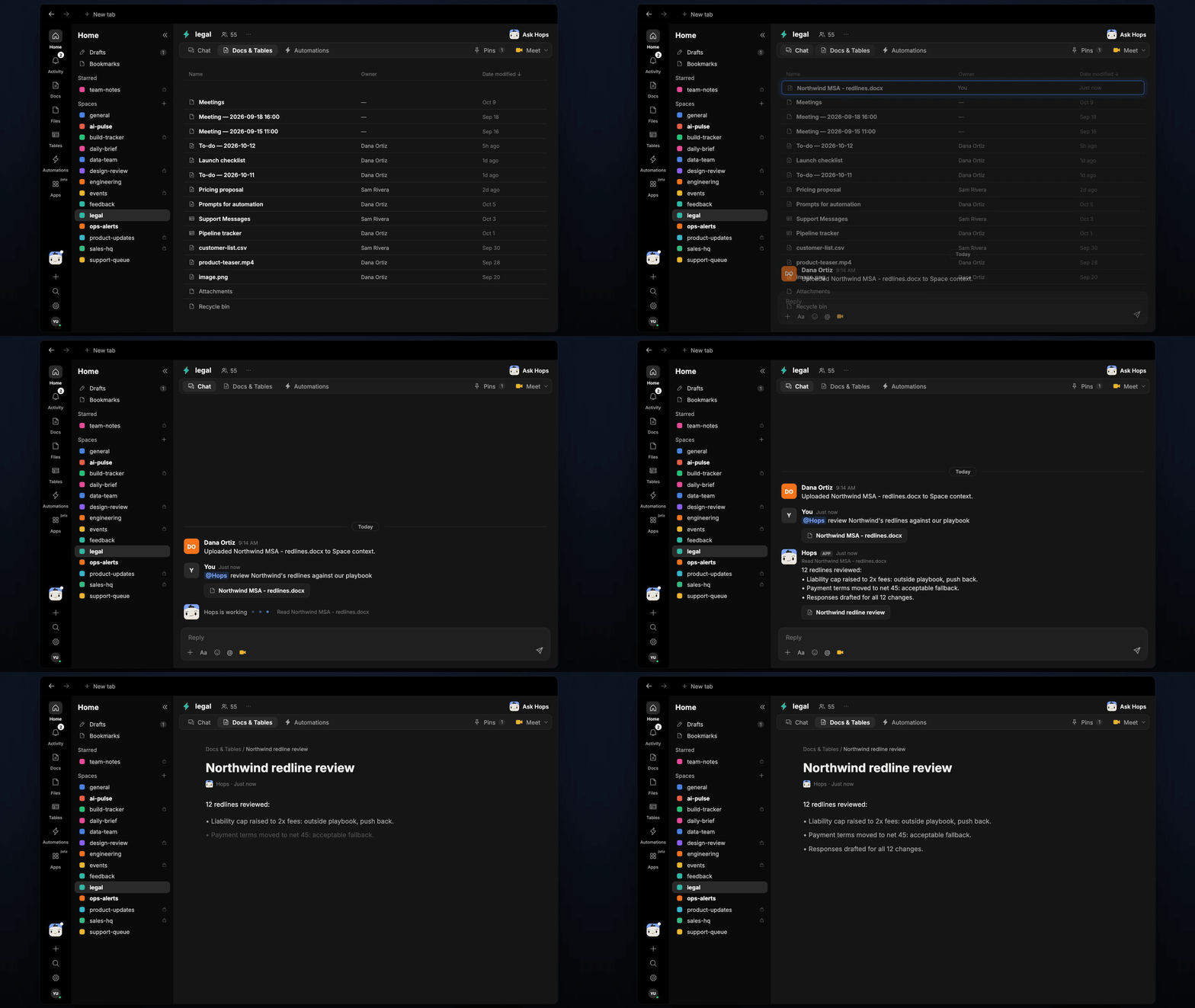
Redlines come back and someone has to compare every change with the playbook. Drop the redlined contract in the Space and Hops lists each change, how it compares to your positions and a suggested response.
**How it runs:** Ask Hops, with a skill so the output has the same format every time. No automation needed.
## What it does
* **Reads every redline.** Hops goes through tracked changes and comments in the contract from Google Drive or Docs.
* **Compares to your playbook.** Each change is checked against your playbook position and fallback.
* **Gives a call per change.** Each redline is marked accept, negotiate or reject, with the clause quoted.
* **Drafts the response.** A short reply is written for each change, ready to send to the counterparty.
* **Flags what falls outside the playbook.** Clauses with no playbook position are listed for legal review.
 ## Ask Hops
Copy a prompt into any chat with Hops, or mention `@Hops` in a Space.
```text theme={null}
Review Northwind's redlines against our playbook.
```
```text theme={null}
Which changes in the Globex MSA redlines are outside our playbook?
```
```text theme={null}
Draft responses to the liability and payment terms changes in the Acme order form.
```
```text theme={null}
Summarize the redlines on the Northwind MSA in a table: clause, change, position, response.
```
```text theme={null}
Which redlines can we accept without going back to the partner?
```
Example reply:
> 12 redlines reviewed:
>
> * Liability cap raised to 2x fees: outside playbook, push back.
> * Payment terms moved to net 45: acceptable fallback.
> * Responses drafted for all 12 changes.
## What you get
* **An answer in chat**, in the same thread, with each change, the playbook position and the suggested response.
* **A saved Doc, when you ask for one.** Say "save this as a doc" and Hops writes the review to **Docs** in the Space.
## Connections needed
Connect these apps. Each card opens Connections in the app.
Redlined contracts and the playbook (or Google Docs).
Executed and in-flight agreements.
Share the review with the team.
## Set it up
Connect the apps above in **Connections**.
See [Connections](/docs/connections/overview).
Create a **legal** Space and pin your contract playbook in Space context.
See [Spaces](/docs/spaces/overview) and [Space context](/docs/spaces/space-context).
Give Hops these instructions:
```text theme={null}
You review redlines. For each change, quote the clause, compare it with the playbook position and fallback, and mark it accept, negotiate or reject. Draft a short response for each.
```
See [Build a skill](/docs/agents/build-a-skill).
Add the redlined contract to the Space and ask Hops in chat.
## Related topics
- [Legal](/teams/legal.md)
- [Explore use cases](/use-cases/overview.md)
- [Contract renewals](/teams/legal/use-cases/contract-renewals.md)
- [Outside counsel review](/teams/legal/use-cases/counsel-review.md)
- [Spaces overview](/spaces/overview.md)
This documentation is built and hosted on [Mintlify](https://mintlify.com), a developer documentation platform.
## Ask Hops
Copy a prompt into any chat with Hops, or mention `@Hops` in a Space.
```text theme={null}
Review Northwind's redlines against our playbook.
```
```text theme={null}
Which changes in the Globex MSA redlines are outside our playbook?
```
```text theme={null}
Draft responses to the liability and payment terms changes in the Acme order form.
```
```text theme={null}
Summarize the redlines on the Northwind MSA in a table: clause, change, position, response.
```
```text theme={null}
Which redlines can we accept without going back to the partner?
```
Example reply:
> 12 redlines reviewed:
>
> * Liability cap raised to 2x fees: outside playbook, push back.
> * Payment terms moved to net 45: acceptable fallback.
> * Responses drafted for all 12 changes.
## What you get
* **An answer in chat**, in the same thread, with each change, the playbook position and the suggested response.
* **A saved Doc, when you ask for one.** Say "save this as a doc" and Hops writes the review to **Docs** in the Space.
## Connections needed
Connect these apps. Each card opens Connections in the app.
Redlined contracts and the playbook (or Google Docs).
Executed and in-flight agreements.
Share the review with the team.
## Set it up
Connect the apps above in **Connections**.
See [Connections](/docs/connections/overview).
Create a **legal** Space and pin your contract playbook in Space context.
See [Spaces](/docs/spaces/overview) and [Space context](/docs/spaces/space-context).
Give Hops these instructions:
```text theme={null}
You review redlines. For each change, quote the clause, compare it with the playbook position and fallback, and mark it accept, negotiate or reject. Draft a short response for each.
```
See [Build a skill](/docs/agents/build-a-skill).
Add the redlined contract to the Space and ask Hops in chat.
## Related topics
- [Legal](/teams/legal.md)
- [Explore use cases](/use-cases/overview.md)
- [Contract renewals](/teams/legal/use-cases/contract-renewals.md)
- [Outside counsel review](/teams/legal/use-cases/counsel-review.md)
- [Spaces overview](/spaces/overview.md)
This documentation is built and hosted on [Mintlify](https://mintlify.com), a developer documentation platform.