> ## Documentation Index
> Fetch the complete documentation index at: https://hopsdocs.mintlify.site/llms.txt
> Use this file to discover all available pages before exploring further.
# New hire onboarding
> One Space per new hire, with the plan, role context, and key docs ready.
New hires ask the same questions in their first week, and the answers live in scattered docs. Create one Space per new hire and Hops builds the plan, answers questions from the onboarding docs and checks progress with HR.
**How it runs:** One Space per hire, with its own context, skill and automations.
## What it does
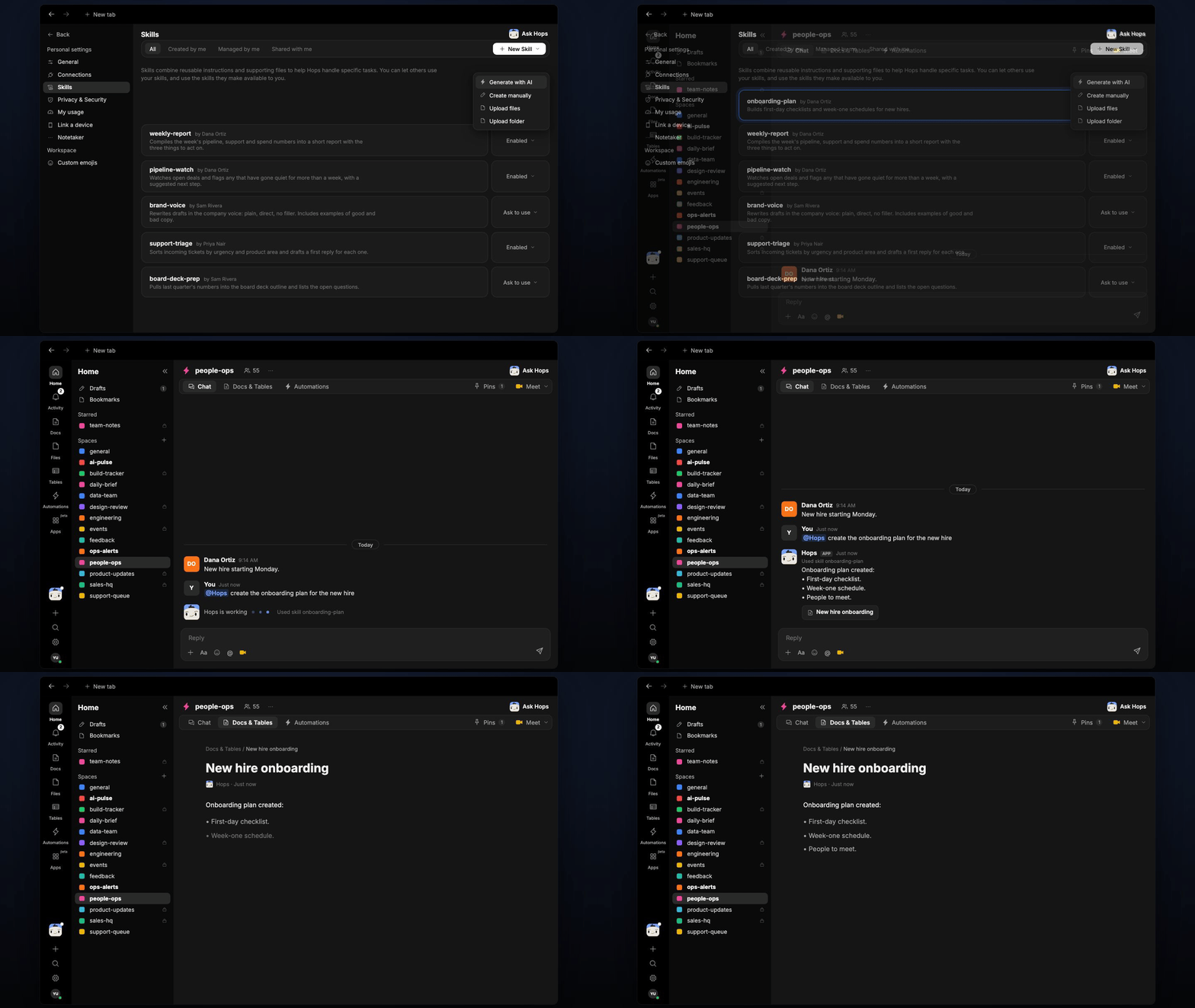
* **Builds the onboarding plan.** Hops creates a first-day checklist, week-one schedule and list of people to meet from the plan and role brief in Space context.
* **Answers first-week questions.** Questions about tasks, tools and people are answered only from the docs in the Space, with the doc cited.
* **Admits gaps.** If something is not in the Space, Hops says so and routes the question to the HR partner.
* **Tracks progress.** On day 3, Hops compares completed and open onboarding items and tags the HR partner.
* **Keeps hires consistent.** Every Space starts from the same plan, so each new hire gets the same experience.
 ## Ask Hops
Copy a prompt into any chat with Hops, or mention `@Hops` in a Space.
```text theme={null}
Create the onboarding plan for Maya Chen, joining Acme as Support Lead on Monday.
```
```text theme={null}
Where do I request access to Zendesk and Slack?
```
```text theme={null}
Who should I meet in my first week, and why?
```
```text theme={null}
Which onboarding items are still open for Maya?
```
```text theme={null}
What is the expense policy for new hires?
```
Example reply:
> Onboarding plan created:
>
> * First-day checklist.
> * Week-one schedule.
> * People to meet.
## What you get
* **A Space per new hire**, with its own context, Docs and Tables, and an invite-only member list.
* **A saved plan.** The onboarding plan is saved to **Docs**, and open items are tracked in **Tables** in the Space.
* **A day-3 check-in post** in the Space chat listing completed vs open items, tagging the HR partner.
* **Answers in chat** for the new hire, with the doc cited.
## Connections needed
Connect these apps. Each card opens Connections in the app.
Start date, role and manager (or Workday or your HR tool).
Onboarding docs (or Notion).
Where the new hire and HR partner chat with Hops.
## Set it up
Connect your HR tool, Google Drive or Notion, and Slack in **Connections**.
See [Connections](/docs/connections/overview).
Create one invite-only Space per new hire. Pin the onboarding plan, role brief and org info in Space context.
See [Spaces](/docs/spaces/overview) and [Space context](/docs/spaces/space-context).
Give Hops these instructions:
```text theme={null}
You support new hire onboarding. Use only the onboarding plan and role docs in the Space Context document. Answer the new hire's questions about first-week tasks, tools, and people. Cite the doc you used. If something isn't in the Space, say so and route to the HR partner.
```
See [Build a skill](/docs/agents/build-a-skill).
On day 3, Hops posts a checklist of onboarding items completed vs open to the Space, tagging the HR partner, and updates the tracking Table.
See [Automation](/docs/spaces/automation).
## Related topics
- [HR & people ops](/teams/hr-people-ops.md)
- [Explore use cases](/use-cases/overview.md)
- [Skills](/agents/skills.md)
- [Client onboarding and kickoff](/teams/professional-services/use-cases/engagement-kickoff.md)
- [Policy Q&A](/teams/hr-people-ops/use-cases/policy-qa.md)
This documentation is built and hosted on [Mintlify](https://mintlify.com), a developer documentation platform.
## Ask Hops
Copy a prompt into any chat with Hops, or mention `@Hops` in a Space.
```text theme={null}
Create the onboarding plan for Maya Chen, joining Acme as Support Lead on Monday.
```
```text theme={null}
Where do I request access to Zendesk and Slack?
```
```text theme={null}
Who should I meet in my first week, and why?
```
```text theme={null}
Which onboarding items are still open for Maya?
```
```text theme={null}
What is the expense policy for new hires?
```
Example reply:
> Onboarding plan created:
>
> * First-day checklist.
> * Week-one schedule.
> * People to meet.
## What you get
* **A Space per new hire**, with its own context, Docs and Tables, and an invite-only member list.
* **A saved plan.** The onboarding plan is saved to **Docs**, and open items are tracked in **Tables** in the Space.
* **A day-3 check-in post** in the Space chat listing completed vs open items, tagging the HR partner.
* **Answers in chat** for the new hire, with the doc cited.
## Connections needed
Connect these apps. Each card opens Connections in the app.
Start date, role and manager (or Workday or your HR tool).
Onboarding docs (or Notion).
Where the new hire and HR partner chat with Hops.
## Set it up
Connect your HR tool, Google Drive or Notion, and Slack in **Connections**.
See [Connections](/docs/connections/overview).
Create one invite-only Space per new hire. Pin the onboarding plan, role brief and org info in Space context.
See [Spaces](/docs/spaces/overview) and [Space context](/docs/spaces/space-context).
Give Hops these instructions:
```text theme={null}
You support new hire onboarding. Use only the onboarding plan and role docs in the Space Context document. Answer the new hire's questions about first-week tasks, tools, and people. Cite the doc you used. If something isn't in the Space, say so and route to the HR partner.
```
See [Build a skill](/docs/agents/build-a-skill).
On day 3, Hops posts a checklist of onboarding items completed vs open to the Space, tagging the HR partner, and updates the tracking Table.
See [Automation](/docs/spaces/automation).
## Related topics
- [HR & people ops](/teams/hr-people-ops.md)
- [Explore use cases](/use-cases/overview.md)
- [Skills](/agents/skills.md)
- [Client onboarding and kickoff](/teams/professional-services/use-cases/engagement-kickoff.md)
- [Policy Q&A](/teams/hr-people-ops/use-cases/policy-qa.md)
This documentation is built and hosted on [Mintlify](https://mintlify.com), a developer documentation platform.