> ## Documentation Index
> Fetch the complete documentation index at: https://hopsdocs.mintlify.site/llms.txt
> Use this file to discover all available pages before exploring further.
# Interview debrief
> Turn interview notes into a scorecard and a hiring recommendation.
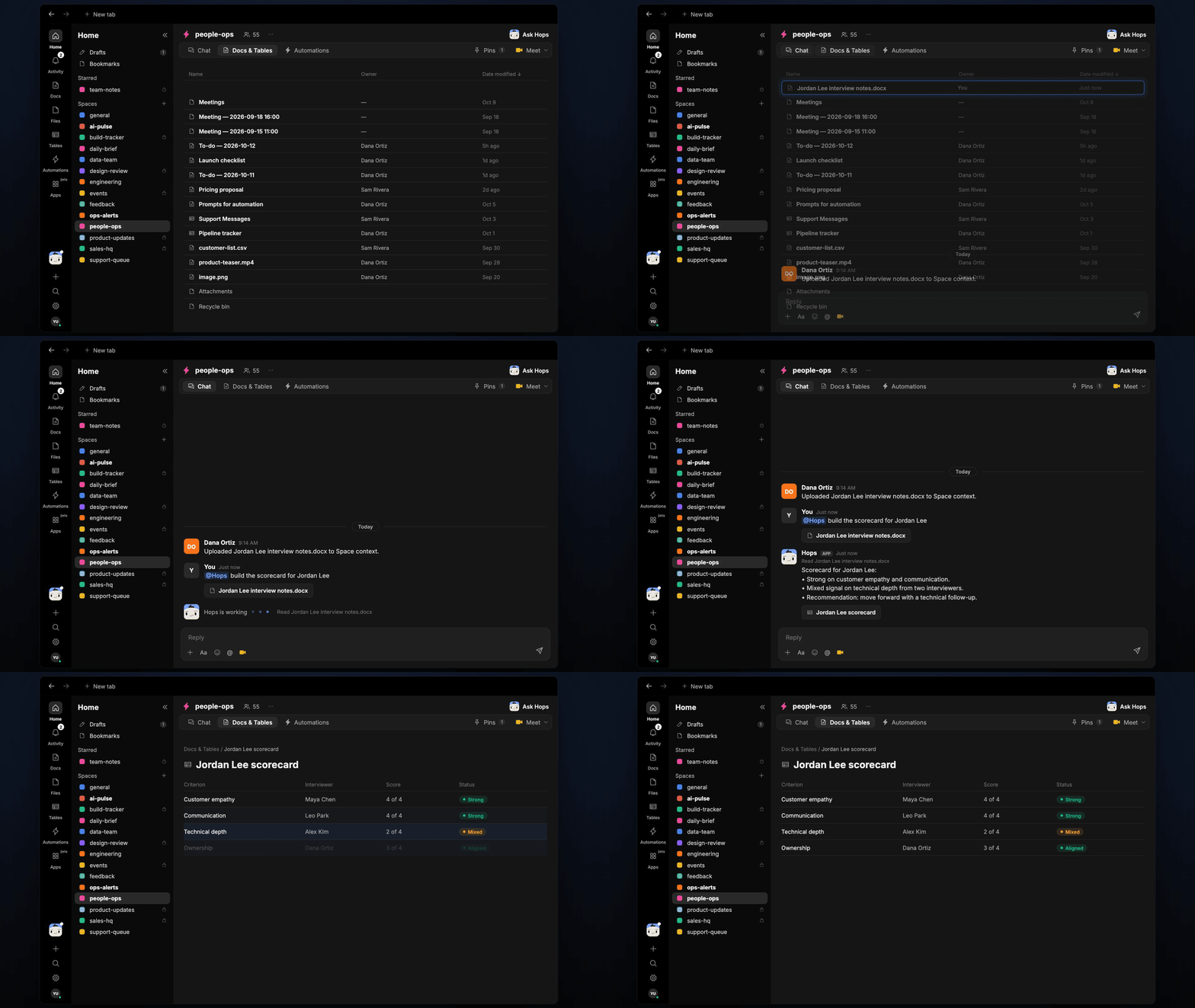
After a loop, notes sit in five places and interviewers forget to write them up. Hops chases the missing notes, builds the scorecard against the role's criteria and drafts the debrief.
**How it runs:** Triggered. An automation runs when an interview loop finishes, and you can also ask Hops directly.
## What it does
* **Reminds interviewers.** When a loop ends, Hops pings anyone who has not added notes or feedback in your ATS or Drive.
* **Scores each criterion.** Once notes are in, Hops scores the candidate on every criterion pinned for the role, quoting evidence from the notes.
* **Marks conflicting signals.** When two interviewers disagree, Hops shows both views instead of averaging them.
* **Recommends a next step.** The scorecard ends with a suggested decision, such as move forward or add a follow-up interview.
* **Never invents evidence.** If a criterion was not covered, Hops says so.
 ## Ask Hops
Copy a prompt into any chat with Hops, or mention `@Hops` in a Space.
```text theme={null}
Build the scorecard for Jordan Lee from the interview notes.
```
```text theme={null}
Who has not added feedback for the Northwind Support Lead loop yet?
```
```text theme={null}
Where did the interviewers disagree on Priya Nair?
```
```text theme={null}
Draft the debrief summary for the Acme Account Executive finalists.
```
```text theme={null}
Compare Jordan Lee and Sam Rivera on the Support Lead criteria.
```
Example reply:
> Scorecard for Jordan Lee:
>
> * Strong on customer empathy and communication.
> * Mixed signal on technical depth from two interviewers.
> * Recommendation: move forward with a technical follow-up.
## What you get
* **A post when the loop finishes**, with the reminder for missing notes, and again when the scorecard is ready.
* **A saved Doc.** The scorecard and recommendation for each candidate are saved to **Docs** in the Space.
* **An optional draft.** Ask Hops for the debrief summary or a candidate update email draft.
## Connections needed
Connect these apps. Each card opens Connections in the app.
Loops, feedback and scorecards (or your ATS).
Interview notes and documents.
Reminders to interviewers and the debrief post.
## Set it up
Connect Greenhouse or your ATS, Google Drive and Slack in **Connections**.
See [Connections](/docs/connections/overview).
Create a **people-ops** Space and pin each role's interview criteria in Space context.
See [Spaces](/docs/spaces/overview) and [Space context](/docs/spaces/space-context).
Give Hops these instructions:
```text theme={null}
You run interview debriefs. Score the candidate on each criterion from the notes, quoting evidence. Mark conflicting signals and recommend a next step. Never invent evidence.
```
See [Build a skill](/docs/agents/build-a-skill).
Run the automation when an interview loop is completed. Hops reminds interviewers to add notes, then builds the scorecard, posts it to the Space and saves it as a Doc.
See [Automation](/docs/spaces/automation).
## Related topics
- [HR & people ops](/teams/hr-people-ops.md)
- [Exit interview themes](/teams/hr-people-ops/use-cases/exit-interview-themes.md)
This documentation is built and hosted on [Mintlify](https://mintlify.com), a developer documentation platform.
## Ask Hops
Copy a prompt into any chat with Hops, or mention `@Hops` in a Space.
```text theme={null}
Build the scorecard for Jordan Lee from the interview notes.
```
```text theme={null}
Who has not added feedback for the Northwind Support Lead loop yet?
```
```text theme={null}
Where did the interviewers disagree on Priya Nair?
```
```text theme={null}
Draft the debrief summary for the Acme Account Executive finalists.
```
```text theme={null}
Compare Jordan Lee and Sam Rivera on the Support Lead criteria.
```
Example reply:
> Scorecard for Jordan Lee:
>
> * Strong on customer empathy and communication.
> * Mixed signal on technical depth from two interviewers.
> * Recommendation: move forward with a technical follow-up.
## What you get
* **A post when the loop finishes**, with the reminder for missing notes, and again when the scorecard is ready.
* **A saved Doc.** The scorecard and recommendation for each candidate are saved to **Docs** in the Space.
* **An optional draft.** Ask Hops for the debrief summary or a candidate update email draft.
## Connections needed
Connect these apps. Each card opens Connections in the app.
Loops, feedback and scorecards (or your ATS).
Interview notes and documents.
Reminders to interviewers and the debrief post.
## Set it up
Connect Greenhouse or your ATS, Google Drive and Slack in **Connections**.
See [Connections](/docs/connections/overview).
Create a **people-ops** Space and pin each role's interview criteria in Space context.
See [Spaces](/docs/spaces/overview) and [Space context](/docs/spaces/space-context).
Give Hops these instructions:
```text theme={null}
You run interview debriefs. Score the candidate on each criterion from the notes, quoting evidence. Mark conflicting signals and recommend a next step. Never invent evidence.
```
See [Build a skill](/docs/agents/build-a-skill).
Run the automation when an interview loop is completed. Hops reminds interviewers to add notes, then builds the scorecard, posts it to the Space and saves it as a Doc.
See [Automation](/docs/spaces/automation).
## Related topics
- [HR & people ops](/teams/hr-people-ops.md)
- [Exit interview themes](/teams/hr-people-ops/use-cases/exit-interview-themes.md)
This documentation is built and hosted on [Mintlify](https://mintlify.com), a developer documentation platform.