> ## Documentation Index
> Fetch the complete documentation index at: https://hopsdocs.mintlify.site/llms.txt
> Use this file to discover all available pages before exploring further.
# Candidate pipeline
> See every open role's pipeline and where candidates are stuck.
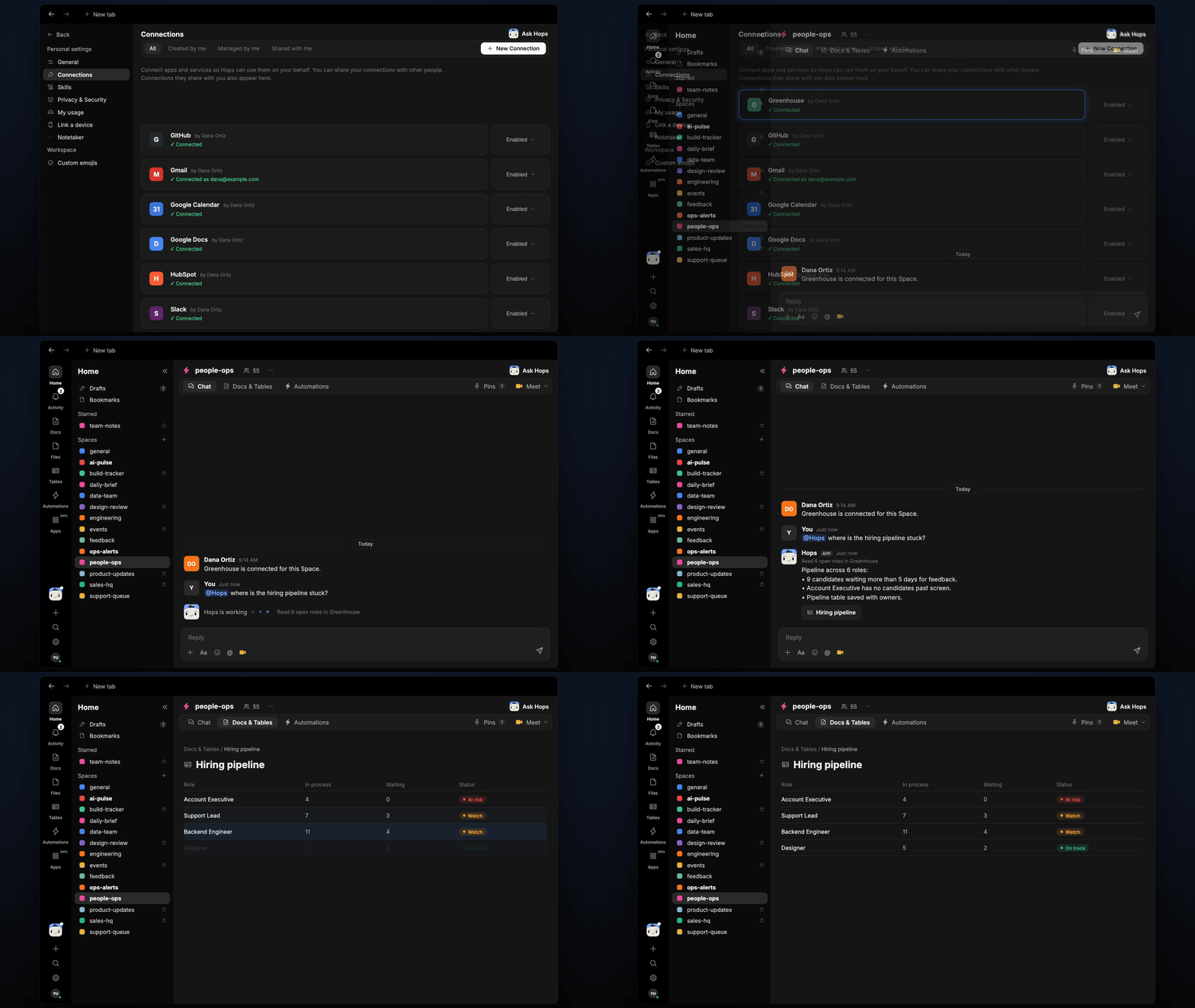
Recruiters need to know which roles are moving and which candidates are waiting. Hops reads your ATS, counts candidates per stage and calls out who is stuck and who owes the next step.
**How it runs:** Scheduled. An automation runs every Monday at 9am, posts the pipeline to the people-ops Space and saves a Table. You can also ask Hops any time.
## What it does
* **Reads every open role.** Hops pulls roles and candidates from Greenhouse, Lever or Ashby and counts candidates per stage.
* **Flags stuck candidates.** Anyone waiting more than 5 days for feedback or a next step is listed with how long they have waited.
* **Names the owner.** Each stuck item shows the interviewer or recruiter who owes the next step.
* **Spots empty stages.** Roles with no candidates past screen, or no new applicants, are called out.
* **Compares to last week.** Hops notes which roles moved and which did not.
 ## Ask Hops
Copy a prompt into any chat with Hops, or mention `@Hops` in a Space.
```text theme={null}
Where is the hiring pipeline stuck this week?
```
```text theme={null}
Which candidates have been waiting more than 5 days for feedback, and who owes it?
```
```text theme={null}
Show the Account Executive pipeline by stage.
```
```text theme={null}
Which open roles have no candidates past the screen stage?
```
```text theme={null}
Compare this week's pipeline to last Monday's for all Globex engineering roles.
```
Example reply:
> Pipeline across 6 roles:
>
> * 9 candidates waiting more than 5 days for feedback.
> * Account Executive has no candidates past screen.
> * Pipeline table updated with owners.
## What you get
* **A weekly post** in the people-ops Space chat (or a Slack channel) every Monday at 9am, with stuck candidates and owners.
* **A saved Table.** The pipeline, with stage counts and owners, is updated in **Tables** in the Space each week.
* **On-demand answers.** Ask Hops in chat any time for a fresh view.
## Connections needed
Connect these apps. Each card opens Connections in the app.
Roles, candidates and stages (or Lever or Ashby).
Where the weekly pipeline is posted.
## Set it up
Connect Greenhouse, Lever or Ashby, and Slack, in **Connections**.
See [Connections](/docs/connections/overview).
Create a **people-ops** Space for the pipeline posts and Table.
See [Spaces](/docs/spaces/overview) and [Space context](/docs/spaces/space-context).
Give Hops these instructions:
```text theme={null}
You review the hiring pipeline. For each open role, count candidates per stage and flag anyone waiting more than 5 days. Name the person who owes the next step.
```
See [Build a skill](/docs/agents/build-a-skill).
Run every Monday at 9am. Hops posts the pipeline to the people-ops Space and updates the pipeline Table.
See [Automation](/docs/spaces/automation).
## Related topics
- [HR & people ops](/teams/hr-people-ops.md)
- [Tables](/artifacts/tables.md)
- [Pipeline review](/teams/revops/use-cases/pipeline-review.md)
- [Interview debrief](/teams/hr-people-ops/use-cases/interview-debrief.md)
- [Founder pipeline and partner meeting](/teams/vc-pe/use-cases/partner-meeting-prep.md)
This documentation is built and hosted on [Mintlify](https://mintlify.com), a developer documentation platform.
## Ask Hops
Copy a prompt into any chat with Hops, or mention `@Hops` in a Space.
```text theme={null}
Where is the hiring pipeline stuck this week?
```
```text theme={null}
Which candidates have been waiting more than 5 days for feedback, and who owes it?
```
```text theme={null}
Show the Account Executive pipeline by stage.
```
```text theme={null}
Which open roles have no candidates past the screen stage?
```
```text theme={null}
Compare this week's pipeline to last Monday's for all Globex engineering roles.
```
Example reply:
> Pipeline across 6 roles:
>
> * 9 candidates waiting more than 5 days for feedback.
> * Account Executive has no candidates past screen.
> * Pipeline table updated with owners.
## What you get
* **A weekly post** in the people-ops Space chat (or a Slack channel) every Monday at 9am, with stuck candidates and owners.
* **A saved Table.** The pipeline, with stage counts and owners, is updated in **Tables** in the Space each week.
* **On-demand answers.** Ask Hops in chat any time for a fresh view.
## Connections needed
Connect these apps. Each card opens Connections in the app.
Roles, candidates and stages (or Lever or Ashby).
Where the weekly pipeline is posted.
## Set it up
Connect Greenhouse, Lever or Ashby, and Slack, in **Connections**.
See [Connections](/docs/connections/overview).
Create a **people-ops** Space for the pipeline posts and Table.
See [Spaces](/docs/spaces/overview) and [Space context](/docs/spaces/space-context).
Give Hops these instructions:
```text theme={null}
You review the hiring pipeline. For each open role, count candidates per stage and flag anyone waiting more than 5 days. Name the person who owes the next step.
```
See [Build a skill](/docs/agents/build-a-skill).
Run every Monday at 9am. Hops posts the pipeline to the people-ops Space and updates the pipeline Table.
See [Automation](/docs/spaces/automation).
## Related topics
- [HR & people ops](/teams/hr-people-ops.md)
- [Tables](/artifacts/tables.md)
- [Pipeline review](/teams/revops/use-cases/pipeline-review.md)
- [Interview debrief](/teams/hr-people-ops/use-cases/interview-debrief.md)
- [Founder pipeline and partner meeting](/teams/vc-pe/use-cases/partner-meeting-prep.md)
This documentation is built and hosted on [Mintlify](https://mintlify.com), a developer documentation platform.