> ## Documentation Index
> Fetch the complete documentation index at: https://hopsdocs.mintlify.site/llms.txt
> Use this file to discover all available pages before exploring further.
# Applicant ranking
> Rank new applicants against the role's must-haves.
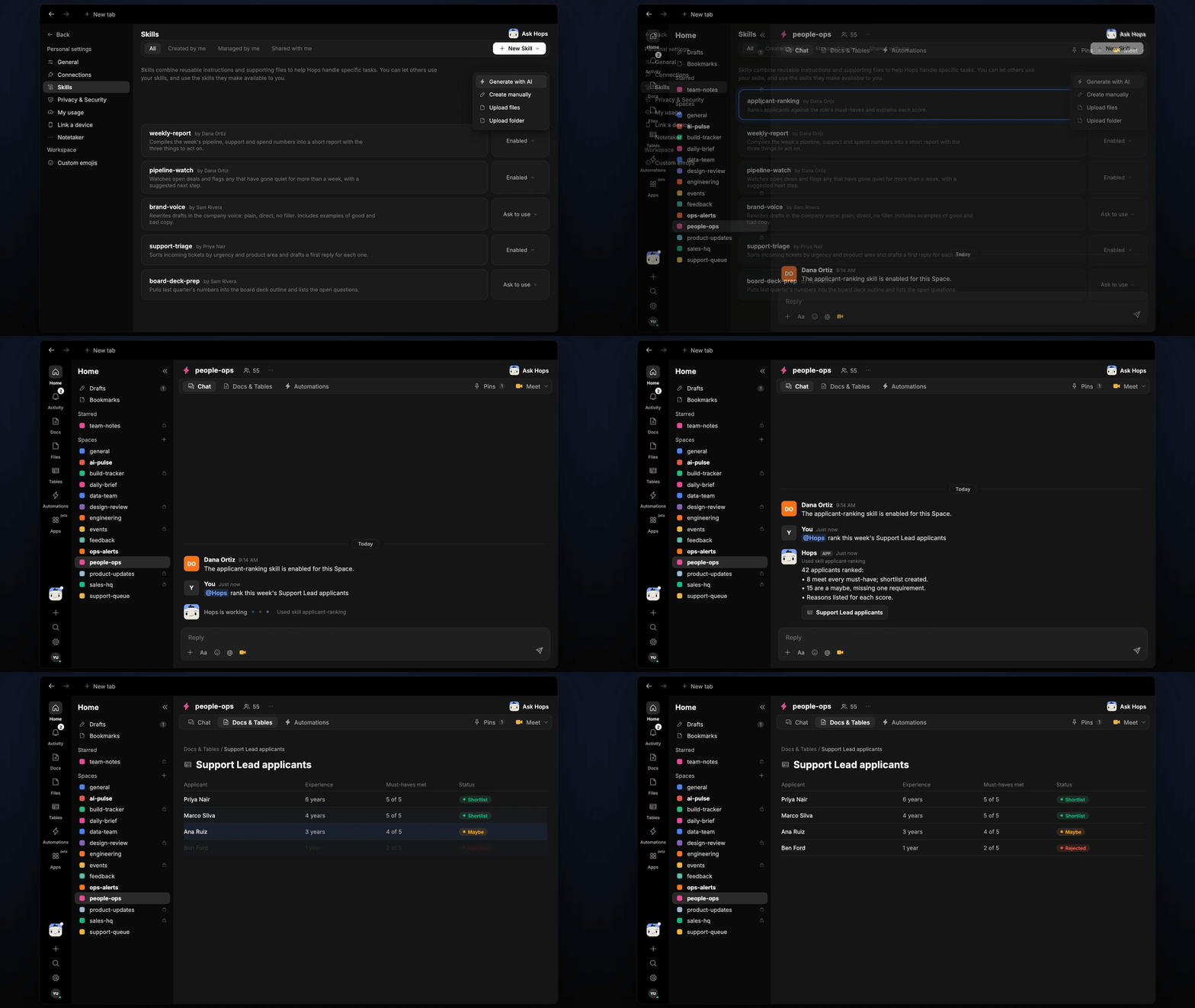
Inbound applications pile up faster than anyone can read them. Hops scores each new applicant against the role's must-haves, with evidence from the resume, so recruiters start with the best fits.
**How it runs:** Triggered. An automation runs when new applicants arrive in your ATS, and you can also ask Hops directly.
## What it does
* **Scores against must-haves.** Hops reads each application in Greenhouse (or your ATS) and gives one point per requirement the role lists in Space context.
* **Shows its evidence.** Every score cites the resume line behind it, so a recruiter can check the call in seconds.
* **Groups the results.** Applicants land in shortlist, maybe or no, with the missing requirement named for each maybe.
* **Ignores protected details.** Name, age, gender and photos are left out of the scoring.
* **Flags edge cases.** Incomplete applications and resumes it cannot read are listed separately instead of being scored down.
 ## Ask Hops
Copy a prompt into any chat with Hops, or mention `@Hops` in a Space.
```text theme={null}
Rank this week's Support Lead applicants against the must-haves.
```
```text theme={null}
Which Account Executive applicants meet every must-have? Show the evidence.
```
```text theme={null}
Why did Priya Nair score as a maybe for the Data Analyst role?
```
```text theme={null}
Rank everyone who applied to Northwind's Operations Manager role since Monday.
```
```text theme={null}
Show me applicants that were missing only one requirement for Support Lead.
```
Example reply:
> 42 applicants ranked for Support Lead:
>
> * 8 meet every must-have; shortlist created.
> * 15 are a maybe, missing one requirement.
> * Reasons listed for each score.
## What you get
* **A post when new applicants are ranked**, in the Space chat or your recruiting Slack channel, with the shortlist on top.
* **A saved Table.** Ranked applicants, scores and reasons are added to **Tables** in the Space so recruiters can sort and filter.
* **An optional draft.** Ask Hops to draft screening emails for the shortlist.
## Connections needed
Connect these apps. Each card opens Connections in the app.
Applicants and resumes (or your ATS).
Where the ranked shortlist is posted.
## Set it up
Connect Greenhouse or your ATS, and Slack, in **Connections**.
See [Connections](/docs/connections/overview).
Create a **people-ops** Space and pin each role's must-haves in Space context.
See [Spaces](/docs/spaces/overview) and [Space context](/docs/spaces/space-context).
Give Hops these instructions:
```text theme={null}
You rank applicants. Score each against the role's must-haves, one point per requirement, with evidence from the resume. Group into shortlist, maybe and no. Ignore name, age, gender and photos.
```
See [Build a skill](/docs/agents/build-a-skill).
Run the automation when new applicants arrive for an open role (checked each weekday at 8am). Hops ranks them, posts the shortlist to the Space chat and adds the rows to a Table.
See [Automation](/docs/spaces/automation).
## Related topics
- [HR & people ops](/teams/hr-people-ops.md)
- [Candidate pipeline](/teams/hr-people-ops/use-cases/candidate-pipeline.md)
This documentation is built and hosted on [Mintlify](https://mintlify.com), a developer documentation platform.
## Ask Hops
Copy a prompt into any chat with Hops, or mention `@Hops` in a Space.
```text theme={null}
Rank this week's Support Lead applicants against the must-haves.
```
```text theme={null}
Which Account Executive applicants meet every must-have? Show the evidence.
```
```text theme={null}
Why did Priya Nair score as a maybe for the Data Analyst role?
```
```text theme={null}
Rank everyone who applied to Northwind's Operations Manager role since Monday.
```
```text theme={null}
Show me applicants that were missing only one requirement for Support Lead.
```
Example reply:
> 42 applicants ranked for Support Lead:
>
> * 8 meet every must-have; shortlist created.
> * 15 are a maybe, missing one requirement.
> * Reasons listed for each score.
## What you get
* **A post when new applicants are ranked**, in the Space chat or your recruiting Slack channel, with the shortlist on top.
* **A saved Table.** Ranked applicants, scores and reasons are added to **Tables** in the Space so recruiters can sort and filter.
* **An optional draft.** Ask Hops to draft screening emails for the shortlist.
## Connections needed
Connect these apps. Each card opens Connections in the app.
Applicants and resumes (or your ATS).
Where the ranked shortlist is posted.
## Set it up
Connect Greenhouse or your ATS, and Slack, in **Connections**.
See [Connections](/docs/connections/overview).
Create a **people-ops** Space and pin each role's must-haves in Space context.
See [Spaces](/docs/spaces/overview) and [Space context](/docs/spaces/space-context).
Give Hops these instructions:
```text theme={null}
You rank applicants. Score each against the role's must-haves, one point per requirement, with evidence from the resume. Group into shortlist, maybe and no. Ignore name, age, gender and photos.
```
See [Build a skill](/docs/agents/build-a-skill).
Run the automation when new applicants arrive for an open role (checked each weekday at 8am). Hops ranks them, posts the shortlist to the Space chat and adds the rows to a Table.
See [Automation](/docs/spaces/automation).
## Related topics
- [HR & people ops](/teams/hr-people-ops.md)
- [Candidate pipeline](/teams/hr-people-ops/use-cases/candidate-pipeline.md)
This documentation is built and hosted on [Mintlify](https://mintlify.com), a developer documentation platform.