> ## Documentation Index
> Fetch the complete documentation index at: https://hopsdocs.mintlify.site/llms.txt
> Use this file to discover all available pages before exploring further.
# Weekly team update
> Turn the week's work across Spaces into the update you send the whole company.
Writing the Friday update means chasing every team for what they shipped. Hops reads each team Space and drafts the update in your voice, ready to review and send.
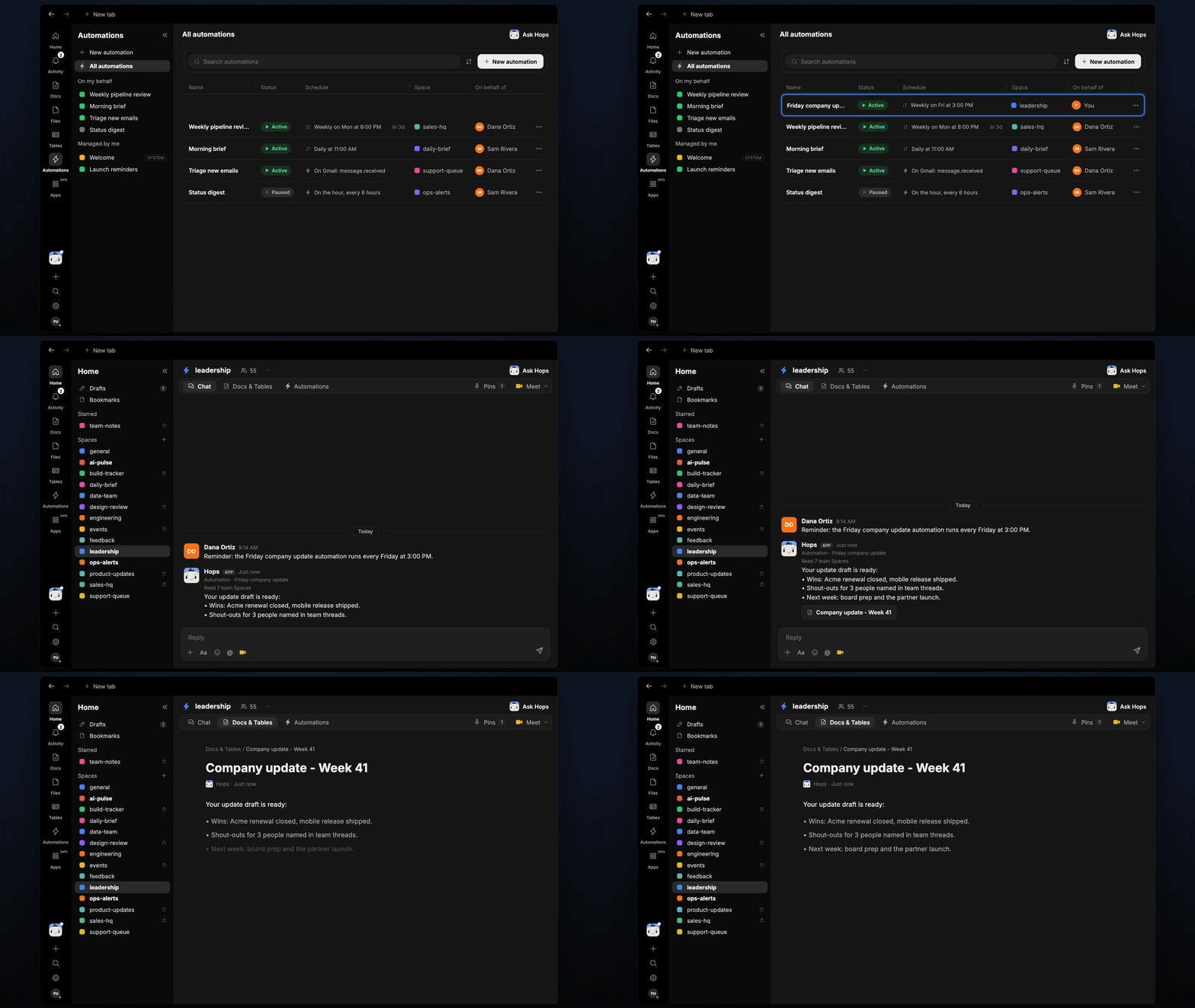
**How it runs:** Scheduled. An automation runs every Friday at 3pm, posts the draft in the Space chat and saves a dated Doc. You can also ask Hops any time.
## What it does
* **Reads every team Space.** Hops goes through the last 7 days of threads, Docs and Tables across your team Spaces.
* **Writes in your voice.** It matches the tone of the past updates pinned in Space context.
* **Keeps a fixed shape.** Wins, shout-outs and what is next, in under 250 words, with links to sources.
* **Names people.** Shout-outs come from people credited in team threads, not guesses.
* **Never invents results.** If a team posted nothing, the draft leaves it out rather than filling in.
 ## Ask Hops
Copy a prompt into any chat with Hops, or mention `@Hops` in a Space.
```text theme={null}
Draft this week's company update from all the team Spaces.
```
```text theme={null}
Who should get a shout-out this week, and for what?
```
```text theme={null}
What did the sales and product teams ship this week? Keep it to 3 bullets each.
```
```text theme={null}
Rewrite the update to be shorter and more upbeat, under 150 words.
```
```text theme={null}
Draft the email version of the update for the all-hands list.
```
Example reply:
> Your update draft is ready:
>
> * Wins: Acme renewal closed, mobile release shipped.
> * Shout-outs for 3 people named in team threads.
> * Next week: board prep and the partner launch.
## What you get
* **A draft in the Space chat** every Friday at 3pm, so you can review before end of day.
* **A dated Doc** saved to **Docs** in the Space, one per week.
* **An email or Slack version, when you ask.** Hops can post to Slack or draft the all-hands email in Gmail for you to send.
## Connections needed
Connect the apps where you share the update. Each card opens Connections in the app.
Team threads, and where you post the update.
Draft the email to the all-hands list.
## Set it up
Connect the apps above in **Connections**.
See [Connections](/docs/connections/overview).
Create a **leadership** Space. Pin last month's updates in Space context so Hops matches your voice.
See [Spaces](/docs/spaces/overview) and [Space context](/docs/spaces/space-context).
Give Hops these instructions:
```text theme={null}
You draft the weekly company update in the founder's voice. Read every team Space from the last 7 days. Sections: wins, shout-outs, what's next. Under 250 words. Link to sources. Never invent results.
```
See [Build a skill](/docs/agents/build-a-skill).
Every Friday at 3pm Hops posts the draft in the Space chat and saves a dated Doc to **Docs**, so you can review before end of day.
See [Automation](/docs/spaces/automation).
## Related topics
- [Founders & executives](/teams/founders-executives.md)
- [Weekly patterns report](/teams/support/use-cases/weekly-patterns.md)
- [Skills](/agents/skills.md)
- [RFP desk](/teams/sales/use-cases/rfp-desk.md)
- [Client onboarding and kickoff](/teams/professional-services/use-cases/engagement-kickoff.md)
This documentation is built and hosted on [Mintlify](https://mintlify.com), a developer documentation platform.
## Ask Hops
Copy a prompt into any chat with Hops, or mention `@Hops` in a Space.
```text theme={null}
Draft this week's company update from all the team Spaces.
```
```text theme={null}
Who should get a shout-out this week, and for what?
```
```text theme={null}
What did the sales and product teams ship this week? Keep it to 3 bullets each.
```
```text theme={null}
Rewrite the update to be shorter and more upbeat, under 150 words.
```
```text theme={null}
Draft the email version of the update for the all-hands list.
```
Example reply:
> Your update draft is ready:
>
> * Wins: Acme renewal closed, mobile release shipped.
> * Shout-outs for 3 people named in team threads.
> * Next week: board prep and the partner launch.
## What you get
* **A draft in the Space chat** every Friday at 3pm, so you can review before end of day.
* **A dated Doc** saved to **Docs** in the Space, one per week.
* **An email or Slack version, when you ask.** Hops can post to Slack or draft the all-hands email in Gmail for you to send.
## Connections needed
Connect the apps where you share the update. Each card opens Connections in the app.
Team threads, and where you post the update.
Draft the email to the all-hands list.
## Set it up
Connect the apps above in **Connections**.
See [Connections](/docs/connections/overview).
Create a **leadership** Space. Pin last month's updates in Space context so Hops matches your voice.
See [Spaces](/docs/spaces/overview) and [Space context](/docs/spaces/space-context).
Give Hops these instructions:
```text theme={null}
You draft the weekly company update in the founder's voice. Read every team Space from the last 7 days. Sections: wins, shout-outs, what's next. Under 250 words. Link to sources. Never invent results.
```
See [Build a skill](/docs/agents/build-a-skill).
Every Friday at 3pm Hops posts the draft in the Space chat and saves a dated Doc to **Docs**, so you can review before end of day.
See [Automation](/docs/spaces/automation).
## Related topics
- [Founders & executives](/teams/founders-executives.md)
- [Weekly patterns report](/teams/support/use-cases/weekly-patterns.md)
- [Skills](/agents/skills.md)
- [RFP desk](/teams/sales/use-cases/rfp-desk.md)
- [Client onboarding and kickoff](/teams/professional-services/use-cases/engagement-kickoff.md)
This documentation is built and hosted on [Mintlify](https://mintlify.com), a developer documentation platform.