> ## Documentation Index
> Fetch the complete documentation index at: https://hopsdocs.mintlify.site/llms.txt
> Use this file to discover all available pages before exploring further.
# Monday company snapshot
> Your company's numbers and moves in one snapshot before Monday's leadership meeting.
Every Monday the leadership team needs the same picture: revenue vs plan, pipeline movement, hiring and what is at risk. Hops pulls it from every team Space and your connected tools into one snapshot before the meeting starts.
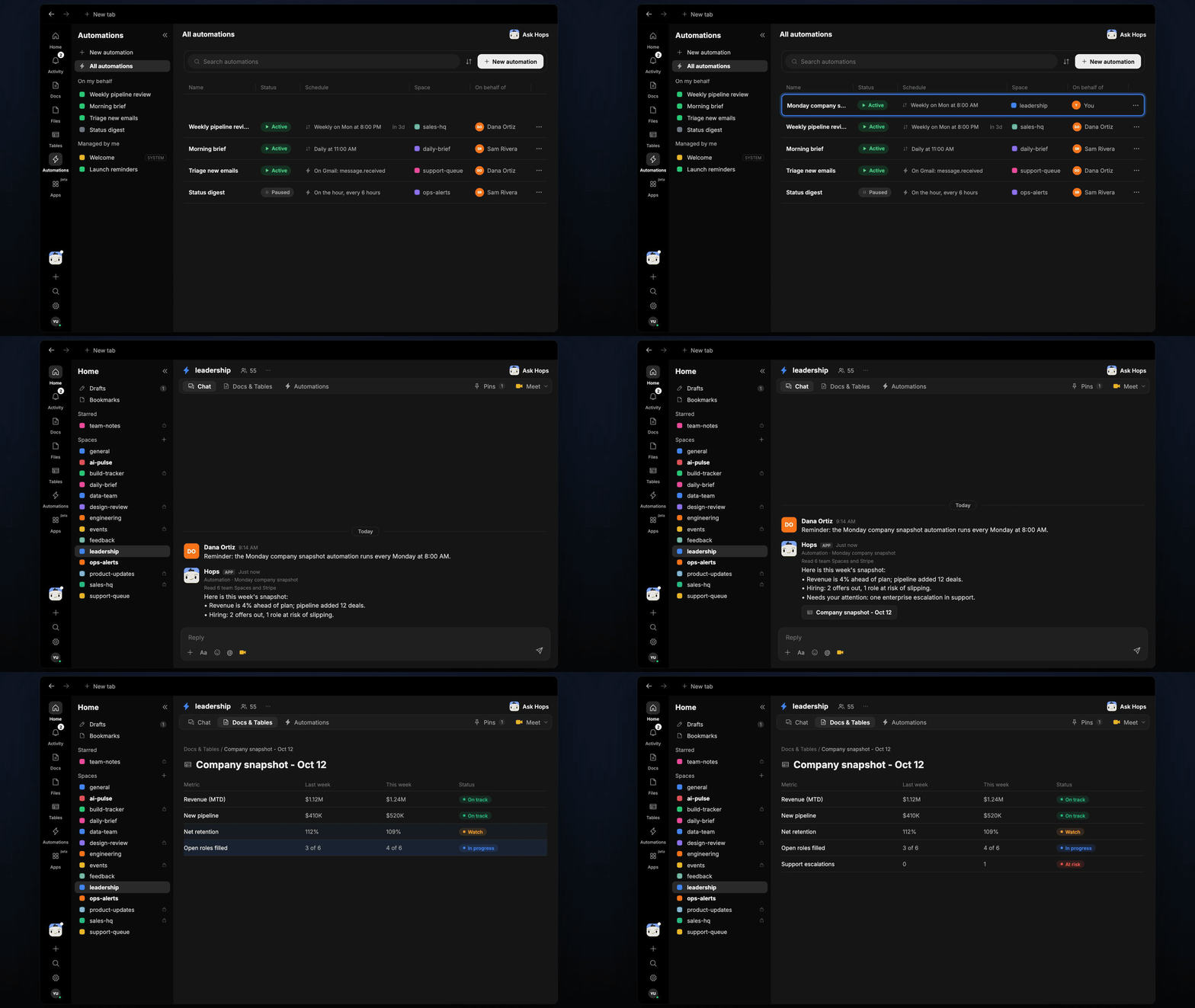
**How it runs:** Scheduled. An automation runs every Monday at 8:00 AM, posts the snapshot to the leadership Space and saves a dated Doc. You can also ask Hops any time.
## What it does
* **Reads every team Space.** Hops summarizes the last 7 days of activity across your team Spaces.
* **Pulls the numbers.** Revenue from Stripe, pipeline from HubSpot or Salesforce and hiring from Greenhouse.
* **Builds a metrics table.** Last week, this week and status for each metric, with a source for every number.
* **Calls out three things.** What moved, what is at risk and what needs a decision.
* **Surfaces escalations.** Anything that needs leadership attention, such as an enterprise issue in support, is listed first.
 ## Ask Hops
Copy a prompt into any chat with Hops, or mention `@Hops` in a Space.
```text theme={null}
Build this week's company snapshot: revenue, pipeline, hiring and risks.
```
```text theme={null}
How is revenue tracking against plan this month?
```
```text theme={null}
Which hiring roles are at risk of slipping, and why?
```
```text theme={null}
What changed in the pipeline since last Monday? Highlight deals over $100K.
```
```text theme={null}
Which decisions are waiting on leadership across the team Spaces?
```
Example reply:
> Here is this week's snapshot:
>
> * Revenue is 4% ahead of plan; pipeline added 12 deals.
> * Hiring: 2 offers out, 1 role at risk of slipping.
> * Needs your attention: one enterprise escalation in support.
## What you get
* **A post in the leadership Space** every Monday at 8:00 AM, before the meeting.
* **A dated Doc** saved to **Docs** in the Space, one per week, so you can compare weeks.
* **On-demand snapshots.** Ask Hops any time for a mid-week view.
## Connections needed
Connect the apps that hold your company numbers. Each card opens Connections in the app.
Revenue.
Pipeline (or Salesforce).
Pipeline (or HubSpot).
Hiring status.
Team threads and the weekly post.
## Set it up
Connect the apps above in **Connections**. Use HubSpot or Salesforce, whichever holds your pipeline.
See [Connections](/docs/connections/overview).
Create a **leadership** Space. List the team Spaces and metrics to watch in Space context.
See [Spaces](/docs/spaces/overview) and [Space context](/docs/spaces/space-context).
Give Hops these instructions:
```text theme={null}
You write the Monday company snapshot. Read every team Space from the last 7 days plus connected revenue and pipeline data. Produce a metrics table (last week, this week, status) and three lines: what moved, what is at risk, what needs a decision. Cite every number.
```
See [Build a skill](/docs/agents/build-a-skill).
Every Monday at 8:00 AM Hops posts the snapshot to the leadership Space before the meeting and saves a dated Doc to **Docs**.
See [Automation](/docs/spaces/automation).
## Related topics
- [Founders & executives](/teams/founders-executives.md)
- [Explore use cases](/use-cases/overview.md)
- [Forecast changes](/teams/revops/use-cases/forecast-changes.md)
- [Company AI brain](/use-cases/company-ai-brain.md)
- [Monday trading brief](/teams/operations/use-cases/weekly-ops-report.md)
This documentation is built and hosted on [Mintlify](https://mintlify.com), a developer documentation platform.
## Ask Hops
Copy a prompt into any chat with Hops, or mention `@Hops` in a Space.
```text theme={null}
Build this week's company snapshot: revenue, pipeline, hiring and risks.
```
```text theme={null}
How is revenue tracking against plan this month?
```
```text theme={null}
Which hiring roles are at risk of slipping, and why?
```
```text theme={null}
What changed in the pipeline since last Monday? Highlight deals over $100K.
```
```text theme={null}
Which decisions are waiting on leadership across the team Spaces?
```
Example reply:
> Here is this week's snapshot:
>
> * Revenue is 4% ahead of plan; pipeline added 12 deals.
> * Hiring: 2 offers out, 1 role at risk of slipping.
> * Needs your attention: one enterprise escalation in support.
## What you get
* **A post in the leadership Space** every Monday at 8:00 AM, before the meeting.
* **A dated Doc** saved to **Docs** in the Space, one per week, so you can compare weeks.
* **On-demand snapshots.** Ask Hops any time for a mid-week view.
## Connections needed
Connect the apps that hold your company numbers. Each card opens Connections in the app.
Revenue.
Pipeline (or Salesforce).
Pipeline (or HubSpot).
Hiring status.
Team threads and the weekly post.
## Set it up
Connect the apps above in **Connections**. Use HubSpot or Salesforce, whichever holds your pipeline.
See [Connections](/docs/connections/overview).
Create a **leadership** Space. List the team Spaces and metrics to watch in Space context.
See [Spaces](/docs/spaces/overview) and [Space context](/docs/spaces/space-context).
Give Hops these instructions:
```text theme={null}
You write the Monday company snapshot. Read every team Space from the last 7 days plus connected revenue and pipeline data. Produce a metrics table (last week, this week, status) and three lines: what moved, what is at risk, what needs a decision. Cite every number.
```
See [Build a skill](/docs/agents/build-a-skill).
Every Monday at 8:00 AM Hops posts the snapshot to the leadership Space before the meeting and saves a dated Doc to **Docs**.
See [Automation](/docs/spaces/automation).
## Related topics
- [Founders & executives](/teams/founders-executives.md)
- [Explore use cases](/use-cases/overview.md)
- [Forecast changes](/teams/revops/use-cases/forecast-changes.md)
- [Company AI brain](/use-cases/company-ai-brain.md)
- [Monday trading brief](/teams/operations/use-cases/weekly-ops-report.md)
This documentation is built and hosted on [Mintlify](https://mintlify.com), a developer documentation platform.