> ## Documentation Index
> Fetch the complete documentation index at: https://hopsdocs.mintlify.site/llms.txt
> Use this file to discover all available pages before exploring further.
# Morning brief
> Start each day with what needs you: meetings, decisions and anything urgent.
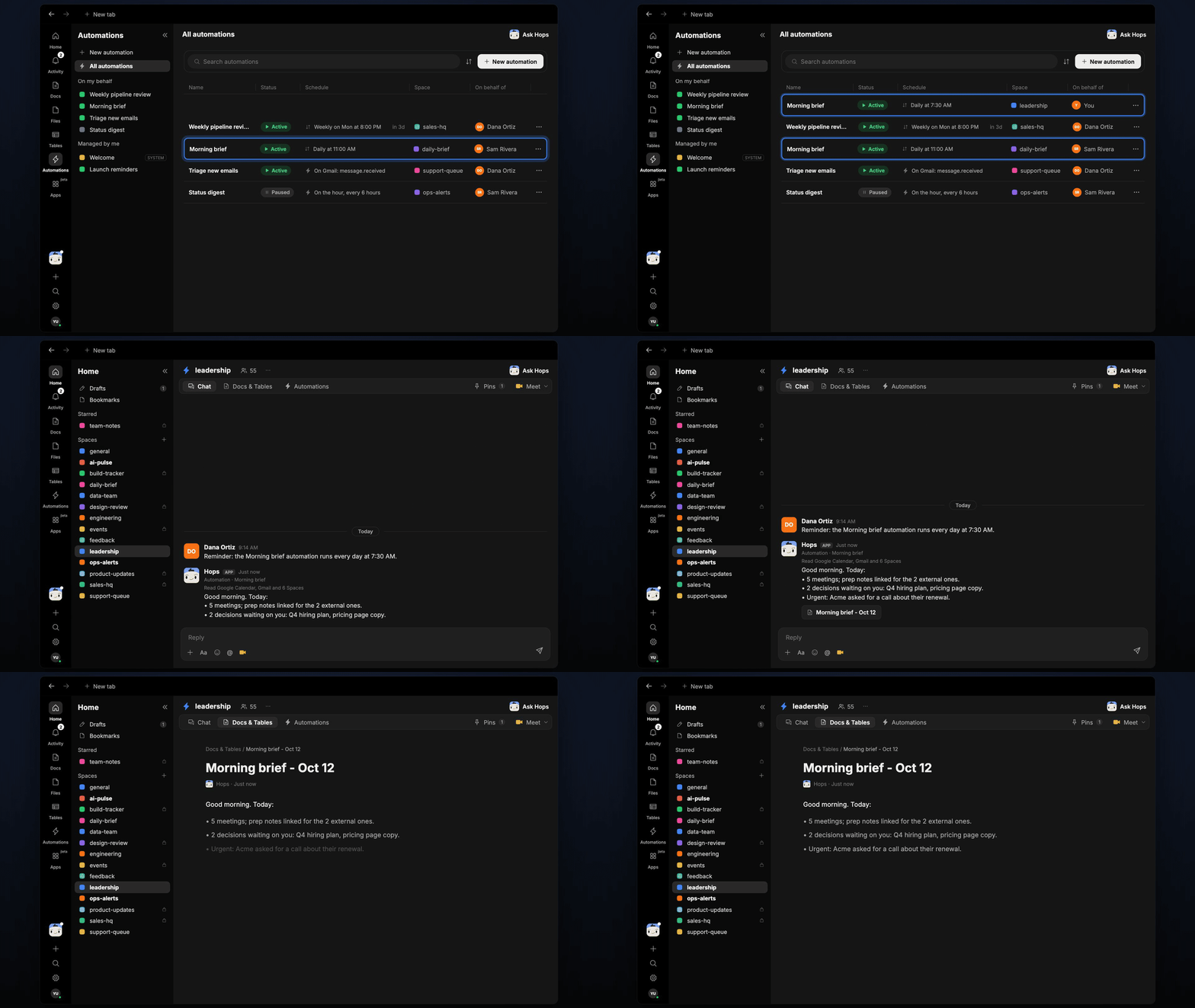
Mornings start with ten tabs. Hops reads your calendar, inbox and team Spaces and posts one short brief of what needs you today.
**How it runs:** Scheduled. An automation runs every day at 7:30 AM, posts the brief in your Space chat and saves a dated Doc. You can also ask Hops any time.
## What it does
* **Reads your day.** Hops checks Google Calendar for today's meetings and flags which are external.
* **Finds what is waiting on you.** It scans Gmail for unread mail from the people you care about and open decisions in team threads.
* **Watches team Spaces and Slack.** New threads that mention you or need a call are pulled in.
* **Keeps it short.** Three sections, meetings, decisions waiting and urgent, in under 150 words.
* **Links to prep.** External meetings link to prep notes so you can open them straight away.
 ## Ask Hops
Copy a prompt into any chat with Hops, or mention `@Hops` in a Space.
```text theme={null}
Give me today's brief: meetings, decisions waiting on me, and anything urgent.
```
```text theme={null}
Which emails from Acme or Northwind came in overnight and need a reply?
```
```text theme={null}
What decisions are waiting on me across the team Spaces?
```
```text theme={null}
Which of today's meetings are external, and do I have prep for each?
```
```text theme={null}
Brief me again at midday with anything new since this morning.
```
Example reply:
> Good morning. Today:
>
> * 5 meetings; prep notes linked for the 2 external ones.
> * 2 decisions waiting on you: Q4 hiring plan, pricing page copy.
> * Urgent: Acme asked for a call about their renewal.
## What you get
* **A brief in the Space chat** every morning at 7:30, ready before your first meeting.
* **A dated Doc** saved to **Docs** in the Space, so you can look back at any day.
* **On-demand briefs.** Ask Hops any time for an updated view.
## Connections needed
Connect the apps Hops reads each morning. Each card opens Connections in the app.
Today's meetings and attendees.
Unread mail from key people.
Threads that need you.
## Set it up
Connect the apps above in **Connections**.
See [Connections](/docs/connections/overview).
Create a personal **leadership** Space. List the people and topics you care about in Space context.
See [Spaces](/docs/spaces/overview) and [Space context](/docs/spaces/space-context).
Give Hops these instructions:
```text theme={null}
You write the founder's morning brief. Read today's calendar, unread email from key people, and new threads in team Spaces. Three sections: meetings, decisions waiting, urgent. Under 150 words.
```
See [Build a skill](/docs/agents/build-a-skill).
Run it every day at 7:30 AM. Hops posts the brief in the Space chat and saves a dated Doc to **Docs**.
See [Automation](/docs/spaces/automation).
## Related topics
- [Founders & executives](/teams/founders-executives.md)
- [Marketplace brief](/teams/operations/use-cases/marketplace-brief.md)
- [Monday trading brief](/teams/operations/use-cases/weekly-ops-report.md)
- [Campaign launch](/teams/marketing/use-cases/campaign-launch.md)
- [Escalation brief](/teams/support/use-cases/escalation-brief.md)
This documentation is built and hosted on [Mintlify](https://mintlify.com), a developer documentation platform.
## Ask Hops
Copy a prompt into any chat with Hops, or mention `@Hops` in a Space.
```text theme={null}
Give me today's brief: meetings, decisions waiting on me, and anything urgent.
```
```text theme={null}
Which emails from Acme or Northwind came in overnight and need a reply?
```
```text theme={null}
What decisions are waiting on me across the team Spaces?
```
```text theme={null}
Which of today's meetings are external, and do I have prep for each?
```
```text theme={null}
Brief me again at midday with anything new since this morning.
```
Example reply:
> Good morning. Today:
>
> * 5 meetings; prep notes linked for the 2 external ones.
> * 2 decisions waiting on you: Q4 hiring plan, pricing page copy.
> * Urgent: Acme asked for a call about their renewal.
## What you get
* **A brief in the Space chat** every morning at 7:30, ready before your first meeting.
* **A dated Doc** saved to **Docs** in the Space, so you can look back at any day.
* **On-demand briefs.** Ask Hops any time for an updated view.
## Connections needed
Connect the apps Hops reads each morning. Each card opens Connections in the app.
Today's meetings and attendees.
Unread mail from key people.
Threads that need you.
## Set it up
Connect the apps above in **Connections**.
See [Connections](/docs/connections/overview).
Create a personal **leadership** Space. List the people and topics you care about in Space context.
See [Spaces](/docs/spaces/overview) and [Space context](/docs/spaces/space-context).
Give Hops these instructions:
```text theme={null}
You write the founder's morning brief. Read today's calendar, unread email from key people, and new threads in team Spaces. Three sections: meetings, decisions waiting, urgent. Under 150 words.
```
See [Build a skill](/docs/agents/build-a-skill).
Run it every day at 7:30 AM. Hops posts the brief in the Space chat and saves a dated Doc to **Docs**.
See [Automation](/docs/spaces/automation).
## Related topics
- [Founders & executives](/teams/founders-executives.md)
- [Marketplace brief](/teams/operations/use-cases/marketplace-brief.md)
- [Monday trading brief](/teams/operations/use-cases/weekly-ops-report.md)
- [Campaign launch](/teams/marketing/use-cases/campaign-launch.md)
- [Escalation brief](/teams/support/use-cases/escalation-brief.md)
This documentation is built and hosted on [Mintlify](https://mintlify.com), a developer documentation platform.