> ## Documentation Index
> Fetch the complete documentation index at: https://hopsdocs.mintlify.site/llms.txt
> Use this file to discover all available pages before exploring further.
# Live revenue dashboard
> Keep a revenue table that updates itself from Stripe.
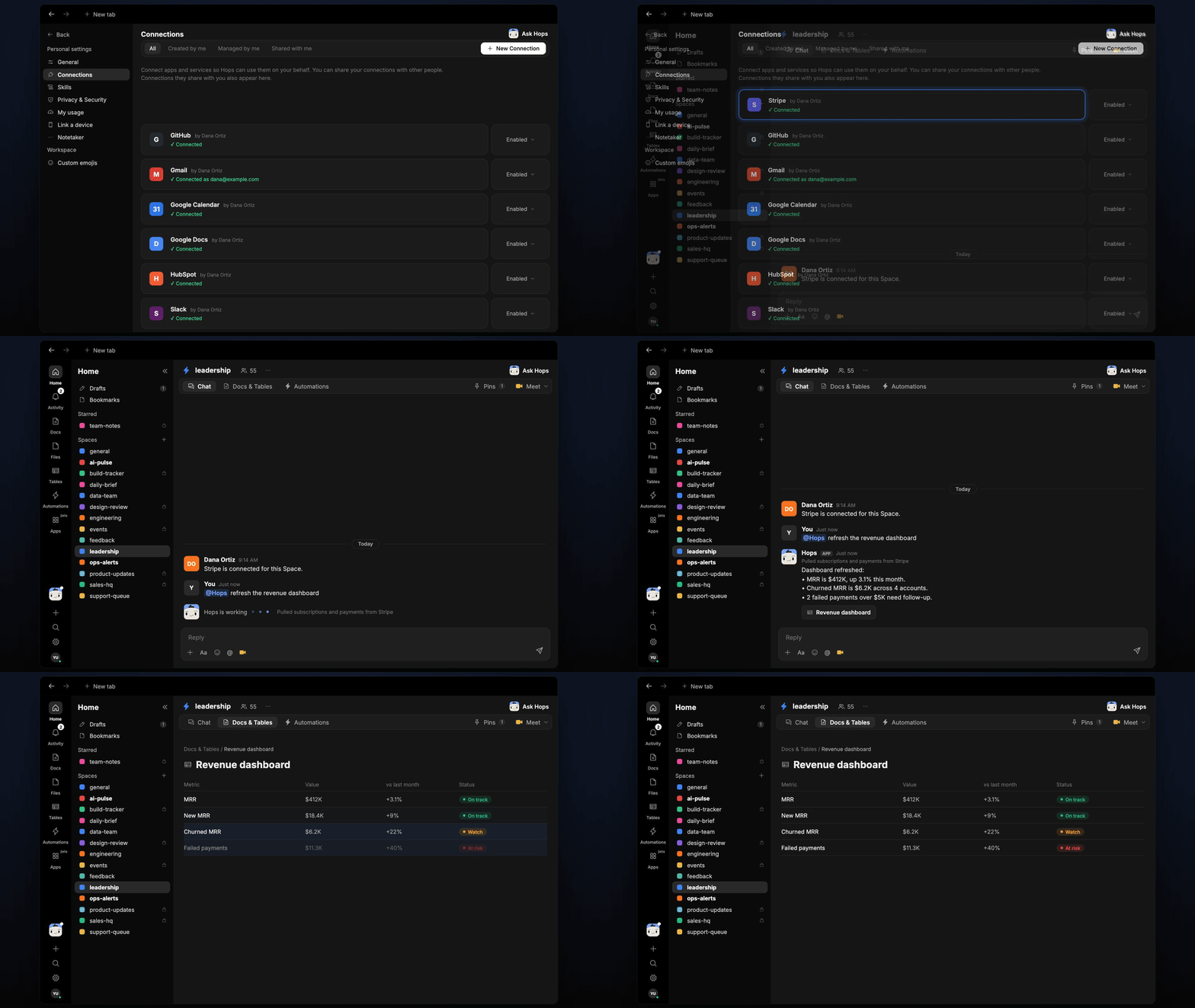
Founders check the same revenue numbers every day. Connect Stripe and Hops keeps a table of MRR, new revenue, churn and failed payments that refreshes on a schedule, and only pings you when something changes status.
**How it runs:** Scheduled. An automation runs every weekday at 7am, posts a Slack alert only when a metric changes status and saves the updated Table. You can also ask Hops any time.
## What it does
* **Pulls live billing data.** Hops reads subscriptions and payments from Stripe for MRR, new revenue, churned revenue and failed payments.
* **Updates the table in place.** Each refresh edits the same Table rather than creating a new one, with a status per metric against last month.
* **Adds pipeline context.** With HubSpot or Salesforce connected, Hops includes open pipeline next to revenue.
* **Alerts only on change.** Hops posts only when a metric moves to a new status, so quiet days stay quiet.
* **Explains what moved.** Each update has one line on what changed most.
 ## Ask Hops
Copy a prompt into any chat with Hops, or mention `@Hops` in a Space.
```text theme={null}
Refresh the revenue dashboard from Stripe.
```
```text theme={null}
What is our MRR today, and how does it compare with last month?
```
```text theme={null}
Which failed payments over $5K still need follow-up?
```
```text theme={null}
List churned accounts this month with their MRR, newest first.
```
```text theme={null}
Add open pipeline from HubSpot next to revenue in the dashboard.
```
Example reply:
> Dashboard refreshed:
>
> * MRR is \$412K, up 3.1% this month.
> * Churned MRR is \$6.2K across 4 accounts.
> * 2 failed payments over \$5K need follow-up: Acme and Northwind.
## What you get
* **A Slack alert** only when a metric changes status, with the one line on what moved.
* **An updated Table** in **Tables** in the Space, refreshed every weekday morning.
* **On-demand refreshes.** Ask Hops any time and get the same numbers in chat.
## Connections needed
Connect the apps that hold your revenue data. Each card opens Connections in the app.
Subscriptions and payments.
Pipeline (or Salesforce).
Where status-change alerts are posted.
## Set it up
Connect the apps above in **Connections**.
See [Connections](/docs/connections/overview).
Create a **leadership** Space for company metrics and pin your metric definitions in Space context.
See [Spaces](/docs/spaces/overview) and [Space context](/docs/spaces/space-context).
Every weekday at 7am Hops refreshes the revenue Table and posts to Slack only when a metric changes status.
See [Automation](/docs/spaces/automation).
## Related topics
- [Founders & executives](/teams/founders-executives.md)
- [Engineering dashboard](/teams/product-engineering/use-cases/engineering-dashboard.md)
- [Client status and dashboard](/teams/professional-services/use-cases/client-status-report.md)
- [Core concepts](/getting-started/core-concepts.md)
- [Board prep](/teams/finance/use-cases/board-prep.md)
This documentation is built and hosted on [Mintlify](https://mintlify.com), a developer documentation platform.
## Ask Hops
Copy a prompt into any chat with Hops, or mention `@Hops` in a Space.
```text theme={null}
Refresh the revenue dashboard from Stripe.
```
```text theme={null}
What is our MRR today, and how does it compare with last month?
```
```text theme={null}
Which failed payments over $5K still need follow-up?
```
```text theme={null}
List churned accounts this month with their MRR, newest first.
```
```text theme={null}
Add open pipeline from HubSpot next to revenue in the dashboard.
```
Example reply:
> Dashboard refreshed:
>
> * MRR is \$412K, up 3.1% this month.
> * Churned MRR is \$6.2K across 4 accounts.
> * 2 failed payments over \$5K need follow-up: Acme and Northwind.
## What you get
* **A Slack alert** only when a metric changes status, with the one line on what moved.
* **An updated Table** in **Tables** in the Space, refreshed every weekday morning.
* **On-demand refreshes.** Ask Hops any time and get the same numbers in chat.
## Connections needed
Connect the apps that hold your revenue data. Each card opens Connections in the app.
Subscriptions and payments.
Pipeline (or Salesforce).
Where status-change alerts are posted.
## Set it up
Connect the apps above in **Connections**.
See [Connections](/docs/connections/overview).
Create a **leadership** Space for company metrics and pin your metric definitions in Space context.
See [Spaces](/docs/spaces/overview) and [Space context](/docs/spaces/space-context).
Every weekday at 7am Hops refreshes the revenue Table and posts to Slack only when a metric changes status.
See [Automation](/docs/spaces/automation).
## Related topics
- [Founders & executives](/teams/founders-executives.md)
- [Engineering dashboard](/teams/product-engineering/use-cases/engineering-dashboard.md)
- [Client status and dashboard](/teams/professional-services/use-cases/client-status-report.md)
- [Core concepts](/getting-started/core-concepts.md)
- [Board prep](/teams/finance/use-cases/board-prep.md)
This documentation is built and hosted on [Mintlify](https://mintlify.com), a developer documentation platform.